Join us at FabCon Atlanta from March 16 - 20, 2026, for the ultimate Fabric, Power BI, AI and SQL community-led event. Save $200 with code FABCOMM.
Register now!The Power BI Data Visualization World Championships is back! Get ahead of the game and start preparing now! Learn more
Hi
Currently we can not suppress subtotals in Matrix report. Is there any work around possible.
Cheers
CheenuSing
Solved! Go to Solution.
Hi @Anonymous,
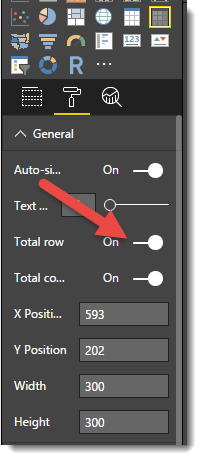
In Power BI desktop version 2.43.4647.541, Total Row or Total Column is available depends on whether the Matrix has row group or column group. Please note Total Row or Total Column options control both subtotals and grand totals visibility at the same time. Currently there is no OOTB feature to suppress the subtotal and keep the grand totals. See:
Regarding the requirement to control subtotals, you can vote on this similar idea item: Please provide a way to enable/disable Subtotals for columns for matrix visualization.
Best Regards.
Qiuyun Yu
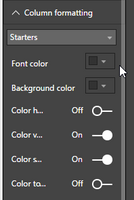
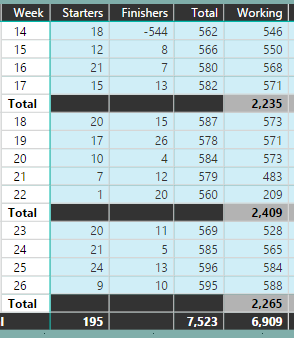
There is a way to hide some of the subtotals but keep others, and that is by changing the font & background colours to match for each column. The Grand total can then be kept
Hope this helps
Hi @Anonymous,
In Power BI desktop version 2.43.4647.541, Total Row or Total Column is available depends on whether the Matrix has row group or column group. Please note Total Row or Total Column options control both subtotals and grand totals visibility at the same time. Currently there is no OOTB feature to suppress the subtotal and keep the grand totals. See:
Regarding the requirement to control subtotals, you can vote on this similar idea item: Please provide a way to enable/disable Subtotals for columns for matrix visualization.
Best Regards.
Qiuyun Yu
Just to be sure, your subject line talks about row totals. These can be turned on/off in the properties of the Matrix
I do not see this option in my version. I am using the latest Feb Update.
Version: 2.43.4647.541 64-bit (February/2017)
Cheers
CheenuSing
Set the font color and background colour to the same as the background colour?
The Power BI Data Visualization World Championships is back! Get ahead of the game and start preparing now!
Check out the November 2025 Power BI update to learn about new features.
| User | Count |
|---|---|
| 59 | |
| 43 | |
| 42 | |
| 23 | |
| 17 |
| User | Count |
|---|---|
| 190 | |
| 122 | |
| 96 | |
| 66 | |
| 47 |