cancel
Showing results for 
Search instead for 
Did you mean: 

The Power BI Data Visualization World Championships is back! Get ahead of the game and start preparing now! Learn more

Reply
JPY
Helper II
Helper II

How to sum the measure

Hi all,

1. I added a calculated column by this formula: 

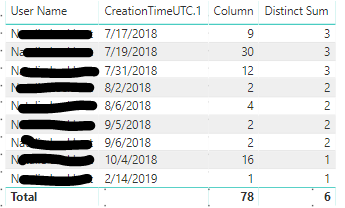
Column = CALCULATE(DISTINCTCOUNT(Query1[CreationTimeUTC.1]),ALLEXCEPT(Query1,Query1[User Name],Query1[CreationTimeUTC.1].[Month]))
2. I added a measure based on the column:
Distinct Sum = SUMX(DISTINCT(Query1[Column]),Query1[Column])help.PNG


I want to create a measure to sum up all the numbers by months.
For example, I want it all showing 9 next to the distinct sum column depending on how many months I choose. Because there are 3 datapoints in July 2018, 2 in August 2018, 2 in September 2018, 1 in October 2018 and 1 in February 2019 for the particular user name. Adding all these datapoints would tally up to 9.


Kindy pls give any suggestion


Thanks!

JPY

1 ACCEPTED SOLUTION
v-lili6-msft
Community Support
Community Support

hi, @JPY 

You could use this formula:

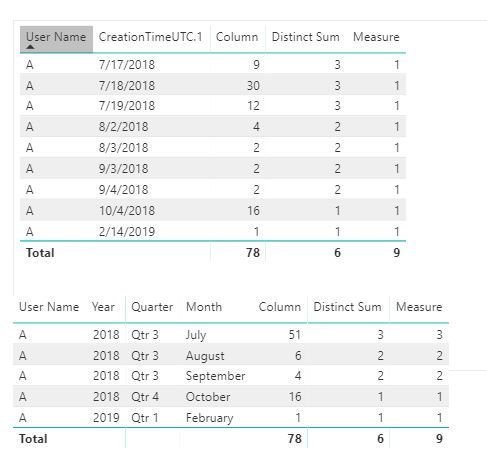
Measure = var _table= SUMMARIZE(Query1,Query1[User Name],Query1[CreationTimeUTC.1],"Column",DISTINCTCOUNT(Query1[Column])) return
SUMX(_table,[Column])

Result:

7.JPG


Best Regards,

Lin

Community Support Team _ Lin
If this post helps, then please consider Accept it as the solution to help the other members find it more quickly.

View solution in original post

5 REPLIES 5
v-lili6-msft
Community Support
Community Support

hi, @JPY 

You could use this formula:

Measure = var _table= SUMMARIZE(Query1,Query1[User Name],Query1[CreationTimeUTC.1],"Column",DISTINCTCOUNT(Query1[Column])) return
SUMX(_table,[Column])

Result:

7.JPG


Best Regards,

Lin

Community Support Team _ Lin
If this post helps, then please consider Accept it as the solution to help the other members find it more quickly.
Anonymous
Not applicable

@JPY -

Whenever you want to get a total value in your measure, it means that you need to remove a filter. To remove a filter, you need to apply some sort of ALL. Which ALL function to use and which columns are relevant is situational - which column(s) need a modified filter context?

Cheers,

Nathan

Hi Nathan @Anonymous ,

Thanks for your reply!

In my dataset, I have mutiple different users and creation times. 

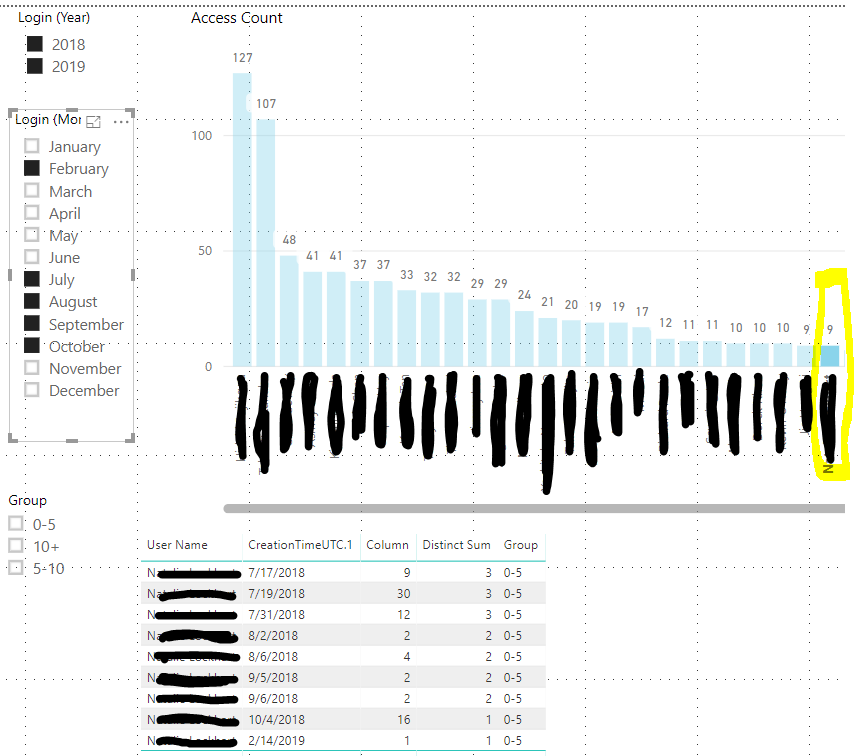
Besides, I have Year and Month slicer in my dashboard. I want the measure can sum up the "distinct sum" according to month and year. For example, if I choose July 2018, Auguest 2018, September 2018 and Feb 2019 then the measure will tally to 9 as per my screenshot above.  Since I want to group the measure so that I can have a slicer to filter.


Group = IF(AND([NEW MEASURE]>0, [NEW MEASURE]<=5),"0-5",
      IF(AND([NEW MEASURE]>5, [NEW MEASURE]<=10),"5-10",
       IF([NEW MEASURE]>10,"10+", BLANK())
))


help1.PNG


Or do you know there is another way to achieve it? 

Thanks.

JPY

Anonymous
Not applicable

@JPY  - 

To get the Total, you will want to use ALLSELECTED.

I don't think you'll be able to use a measure as a slicer though.


Hi @Anonymous,

Could you please explain in more detail? Where should I apply the Allselected formula?

Thanks.


JPY

Helpful resources

Announcements
November Power BI Update Carousel

Power BI Monthly Update - November 2025

Check out the November 2025 Power BI update to learn about new features.

Fabric Data Days Carousel

Fabric Data Days

Advance your Data & AI career with 50 days of live learning, contests, hands-on challenges, study groups & certifications and more!

FabCon Atlanta 2026 carousel

FabCon Atlanta 2026

Join us at FabCon Atlanta, March 16-20, for the ultimate Fabric, Power BI, AI and SQL community-led event. Save $200 with code FABCOMM.

Top Kudoed Authors