Join us at FabCon Atlanta from March 16 - 20, 2026, for the ultimate Fabric, Power BI, AI and SQL community-led event. Save $200 with code FABCOMM.
Register now!Learn from the best! Meet the four finalists headed to the FINALS of the Power BI Dataviz World Championships! Register now
Hi All,
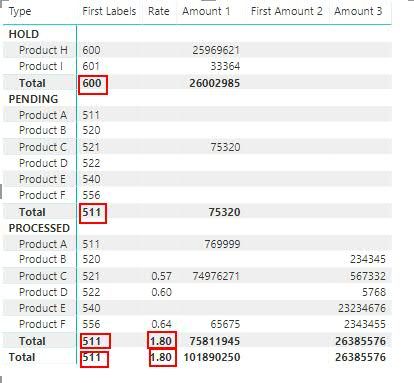
I have the below matrix in the exact same format that I need.
Here, 'Labels' is a text field - both 'Labels' and 'Rate' I don't want to get summarized (as highlighted).
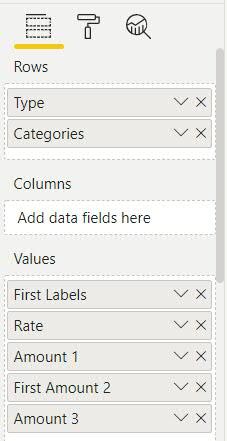
My fields pane -
This is a transactional date and there can be multiple occurances of the same product (hence the same Labels and rates) under each type - so using HASONEVALUE would not be of much help I think.
Please can someone help here?
Solved! Go to Solution.
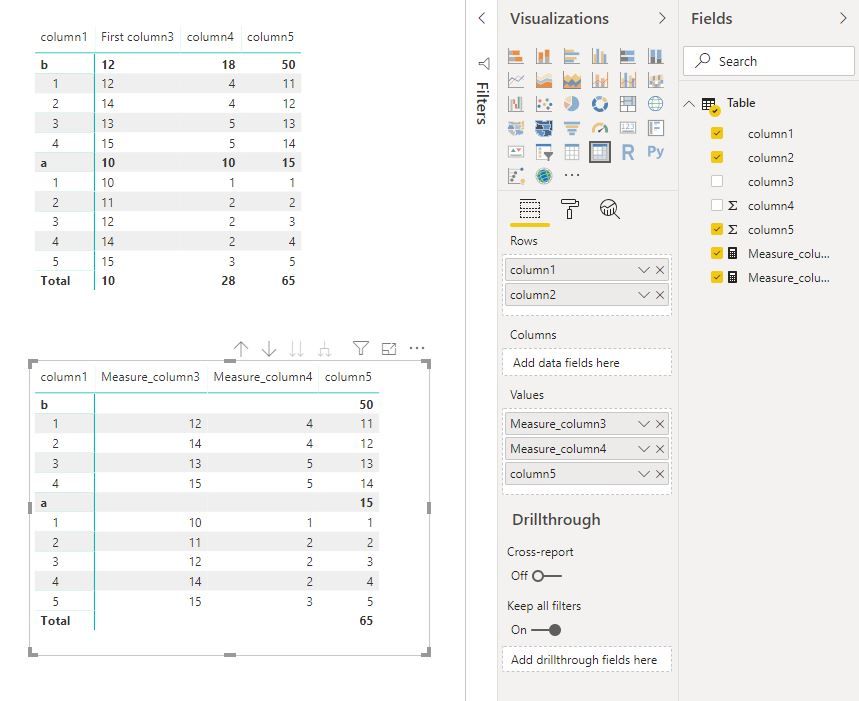
Hi @RD2019
Create measures
Measure_column3 =
IF (
ISINSCOPE ( 'Table'[column2] ),
MAX ( 'Table'[column3] ),
IF ( ISINSCOPE ( 'Table'[column1] ), BLANK (), BLANK () )
)
Measure_column4 =
IF (
ISINSCOPE ( 'Table'[column2] ),
SUM ( 'Table'[column4] ),
IF ( ISINSCOPE ( 'Table'[column1] ), BLANK (), BLANK () )
)
Best Regards
Maggie
Community Support Team _ Maggie Li
If this post helps, then please consider Accept it as the solution to help the other members find it more quickly.
Hi Maggie,
Thanks for this...I think this would work as well. However I have applied a work-around using HASONEVALUE only. As in my case, every product has the same label code and rate - I have just use an IF condition stating that if there is one value for any label or rate (although there can be multiple occurances) - just take the AVERAGE value, otherwise BLANK (ensuring the subtotal will be blank). Seems that it's working fine now.
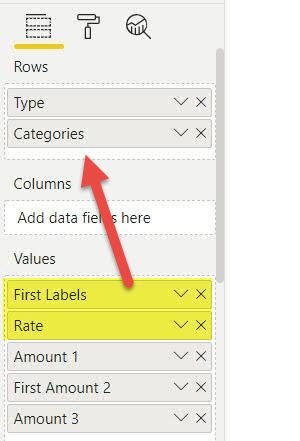
Did you tried to move “First Labels” and “Rate” from Values to Rows? You are getting total for text fields because you have placed these text fields in value section of matrix. see below screenshot
Hi @RD2019
Create measures
Measure_column3 =
IF (
ISINSCOPE ( 'Table'[column2] ),
MAX ( 'Table'[column3] ),
IF ( ISINSCOPE ( 'Table'[column1] ), BLANK (), BLANK () )
)
Measure_column4 =
IF (
ISINSCOPE ( 'Table'[column2] ),
SUM ( 'Table'[column4] ),
IF ( ISINSCOPE ( 'Table'[column1] ), BLANK (), BLANK () )
)
Best Regards
Maggie
Community Support Team _ Maggie Li
If this post helps, then please consider Accept it as the solution to help the other members find it more quickly.
Hi Maggie,
Thanks for this...I think this would work as well. However I have applied a work-around using HASONEVALUE only. As in my case, every product has the same label code and rate - I have just use an IF condition stating that if there is one value for any label or rate (although there can be multiple occurances) - just take the AVERAGE value, otherwise BLANK (ensuring the subtotal will be blank). Seems that it's working fine now.
I see repeating values, so assuming these are both columns, you can write measures as follows
=selectedvalue(table[column])
Share feedback directly with Fabric product managers, participate in targeted research studies and influence the Fabric roadmap.
Check out the February 2026 Power BI update to learn about new features.
| User | Count |
|---|---|
| 61 | |
| 54 | |
| 39 | |
| 16 | |
| 14 |
| User | Count |
|---|---|
| 98 | |
| 84 | |
| 35 | |
| 30 | |
| 25 |