Join us at FabCon Atlanta from March 16 - 20, 2026, for the ultimate Fabric, Power BI, AI and SQL community-led event. Save $200 with code FABCOMM.
Register now!The Power BI Data Visualization World Championships is back! Get ahead of the game and start preparing now! Learn more
Hello,
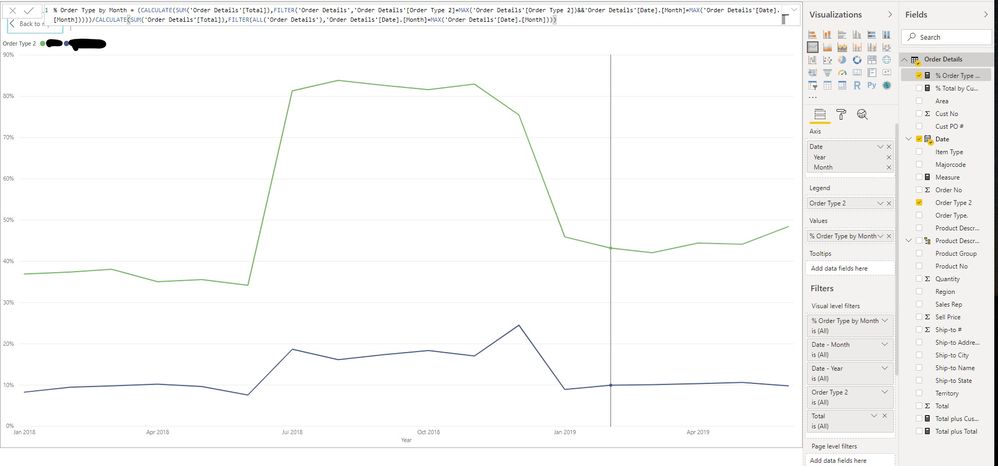
I have sales data from beginning of 2018 thru June 2019. I am trying to show the % of total sales dollars by order type for each month. Using the DAX shown in the below picture, I was able to get it to work for Jul 18 thru Dec 18. However, for any months that I have data for in both 2018 and 2019, the formula is taking the month from 2018 and dividing it by the combined 2018 and 2019 month. For example: For Jan 2018, the formula takes the dollar amount from Jan 2018 and divides it by Jan 2018 + Jan 2019. I need it to only divide by Jan 2018.
Any solutions would be appreciated.
Thanks!
Solved! Go to Solution.
If you write a measure for Order Total:
Order Total = SUM ( 'Order Details'[Total] )
You can then write the % of total measure as:
Pct of type =
DIVIDE (
[Order Total],
CALCULATE ( [Order Total], ALL ( 'Order Details'[Order Type 2] ) )
)This should respect the moth year properly.
If you write a measure for Order Total:
Order Total = SUM ( 'Order Details'[Total] )
You can then write the % of total measure as:
Pct of type =
DIVIDE (
[Order Total],
CALCULATE ( [Order Total], ALL ( 'Order Details'[Order Type 2] ) )
)This should respect the moth year properly.
The Power BI Data Visualization World Championships is back! Get ahead of the game and start preparing now!
Check out the November 2025 Power BI update to learn about new features.
| User | Count |
|---|---|
| 59 | |
| 43 | |
| 42 | |
| 23 | |
| 17 |
| User | Count |
|---|---|
| 190 | |
| 122 | |
| 96 | |
| 66 | |
| 47 |