Join us at FabCon Atlanta from March 16 - 20, 2026, for the ultimate Fabric, Power BI, AI and SQL community-led event. Save $200 with code FABCOMM.
Register now!The Power BI Data Visualization World Championships is back! Get ahead of the game and start preparing now! Learn more
Hello,
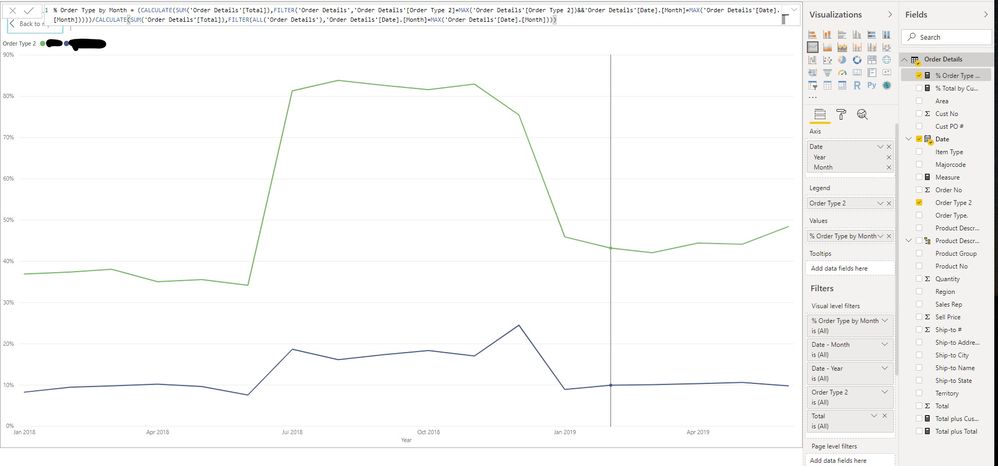
I have sales data from beginning of 2018 thru June 2019. I am trying to show the % of total sales dollars by order type for each month. Using the DAX shown in the below picture, I was able to get it to work for Jul 18 thru Dec 18. However, for any months that I have data for in both 2018 and 2019, the formula is taking the month from 2018 and dividing it by the combined 2018 and 2019 month. For example: For Jan 2018, the formula takes the dollar amount from Jan 2018 and divides it by Jan 2018 + Jan 2019. I need it to only divide by Jan 2018.
Any solutions would be appreciated.
Thanks!
Solved! Go to Solution.
If you write a measure for Order Total:
Order Total = SUM ( 'Order Details'[Total] )
You can then write the % of total measure as:
Pct of type =
DIVIDE (
[Order Total],
CALCULATE ( [Order Total], ALL ( 'Order Details'[Order Type 2] ) )
)This should respect the moth year properly.
If you write a measure for Order Total:
Order Total = SUM ( 'Order Details'[Total] )
You can then write the % of total measure as:
Pct of type =
DIVIDE (
[Order Total],
CALCULATE ( [Order Total], ALL ( 'Order Details'[Order Type 2] ) )
)This should respect the moth year properly.
The Power BI Data Visualization World Championships is back! Get ahead of the game and start preparing now!
| User | Count |
|---|---|
| 38 | |
| 38 | |
| 37 | |
| 28 | |
| 28 |
| User | Count |
|---|---|
| 124 | |
| 89 | |
| 73 | |
| 66 | |
| 65 |