Join us at FabCon Atlanta from March 16 - 20, 2026, for the ultimate Fabric, Power BI, AI and SQL community-led event. Save $200 with code FABCOMM.
Register now!The Power BI Data Visualization World Championships is back! Get ahead of the game and start preparing now! Learn more
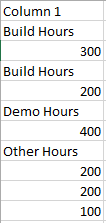
So I have a bunch of really messy pdf files that i'm drawing data from and they have the data all in one column when pulled into power bi like this:
I want to reorgnaize the data into this format, summing the numbers that belong in the same category:
Any ideas on how to approach?
Solved! Go to Solution.
So I went through and used power query to get a table that looks like this:
| Column1 | Column1 - Copy |
| Build Hours | 300 |
| Build Hours | 200 |
| Demo Hours | 400 |
| Other Hours | 200 |
| Other Hours | 200 |
| Other Hours | 100 |
Here's the power query (and I'm sure it could be cleaned up, but it gets a usuable result:
let
Source = Table.FromRows(Json.Document(Binary.Decompress(Binary.FromText("i45WcirNzElR8MgvLSpWitWJVjI2MADT6OJGUHGX1Nx8JGETqLB/SUZqERblMNoQRMcCAA==", BinaryEncoding.Base64), Compression.Deflate)), let _t = ((type text) meta [Serialized.Text = true]) in type table [Column1 = _t]),
#"Changed Type" = Table.TransformColumnTypes(Source,{{"Column1", type text}}),
#"Duplicated Column" = Table.DuplicateColumn(#"Changed Type", "Column1", "Column1 - Copy"),
#"Remove Numbers" = Table.TransformColumns(#"Duplicated Column",{{"Column1", each Text.Combine(List.RemoveItems(Text.ToList(_),{"0".."9"}))}}),
#"Replaced Value" = Table.ReplaceValue(#"Remove Numbers","",null,Replacer.ReplaceValue,{"Column1"}),
#"Filled Down" = Table.FillDown(#"Replaced Value",{"Column1"}),
#"Changed Type1" = Table.TransformColumnTypes(#"Filled Down",{{"Column1 - Copy", Int64.Type}}),
#"Removed Errors" = Table.RemoveRowsWithErrors(#"Changed Type1", {"Column1 - Copy"})
in
#"Removed Errors"
So I went through and used power query to get a table that looks like this:
| Column1 | Column1 - Copy |
| Build Hours | 300 |
| Build Hours | 200 |
| Demo Hours | 400 |
| Other Hours | 200 |
| Other Hours | 200 |
| Other Hours | 100 |
Here's the power query (and I'm sure it could be cleaned up, but it gets a usuable result:
let
Source = Table.FromRows(Json.Document(Binary.Decompress(Binary.FromText("i45WcirNzElR8MgvLSpWitWJVjI2MADT6OJGUHGX1Nx8JGETqLB/SUZqERblMNoQRMcCAA==", BinaryEncoding.Base64), Compression.Deflate)), let _t = ((type text) meta [Serialized.Text = true]) in type table [Column1 = _t]),
#"Changed Type" = Table.TransformColumnTypes(Source,{{"Column1", type text}}),
#"Duplicated Column" = Table.DuplicateColumn(#"Changed Type", "Column1", "Column1 - Copy"),
#"Remove Numbers" = Table.TransformColumns(#"Duplicated Column",{{"Column1", each Text.Combine(List.RemoveItems(Text.ToList(_),{"0".."9"}))}}),
#"Replaced Value" = Table.ReplaceValue(#"Remove Numbers","",null,Replacer.ReplaceValue,{"Column1"}),
#"Filled Down" = Table.FillDown(#"Replaced Value",{"Column1"}),
#"Changed Type1" = Table.TransformColumnTypes(#"Filled Down",{{"Column1 - Copy", Int64.Type}}),
#"Removed Errors" = Table.RemoveRowsWithErrors(#"Changed Type1", {"Column1 - Copy"})
in
#"Removed Errors"
The Power BI Data Visualization World Championships is back! Get ahead of the game and start preparing now!
| User | Count |
|---|---|
| 64 | |
| 47 | |
| 41 | |
| 36 | |
| 23 |
| User | Count |
|---|---|
| 185 | |
| 123 | |
| 106 | |
| 78 | |
| 52 |
