cancel
Showing results for 
Search instead for 
Did you mean: 

The Power BI Data Visualization World Championships is back! It's time to submit your entry. Live now!

Reply
Anonymous
Not applicable

How to shape this data

I need to create a chart that shows by month, how many first time registrants there are vs how many repeat registrants, relative to that point in time. I am stuck on how to manipulate the data to accomplish this.


Here's the current data I have. I'm stumped on how to manipulate this.

Contact IDCampaign IDCampaign Date
JoeWebinar AJanuary 2020
JoeWebinar BJune 2020
SallyWebinar BJune 2020
JoeWebinar CNovember 2020
SallyWebinar CNovember 2020


Example: Joe registers for webinar A in January, webinar B in June, webinar C in November. In January, he was a first-time registrant. In June, he is a repeat registrant.


Based on this data table, I want a chart that shows:

  • January (webinar A): 1 first-timer (Joe), 0 repeats
  • June (webinar B): 1 first-timer (Sally), 1 repeat (Joe)
  • November (webinar C): 0 first-timers, 2 repeats (Joe and Sally)


1 ACCEPTED SOLUTION
camargos88
Community Champion
Community Champion

@Anonymous .

You can use this code to create a new calculated column:

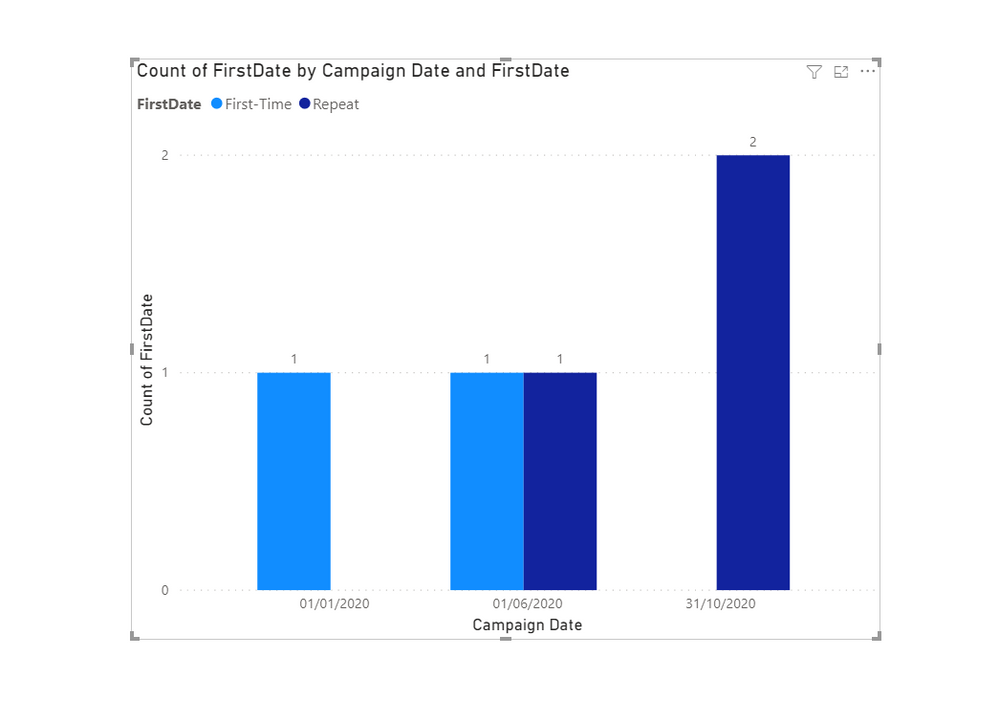
FirstDate = IF('Table'[Campaign Date] = CALCULATE(MIN('Table'[Campaign Date]), ALLEXCEPT('Table', 'Table'[Contact ID])), "First-Time", "Repeat")

Capture.PNG


Did I answer your question? Mark my post as a solution!

Proud to be a Super User!


View solution in original post

3 REPLIES 3
Ashish_Mathur
Super User
Super User

Hi,

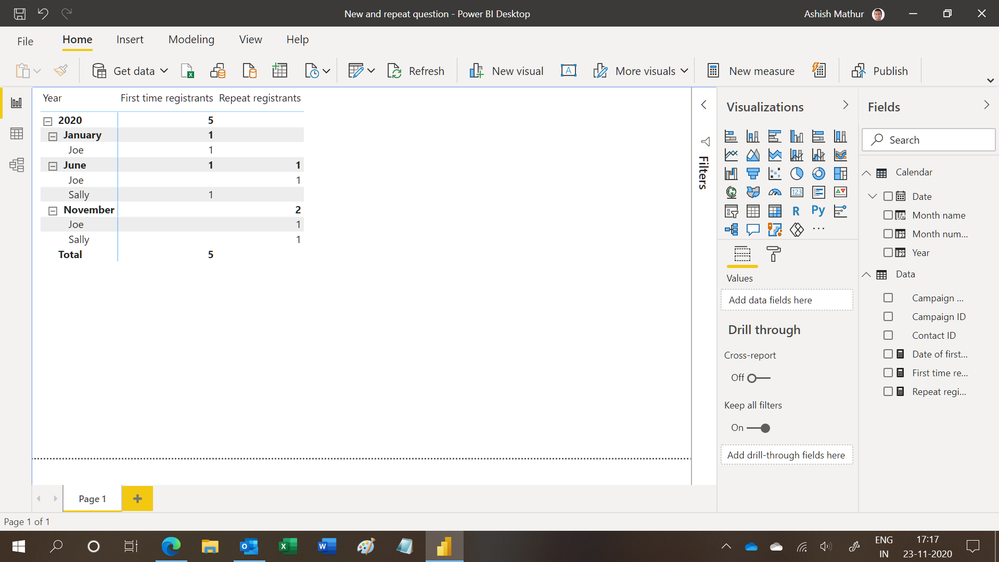
You may download my PBI file from here.

Hope this helps.

Untitled.png


Regards,
Ashish Mathur
http://www.ashishmathur.com
https://www.linkedin.com/in/excelenthusiasts/
mahoneypat
Microsoft Employee
Microsoft Employee

Here are two measure expressions to use in a table visual with the Campaign Date column.


Repeat =
VAR maxdate =
    MAX ( Events[Campaign Date] )
RETURN
    COUNTROWS (
        FILTER (
            DISTINCT ( Events[Contact ID] ),
            NOT (
                ISBLANK (
                    CALCULATE (
                        COUNT ( Events[Campaign ID] ),
                        ALL ( Events[Campaign Date] ),
                        Events[Campaign Date] < maxdate
                    )
                )
            )
        )
    ) + 0


First Timers =
VAR maxdate =
    MAX ( Events[Campaign Date] )
RETURN
    COUNTROWS (
        FILTER (
            DISTINCT ( Events[Contact ID] ),
            ISBLANK (
                CALCULATE (
                    COUNT ( Events[Campaign ID] ),
                    ALL ( Events[Campaign Date] ),
                    Events[Campaign Date] < maxdate
                )
            )
        )
    ) + 0


Regards,

Pat


Did I answer your question? Mark my post as a solution! Kudos are also appreciated!

To learn more about Power BI, follow me on Twitter or subscribe on YouTube.


@mahoneypa HoosierBI on YouTube


camargos88
Community Champion
Community Champion

@Anonymous .

You can use this code to create a new calculated column:

FirstDate = IF('Table'[Campaign Date] = CALCULATE(MIN('Table'[Campaign Date]), ALLEXCEPT('Table', 'Table'[Contact ID])), "First-Time", "Repeat")

Capture.PNG


Did I answer your question? Mark my post as a solution!

Proud to be a Super User!


Helpful resources

Announcements
Power BI DataViz World Championships

Power BI Dataviz World Championships

The Power BI Data Visualization World Championships is back! It's time to submit your entry.

January Power BI Update Carousel

Power BI Monthly Update - January 2026

Check out the January 2026 Power BI update to learn about new features.

FabCon Atlanta 2026 carousel

FabCon Atlanta 2026

Join us at FabCon Atlanta, March 16-20, for the ultimate Fabric, Power BI, AI and SQL community-led event. Save $200 with code FABCOMM.