Don't miss your chance to take the Fabric Data Engineer (DP-600) exam for FREE! Find out how by watching the DP-600 session on-demand now through April 28th.
Learn moreJoin the FabCon + SQLCon recap series. Up next: Power BI, Real-Time Intelligence, IQ and AI, and Data Factory take center stage. All sessions are available on-demand after the live show. Register now
I need to create a chart that shows by month, how many first time registrants there are vs how many repeat registrants, relative to that point in time. I am stuck on how to manipulate the data to accomplish this.
Here's the current data I have. I'm stumped on how to manipulate this.
| Contact ID | Campaign ID | Campaign Date |
| Joe | Webinar A | January 2020 |
| Joe | Webinar B | June 2020 |
| Sally | Webinar B | June 2020 |
| Joe | Webinar C | November 2020 |
| Sally | Webinar C | November 2020 |
Example: Joe registers for webinar A in January, webinar B in June, webinar C in November. In January, he was a first-time registrant. In June, he is a repeat registrant.
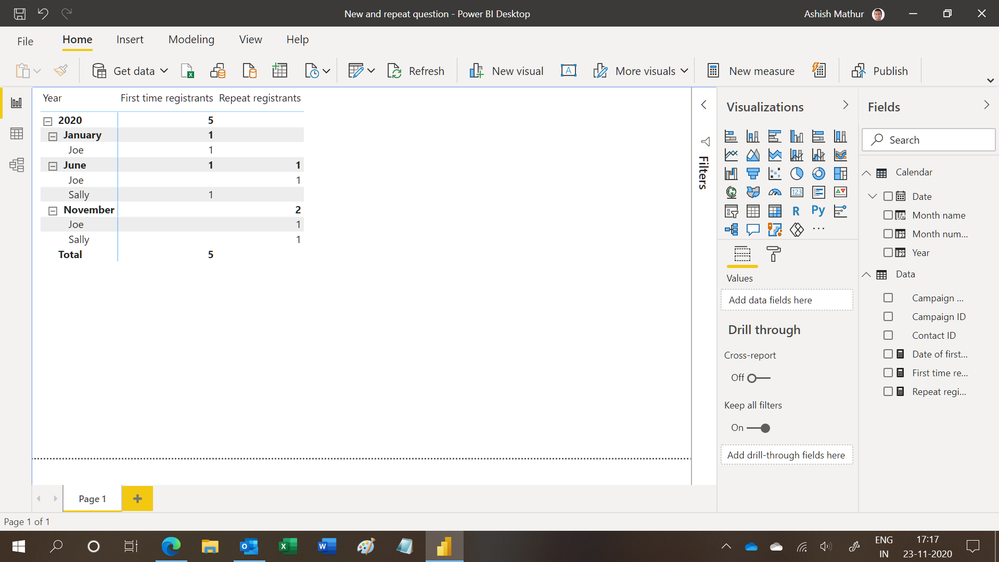
Based on this data table, I want a chart that shows:
Solved! Go to Solution.
@Anonymous .
You can use this code to create a new calculated column:
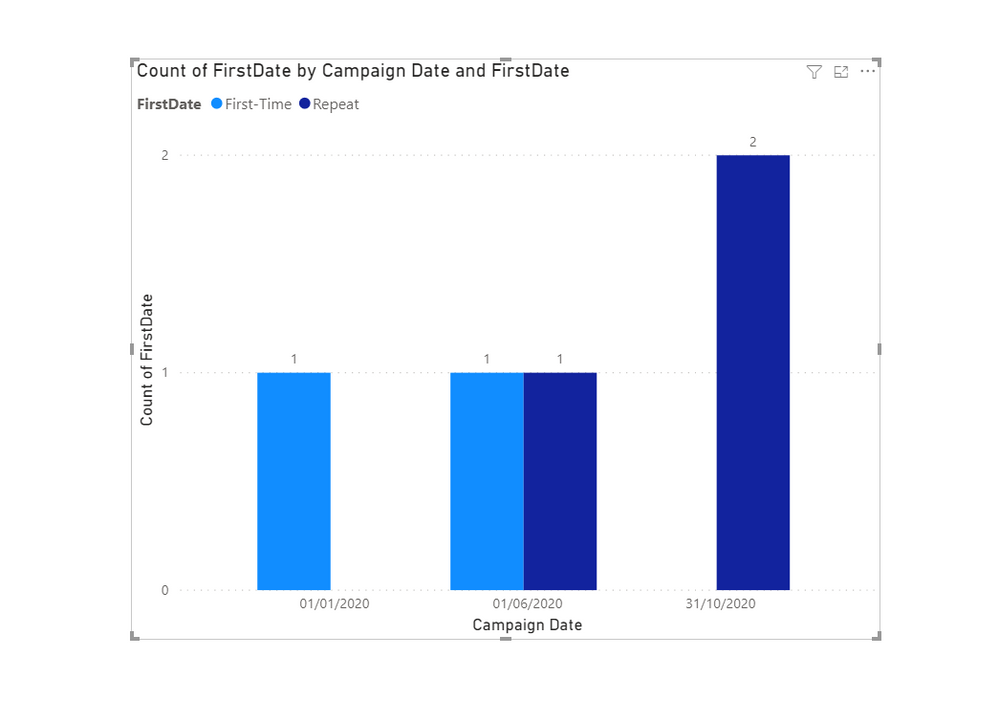
FirstDate = IF('Table'[Campaign Date] = CALCULATE(MIN('Table'[Campaign Date]), ALLEXCEPT('Table', 'Table'[Contact ID])), "First-Time", "Repeat")
Hi,
You may download my PBI file from here.
Hope this helps.
Here are two measure expressions to use in a table visual with the Campaign Date column.
Repeat =
VAR maxdate =
MAX ( Events[Campaign Date] )
RETURN
COUNTROWS (
FILTER (
DISTINCT ( Events[Contact ID] ),
NOT (
ISBLANK (
CALCULATE (
COUNT ( Events[Campaign ID] ),
ALL ( Events[Campaign Date] ),
Events[Campaign Date] < maxdate
)
)
)
)
) + 0
First Timers =
VAR maxdate =
MAX ( Events[Campaign Date] )
RETURN
COUNTROWS (
FILTER (
DISTINCT ( Events[Contact ID] ),
ISBLANK (
CALCULATE (
COUNT ( Events[Campaign ID] ),
ALL ( Events[Campaign Date] ),
Events[Campaign Date] < maxdate
)
)
)
) + 0
Regards,
Pat
To learn more about Power BI, follow me on Twitter or subscribe on YouTube.
Check out the April 2026 Power BI update to learn about new features.
If you have recently started exploring Fabric, we'd love to hear how it's going. Your feedback can help with product improvements.
A new Power BI DataViz World Championship is coming this June! Don't miss out on submitting your entry.
| User | Count |
|---|---|
| 42 | |
| 37 | |
| 35 | |
| 22 | |
| 15 |
| User | Count |
|---|---|
| 67 | |
| 58 | |
| 29 | |
| 27 | |
| 25 |