cancel
Showing results for 
Search instead for 
Did you mean: 

Get Fabric Certified for FREE during Fabric Data Days. Don't miss your chance! Request now

Reply
arie_energy
New Member

How to set vertical lines at the beginning of each day in a time-series line graph

I would like to create a measure or use another method that sets vertical lines at the beginning of each day in the following time series plot:

arie_energy_0-1661333269496.png

The date column has hourly values. I would like to have a vertical line indicating the difference between days, similar to the plot below (which I made in paint) - at the start of every day. 

arie_energy_1-1661333410631.png

Is there a way of doing so? My current issue with time series graphs is that they are hard to read and it is hard to distinguish between different days.


EDIT: Seems like there is no way to do this. Power BI is trash.

4 REPLIES 4
amitchandak
Super User
Super User

@arie_energy , You can follow the suggestion from @Luuky 


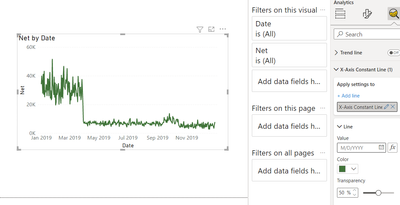
With a Date or number on  X-axis , you get an option to have x-axis constant line too under the analytic pane with FX option, means you can add a measure or fixed date.

amitchandak_0-1661334994180.png


But 1 line will display as one point, so you have add A few


Share with Power BI Enthusiasts: Full Power BI Video (20 Hours) YouTube
Microsoft Fabric Series 60+ Videos YouTube
Microsoft Fabric Hindi End to End YouTube

Yeah this really isn't going to work for me. I just want to have dynamically created vertical lines at the beginning of each day. My time series lasts a month so adding 30 vertical lines manually isn't going to help.

Luuky
Helper I
Helper I

Hi @arie_energy ,


A quick tip to increase readability is to put on vertical gridlines. 

Greeting,

Luuk

This does not help at all. This only helps when you display 5 days of data, but if its more it already skips a day. I am actually very disappointed by the fact that PowerBI doesn't have any capabilities of changing this.

Helpful resources

Announcements
November Power BI Update Carousel

Power BI Monthly Update - November 2025

Check out the November 2025 Power BI update to learn about new features.

Fabric Data Days Carousel

Fabric Data Days

Advance your Data & AI career with 50 days of live learning, contests, hands-on challenges, study groups & certifications and more!

FabCon Atlanta 2026 carousel

FabCon Atlanta 2026

Join us at FabCon Atlanta, March 16-20, for the ultimate Fabric, Power BI, AI and SQL community-led event. Save $200 with code FABCOMM.

Top Solution Authors
Top Kudoed Authors