cancel
Showing results for 
Search instead for 
Did you mean: 

The Power BI Data Visualization World Championships is back! Get ahead of the game and start preparing now! Learn more

Reply
Anonymous
Not applicable

How to round up a calculated measure?

I am calculating sales for this day vs last day. I want to calculate the percentage in change. So, I created a the following measure :


Change = ((([Total Sales] - [Total Sales Last Day])/[Total Sales Last Day])*100) & "%"


I want to round up the result to last 2 digits. I tried using INT and ROUND functions, but they dont work. Can anybody suggest how can i round up the value?

1 ACCEPTED SOLUTION
v-yuta-msft
Community Support
Community Support

Hi trisabiswas,


Based on your description, you want measure [change] to be a percentage, right?


To achieve your requirement, please use DAX formula below:


Change = ([Total Sales] - [Total Sales Last Day])/[Total Sales Last Day]


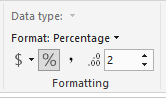
Then click on [change] and click Modeling->Format->Select Percentage->Set decimal places to 2.

2.PNG


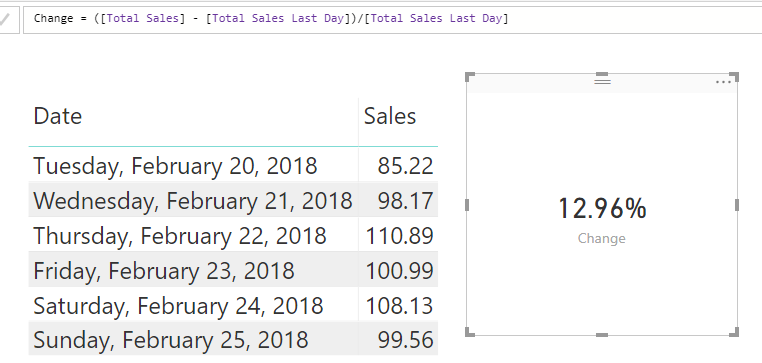
The result is like below and you can refer to my sample PBIX file: https://www.dropbox.com/s/t8ndcw6rt0qcfh5/For%20trisabiswas.pbix?dl=0

1.PNG


Best Regards,

Jimmy Tao

View solution in original post

3 REPLIES 3
v-yuta-msft
Community Support
Community Support

Hi trisabiswas,


Based on your description, you want measure [change] to be a percentage, right?


To achieve your requirement, please use DAX formula below:


Change = ([Total Sales] - [Total Sales Last Day])/[Total Sales Last Day]


Then click on [change] and click Modeling->Format->Select Percentage->Set decimal places to 2.

2.PNG


The result is like below and you can refer to my sample PBIX file: https://www.dropbox.com/s/t8ndcw6rt0qcfh5/For%20trisabiswas.pbix?dl=0

1.PNG


Best Regards,

Jimmy Tao

Hi, I have similar issue, but I want only 1 value after decimal and in my case, it's rounding up 94.96 to 95% how can I show only 94.9% ?? I used 1 decimal place under formatting tab. Please help, it's urgent!

Anonymous
Not applicable

Solved !! Thanks Jimmy 🙂

Helpful resources

Announcements
Power BI DataViz World Championships

Power BI Dataviz World Championships

The Power BI Data Visualization World Championships is back! Get ahead of the game and start preparing now!

November Power BI Update Carousel

Power BI Monthly Update - November 2025

Check out the November 2025 Power BI update to learn about new features.

FabCon Atlanta 2026 carousel

FabCon Atlanta 2026

Join us at FabCon Atlanta, March 16-20, for the ultimate Fabric, Power BI, AI and SQL community-led event. Save $200 with code FABCOMM.