Join us at FabCon Atlanta from March 16 - 20, 2026, for the ultimate Fabric, Power BI, AI and SQL community-led event. Save $200 with code FABCOMM.
Register now!The Power BI Data Visualization World Championships is back! Get ahead of the game and start preparing now! Learn more
How do I remove the time from a visualization? The data is formated as a date in the format M/d/yyyy. If I change the X axis from Continuous to Categorical it fixes the issue, but it also elminates the days with no data. We want to be able to see days with no data as we want to see trending data over time, not just data on those dates it has it.
Solved! Go to Solution.
@Anonymous ,
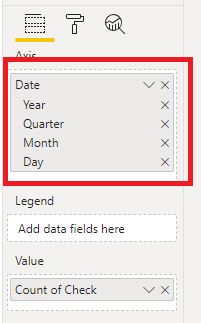
Currently in the date hierarchy there's no "time" level, so I'm afraid we can't show aggregation value based on time, we can only aggregate value based on day.
However, as a workaround, you can convert the date column to text type, in this way, each time in a day can be shown on the X-axis of a bar chart.
Regards,
Jimmy Tao
@Anonymous ,
Currently in the date hierarchy there's no "time" level, so I'm afraid we can't show aggregation value based on time, we can only aggregate value based on day.
However, as a workaround, you can convert the date column to text type, in this way, each time in a day can be shown on the X-axis of a bar chart.
Regards,
Jimmy Tao
Check out the November 2025 Power BI update to learn about new features.
Advance your Data & AI career with 50 days of live learning, contests, hands-on challenges, study groups & certifications and more!