Don't miss your chance to take exam DP-600 or DP-700 on us!
Request nowLearn from the best! Meet the four finalists headed to the FINALS of the Power BI Dataviz World Championships! Register now
Hi,
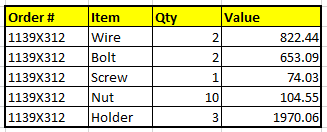
I am trying to analyse a data set, below is the sample data
is it possible to get the count of a particular item ( slicer) and the total count of all the items for the order #?
What I am trying is to do is to add "Item" as slicer and I need to get the Count of selected item and the Total count of all the items in an Order #
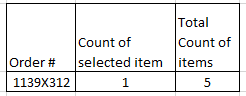
for example if I add "Wire" in the slider the table should display the Count of selected Item as "1" and I need a measure to display the total count as "5" for the Order # as below
How do I create a measure to exclude the filter and show the Total count of all the items of an Order #
Kindly help to resolve this,
Regards,
Shyam.
Solved! Go to Solution.
Try:
Total count of items = CALCULATE (COUNT(Table[Item]), ALL(Table[Item]))
Proud to be a Super User!
Paul on Linkedin.
Hi @Skumaran
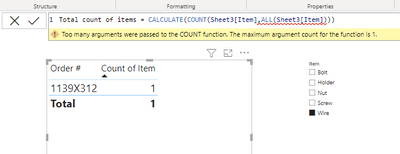
You didn't close your Count() function correctly.
CALCULATE(COUNT(Sheet3[Item]),ALL(Sheet3[Item]))
Hope it helps!
Kind regards,
OD
Hi, It works!!
Thank you very much!!
Try:
Total count of items = CALCULATE (COUNT(Table[Item]), ALL(Table[Item]))
Proud to be a Super User!
Paul on Linkedin.
Hi Paul,
Thank you for your response,
I tried as you suggested but it returned with an error,
Hi @Skumaran
You didn't close your Count() function correctly.
CALCULATE(COUNT(Sheet3[Item]),ALL(Sheet3[Item]))
Hope it helps!
Kind regards,
OD
Share feedback directly with Fabric product managers, participate in targeted research studies and influence the Fabric roadmap.
Check out the February 2026 Power BI update to learn about new features.
| User | Count |
|---|---|
| 51 | |
| 40 | |
| 37 | |
| 14 | |
| 14 |
| User | Count |
|---|---|
| 85 | |
| 69 | |
| 38 | |
| 29 | |
| 27 |