cancel
Showing results for 
Search instead for 
Did you mean: 

Join the FabCon + SQLCon recap series. Up next: Power BI, Real-Time Intelligence, IQ and AI, and Data Factory take center stage. All sessions are available on-demand after the live show. Register now

Reply
DSmith4
Helper II
Helper II

How to remove data type changes

Hi,


I have a datasource connected to SAP business warehouse. I tried refreshing it and recieved the OLE DB or ODBC error DISP_E_TYPEMISMATCH error. based on what I can see online it appears this is because I changed the data type to something that cannot be handled by the application. 


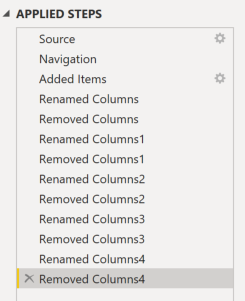
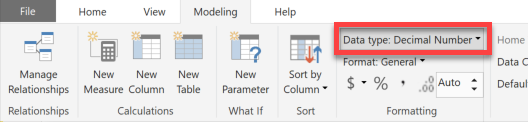
I tried to change this back however I am unable to delete the step. When I set the data types, I did from the modelling tab. Any way to correct this? Im not sure what the original data types were before I changed them. 


2020-04-22_8-36-05.png2020-04-22_8-38-09.png


Thanks,

1 ACCEPTED SOLUTION
DSmith4
Helper II
Helper II

I set all data type to text and was able to refresh

View solution in original post

2 REPLIES 2
DSmith4
Helper II
Helper II

I set all data type to text and was able to refresh

amitchandak
Super User
Super User

@DSmith4 

If you have changed data type in Edit Query mode then you will get step. If you have done it in the Data view then you will not get the step. Just change it again to original


Share with Power BI Enthusiasts: Full Power BI Video (20 Hours) YouTube
Microsoft Fabric Series 60+ Videos YouTube
Microsoft Fabric Hindi End to End YouTube

Helpful resources

Announcements
April Power BI Update Carousel

Power BI Monthly Update - April 2026

Check out the April 2026 Power BI update to learn about new features.

New to Fabric survey Carousel

New to Fabric Survey

If you have recently started exploring Fabric, we'd love to hear how it's going. Your feedback can help with product improvements.

Power BI DataViz World Championships carousel

Power BI DataViz World Championships - June 2026

A new Power BI DataViz World Championship is coming this June! Don't miss out on submitting your entry.

FabCon and SQLCon Highlights Carousel

FabCon &SQLCon Highlights

Experience the highlights from FabCon & SQLCon, available live and on-demand starting April 14th.