cancel
Showing results for 
Search instead for 
Did you mean: 

The Power BI Data Visualization World Championships is back! Get ahead of the game and start preparing now! Learn more

Reply
pucities
Frequent Visitor

How to pivot multiple columns into Matrix..

My data source looks something like this:

StudentIDTest1ScoreTest1AvgTest2ScoreTest2AvgTest3ScoreTest3Avg
1757586808768
2607596806968
3747574807968


I can't use Test#Avg as measures for some reasons. 


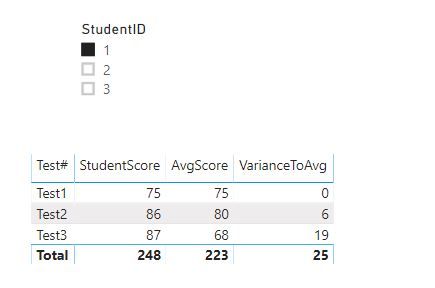
When I choose StudentID=1 in the slicer, I want the matrix to show like this:


StudentID = 1   
    
Test #StudentScoreAvgScoreVarianceToAvg
Test175750
Test286806
Test3876819


How can I achieve this? Is there a way to do it without creating additional tables?


Thank you in advance!

2 ACCEPTED SOLUTIONS
amitchandak
Super User
Super User

I think the better option is to unpivot data

https://radacad.com/pivot-and-unpivot-with-power-bi


Appreciate your Kudos. In case, this is the solution you are looking for, mark it as the Solution. In case it does not help, please provide additional information and mark me with @
Thanks. My Recent Blog -
Winner-Topper-on-Map-How-to-Color-States-on-a-Map-with-Winners , HR-Analytics-Active-Employee-Hire-and-Termination-trend
Power-BI-Working-with-Non-Standard-Time-Periods And Comparing-Data-Across-Date-Ranges

Connect on Linkedin

Share with Power BI Enthusiasts: Full Power BI Video (20 Hours) YouTube
Microsoft Fabric Series 60+ Videos YouTube
Microsoft Fabric Hindi End to End YouTube

View solution in original post

v-lili6-msft
Community Support
Community Support

hi @pucities 

You could refer to this pbix file:

1.JPG


Regards,

Lin

Community Support Team _ Lin
If this post helps, then please consider Accept it as the solution to help the other members find it more quickly.

View solution in original post

2 REPLIES 2
v-lili6-msft
Community Support
Community Support

hi @pucities 

You could refer to this pbix file:

1.JPG


Regards,

Lin

Community Support Team _ Lin
If this post helps, then please consider Accept it as the solution to help the other members find it more quickly.
amitchandak
Super User
Super User

I think the better option is to unpivot data

https://radacad.com/pivot-and-unpivot-with-power-bi


Appreciate your Kudos. In case, this is the solution you are looking for, mark it as the Solution. In case it does not help, please provide additional information and mark me with @
Thanks. My Recent Blog -
Winner-Topper-on-Map-How-to-Color-States-on-a-Map-with-Winners , HR-Analytics-Active-Employee-Hire-and-Termination-trend
Power-BI-Working-with-Non-Standard-Time-Periods And Comparing-Data-Across-Date-Ranges

Connect on Linkedin

Share with Power BI Enthusiasts: Full Power BI Video (20 Hours) YouTube
Microsoft Fabric Series 60+ Videos YouTube
Microsoft Fabric Hindi End to End YouTube

Helpful resources

Announcements
Power BI DataViz World Championships

Power BI Dataviz World Championships

The Power BI Data Visualization World Championships is back! Get ahead of the game and start preparing now!

December 2025 Power BI Update Carousel

Power BI Monthly Update - December 2025

Check out the December 2025 Power BI Holiday Recap!

FabCon Atlanta 2026 carousel

FabCon Atlanta 2026

Join us at FabCon Atlanta, March 16-20, for the ultimate Fabric, Power BI, AI and SQL community-led event. Save $200 with code FABCOMM.