Join us at FabCon Atlanta from March 16 - 20, 2026, for the ultimate Fabric, Power BI, AI and SQL community-led event. Save $200 with code FABCOMM.
Register now!View all the Fabric Data Days sessions on demand. View schedule
I'm looking for ideas for how to model and measure event rates across an inventory which also changes daily. I've solved this in prototype but suspect there are more refined models that might make this more sensible.
We have a WorkerTable updated daily:
Date | WorkerName | Catagory | SubCatagory | ... |
1/1 | Worker1 | A | X |
|
1/1 | Worker2 | A | Y |
|
1/2 | Worker1 | A | X |
|
1/2 | Worker2 | A | Y |
|
1/2 | Worker3 | B | X |
|
1/3 | Worker2 | A | Y |
|
1/3 | Worker3 | B | X |
|
We have a daily EventTable:
Date | Event | WorkerName |
1/1 | Injury | Worker1 |
1/3 | Confusion | Worker2 |
1/3 | Dissolution | Worker3 |
We want to be able to see the rate of events against all workers:
Date | Event | Occurrences | Workers | Rate |
1/1 | Injury | 1 | 2 | 1/2 |
1/2 |
|
| 3 | 0 |
1/3 | Confusion | 1 | 2 | 1/2 |
1/3 | Dissolution | 1 | 2 | 1/2 |
Or by a certain selection of category:
Date | Event | Occurrences | SubCatagory = X | Rate |
1/1 | Injury | 1 | 1 | 1/1 |
1/2 |
|
| 1 | 0 |
1/3 | Dissolution | 1 | 1 | 1/1 |
And finally to be able to group events of any type:
Date | Events | Workers | Rate |
1/1 | 1 | 2 | 1/2 |
1/2 | 0 | 2 | 0 |
1/3 | 2 | 3 | 2/3 |
What is a good way to shape and model the data in powerbi to achieve this result?
Solved! Go to Solution.
Hi @gareta,
Firstly, only when you have an entry for Date 1/2 in EventTable, you are able to get the following desired result.

Create the following measures in your EventTable, please note that there is no relationship between two tables.
Workers = COUNTROWS(FILTER(WorkerTable,WorkerTable[Date]=MAX(EventTable[Date])))
Occurrences2 = CALCULATE(COUNTA(EventTable[Event]),FILTER(EventTable,EventTable[Event]<>""))
Rate 2 = IF(ISBLANK([Occurrences2]/[Workers]),0,[Occurrences2]/[Workers])
Then create a table visual using fields and mesaures of EventTable as shown in the following screenshot.
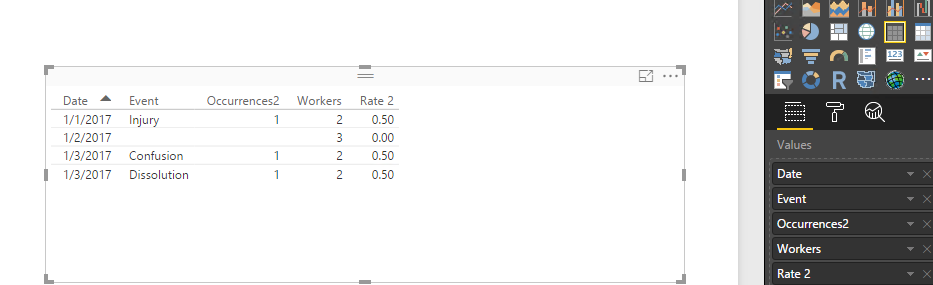
Secondly, if you don’t have record for Date 1/2 in EventTable, create the measures below, and you will get the following table visual.
Occurrences = COUNTA(EventTable[Event])
Workers = COUNTROWS(FILTER(WorkerTable,WorkerTable[Date]=MAX(EventTable[Date])))
Rate = [Occurrences]/[Workers]
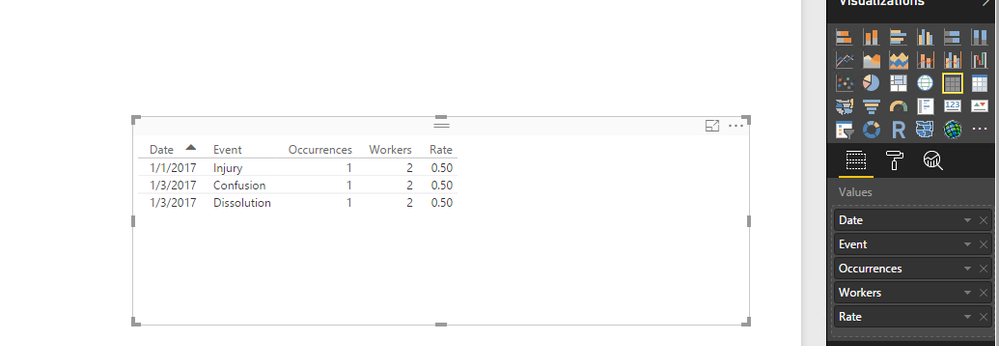
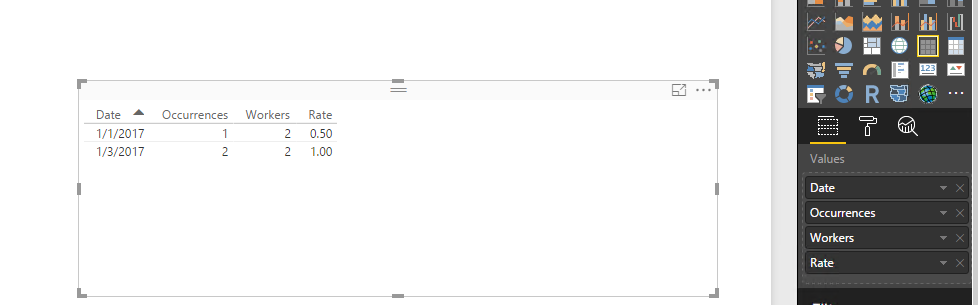
Thirdly, could you please describe more details about how you get the numbers of workers for 1/2, 1/3 in your last screenshot? Based on my test, when we group events of any type of above table visual, we just need to exclude Event field from the table visual. But this way, I get different numbers of workers for 1/2, 1/3.
Thanks,
Lydia Zhang
Hi @gareta,
Firstly, only when you have an entry for Date 1/2 in EventTable, you are able to get the following desired result.
Create the following measures in your EventTable, please note that there is no relationship between two tables.
Workers = COUNTROWS(FILTER(WorkerTable,WorkerTable[Date]=MAX(EventTable[Date])))
Occurrences2 = CALCULATE(COUNTA(EventTable[Event]),FILTER(EventTable,EventTable[Event]<>""))
Rate 2 = IF(ISBLANK([Occurrences2]/[Workers]),0,[Occurrences2]/[Workers])
Then create a table visual using fields and mesaures of EventTable as shown in the following screenshot.
Secondly, if you don’t have record for Date 1/2 in EventTable, create the measures below, and you will get the following table visual.
Occurrences = COUNTA(EventTable[Event])
Workers = COUNTROWS(FILTER(WorkerTable,WorkerTable[Date]=MAX(EventTable[Date])))
Rate = [Occurrences]/[Workers]
Thirdly, could you please describe more details about how you get the numbers of workers for 1/2, 1/3 in your last screenshot? Based on my test, when we group events of any type of above table visual, we just need to exclude Event field from the table visual. But this way, I get different numbers of workers for 1/2, 1/3.
Thanks,
Lydia Zhang
This all looks good and I will work on replicating it as you describe. Thank you!
(Regarding worker count on 1/2 and 1/3, your numbers are accurate, my sample results are incorrect.)
This is all very helpful, thank you Lydia. @Anonymous
One more question, I'm still unclear how to do this last bit. When I want to view issues that affected a subset of all Workers (eg, group by a certain selection of category):
Date | Event | Occurrences | Workers WHERE SubCatagory = X | Rate |
1/1 | Injury | 1 | 1 | 1/1 |
| 1/2 |
|
| 1 | 0 |
1/3 | Dissolution | 1 | 1 | 1/1 |
Hi @gareta,
Firstly, create a new table using DAX below. And create relationship between NewTable and EventTable using WorkerName field.
NewTable = CALCULATETABLE(WorkerTable,WorkerTable[SubCatagory]="X")
Then create the following measures.
Measure = CALCULATE(COUNTA(NewTable[Date]),FILTER(NewTable,NewTable[Date]=Max(EventTable[Date])))
Occurrences = COUNTA(EventTable[Event])
Rate = [Occurrences]/[Measure]
Thanks,
Lydia Zhang
Check out the November 2025 Power BI update to learn about new features.
Advance your Data & AI career with 50 days of live learning, contests, hands-on challenges, study groups & certifications and more!