Join us at FabCon Atlanta from March 16 - 20, 2026, for the ultimate Fabric, Power BI, AI and SQL community-led event. Save $200 with code FABCOMM.
Register now!Get Fabric Certified for FREE during Fabric Data Days. Don't miss your chance! Request now
Hi Team,
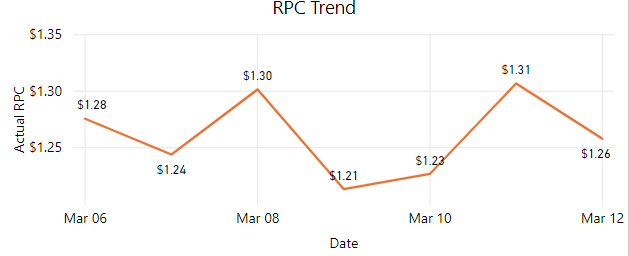
I want to plot polynomial like line charts in Power BI.
In Power BI I am getting default line chart like below.
Solved! Go to Solution.
I understand your requirement is to achieve a polynomial trend line, right? However, I'm afraid currently power bi doesn;t support this feature. Please see this idea. In addtion, as a workaround, you could use python visual instead.
Community Support Team _ Jimmy Tao
If this post helps, then please consider Accept it as the solution to help the other members find it more quickly.
Does "polynomial " mean trend line? If it is, select the line chart and click format pane, then select Trend line as below:
Community Support Team _ Jimmy Tao
If this post helps, then please consider Accept it as the solution to help the other members find it more quickly.
Hi @v-yuta-msft
Not Polynomial trend line I just not like the zig-zag graph I want smooth graph in the replacement of the above graph.
I understand your requirement is to achieve a polynomial trend line, right? However, I'm afraid currently power bi doesn;t support this feature. Please see this idea. In addtion, as a workaround, you could use python visual instead.
Community Support Team _ Jimmy Tao
If this post helps, then please consider Accept it as the solution to help the other members find it more quickly.
Check out the November 2025 Power BI update to learn about new features.
Advance your Data & AI career with 50 days of live learning, contests, hands-on challenges, study groups & certifications and more!