cancel
Showing results for 
Search instead for 
Did you mean: 

The Power BI Data Visualization World Championships is back! Get ahead of the game and start preparing now! Learn more

Reply
Anonymous
Not applicable

undefined

Hi,

I need to create the visual with trend lines:
1. How to compare distance between two trend lines?

2. Is it possible to make visual with trends and two differente x axis, eg. X - Sum, X -% and Y - date?

Thanks!
2 REPLIES 2
Icey
Community Support
Community Support

Hi @Anonymous ,

 
Is this problem sloved?
 
If it is sloved, could you kindly accept it as a solution to close this case?  
 
If not, please let me know.  
 
Best Regards
Icey
Icey
Community Support
Community Support

Hi @Anonymous ,

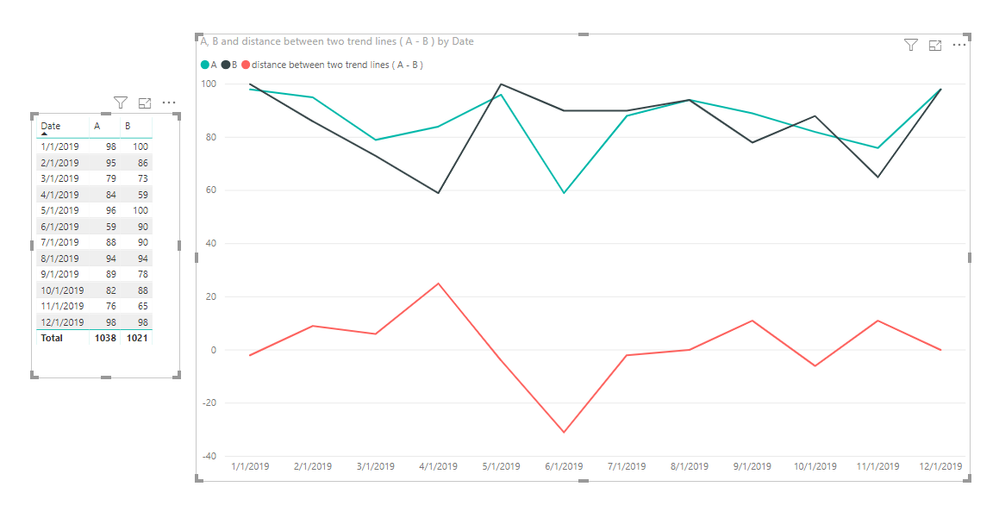
1. For 'How to compare distance between two trend lines?',

You can create a measure like so:

distance between two trend lines ( A - B ) =
MAX ( 'Table'[A] ) - MAX ( 'Table'[B] )

undefined.PNG

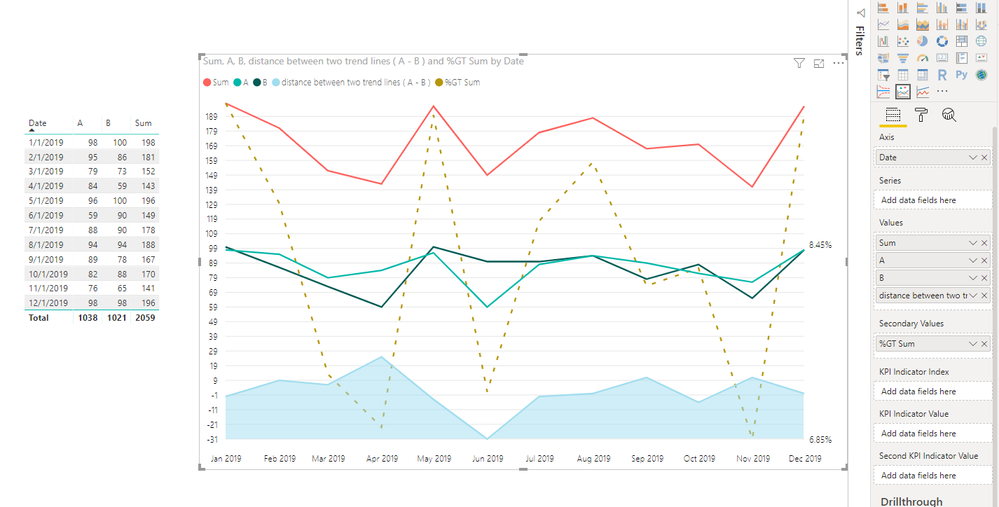
2. For ‘Is it possible to make visual with trends and two different x axis, e.g. X - Sum, X -% and Y - date? ’,

Power BI does not currently support it. You can submit your idea here.

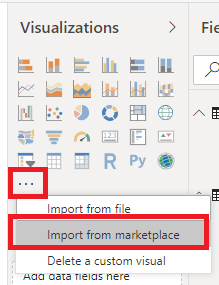
Or you can use 'Power KPI' and can refer to this article. This visual can have two different y axis. You can import it from marketplace.

undefined 4.PNG

undefined 3.PNG

This is my sample file.


Best Regards,

Icey


If this post helps, then please consider Accept it as the solution to help the other members find it more quickly.


Helpful resources

Announcements
Power BI DataViz World Championships

Power BI Dataviz World Championships

The Power BI Data Visualization World Championships is back! Get ahead of the game and start preparing now!

December 2025 Power BI Update Carousel

Power BI Monthly Update - December 2025

Check out the December 2025 Power BI Holiday Recap!

FabCon Atlanta 2026 carousel

FabCon Atlanta 2026

Join us at FabCon Atlanta, March 16-20, for the ultimate Fabric, Power BI, AI and SQL community-led event. Save $200 with code FABCOMM.