FabCon is coming to Atlanta
Join us at FabCon Atlanta from March 16 - 20, 2026, for the ultimate Fabric, Power BI, AI and SQL community-led event. Save $200 with code FABCOMM.
Register now!- Power BI forums
- Get Help with Power BI
- Desktop
- Service
- Report Server
- Power Query
- Mobile Apps
- Developer
- DAX Commands and Tips
- Custom Visuals Development Discussion
- Health and Life Sciences
- Power BI Spanish forums
- Translated Spanish Desktop
- Training and Consulting
- Instructor Led Training
- Dashboard in a Day for Women, by Women
- Galleries
- Data Stories Gallery
- Themes Gallery
- Contests Gallery
- QuickViz Gallery
- Quick Measures Gallery
- Visual Calculations Gallery
- Notebook Gallery
- Translytical Task Flow Gallery
- TMDL Gallery
- R Script Showcase
- Webinars and Video Gallery
- Ideas
- Custom Visuals Ideas (read-only)
- Issues
- Issues
- Events
- Upcoming Events
The Power BI Data Visualization World Championships is back! Get ahead of the game and start preparing now! Learn more
- Power BI forums
- Forums
- Get Help with Power BI
- Desktop
- Re: How to make Rev go is good and Exp go up is ba...
- Subscribe to RSS Feed
- Mark Topic as New
- Mark Topic as Read
- Float this Topic for Current User
- Bookmark
- Subscribe
- Printer Friendly Page


- Mark as New
- Bookmark
- Subscribe
- Mute
- Subscribe to RSS Feed
- Permalink
- Report Inappropriate Content
How to make Rev go is good and Exp go up is bad ?
Hi All
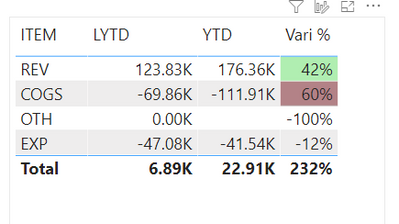
i have Table which display Rev & Exp in one table .
I can make Rev go up display VARI % green
but I cannot make Exp go up display VARI % Red
See image below
https://www.dropbox.com/s/0069e5bwamsh93k/IMG_5663.PNG?dl=0
Paul
Solved! Go to Solution.


- Mark as New
- Bookmark
- Subscribe
- Mute
- Subscribe to RSS Feed
- Permalink
- Report Inappropriate Content
@admin11 I would try creating another measure to use for the conditional formatting:
CF for Table =
if(selectedvalue('Table'[ITEM])="Rev",[Vari NP %],
if(selectedvalue('Table'[ITEM])="COGS",[Vari NP %]*-1,
blank()))
then in the conditional formatting use this one as your range with the diverging option on, making the center 0.
Respectfully,
Zoe Douglas (DataZoe)
Follow me on LinkedIn at https://www.linkedin.com/in/zoedouglas-data
See my reports and blog at https://www.datazoepowerbi.com/


- Mark as New
- Bookmark
- Subscribe
- Mute
- Subscribe to RSS Feed
- Permalink
- Report Inappropriate Content
Hi, @admin11
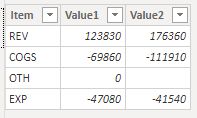
Based on your descritpion, I created data to reproduce your scenario. The pbix file is attached in the end.
Table:
Measure1:
Measure1 = SUM('Table'[Value1])
Measure2:
Measure2 = SUM('Table'[Value2])
Vari %:
Vari % =
DIVIDE(
    [Measure2]-[Measure1],
    [Measure1]
)
You may create a measure as below.
Color Control =
var val =
SWITCH(
    SELECTEDVALUE('Table'[Item]),
    "Rev",[Measure2]-[Measure1],
    "Exp",[Measure1]-[Measure2]
)
return
IF(
    val>0,
    "green",
    IF(
        val<0,
        "red"
    )
)
Then you need to conditionally format 'Vari %' based on 'Color Control'.
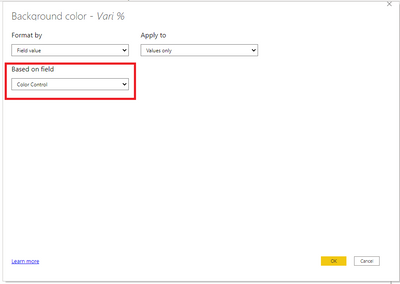
Result:

Best Regards
Allan
If this post helps, then please consider Accept it as the solution to help the other members find it more quickly.
- Mark as New
- Bookmark
- Subscribe
- Mute
- Subscribe to RSS Feed
- Permalink
- Report Inappropriate Content
Hi, @admin11
Based on your descritpion, I created data to reproduce your scenario. The pbix file is attached in the end.
Table:
Measure1:
Measure1 = SUM('Table'[Value1])
Measure2:
Measure2 = SUM('Table'[Value2])
Vari %:
Vari % =
DIVIDE(
    [Measure2]-[Measure1],
    [Measure1]
)
You may create a measure as below.
Color Control =
var val =
SWITCH(
    SELECTEDVALUE('Table'[Item]),
    "Rev",[Measure2]-[Measure1],
    "Exp",[Measure1]-[Measure2]
)
return
IF(
    val>0,
    "green",
    IF(
        val<0,
        "red"
    )
)
Then you need to conditionally format 'Vari %' based on 'Color Control'.
Result:
Best Regards
Allan
If this post helps, then please consider Accept it as the solution to help the other members find it more quickly.
- Mark as New
- Bookmark
- Subscribe
- Mute
- Subscribe to RSS Feed
- Permalink
- Report Inappropriate Content
- Mark as New
- Bookmark
- Subscribe
- Mute
- Subscribe to RSS Feed
- Permalink
- Report Inappropriate Content
@admin11 I would try creating another measure to use for the conditional formatting:
CF for Table =
if(selectedvalue('Table'[ITEM])="Rev",[Vari NP %],
if(selectedvalue('Table'[ITEM])="COGS",[Vari NP %]*-1,
blank()))
then in the conditional formatting use this one as your range with the diverging option on, making the center 0.
Respectfully,
Zoe Douglas (DataZoe)
Follow me on LinkedIn at https://www.linkedin.com/in/zoedouglas-data
See my reports and blog at https://www.datazoepowerbi.com/


- Mark as New
- Bookmark
- Subscribe
- Mute
- Subscribe to RSS Feed
- Permalink
- Report Inappropriate Content
Hi Paul,
Can you link to your PBIX please.
Regards
Phil
Did I answer your question? Then please mark my post as the solution.
If I helped you, click on the Thumbs Up to give Kudos.
Blog :: YouTube Channel :: Connect on Linkedin
Proud to be a Super User!
- Mark as New
- Bookmark
- Subscribe
- Mute
- Subscribe to RSS Feed
- Permalink
- Report Inappropriate Content
Thank you for sharing alway.
Above link is my PBI file
Paul

Helpful resources

Power BI Dataviz World Championships
The Power BI Data Visualization World Championships is back! Get ahead of the game and start preparing now!

Power BI Monthly Update - December 2025
Check out the December 2025 Power BI Holiday Recap!

FabCon Atlanta 2026
Join us at FabCon Atlanta, March 16-20, for the ultimate Fabric, Power BI, AI and SQL community-led event. Save $200 with code FABCOMM.

| User | Count |
|---|---|
| 39 | |
| 39 | |
| 37 | |
| 29 | |
| 24 |


| User | Count |
|---|---|
| 120 | |
| 95 | |
| 70 | |
| 69 | |
| 65 |


