FabCon is coming to Atlanta
Join us at FabCon Atlanta from March 16 - 20, 2026, for the ultimate Fabric, Power BI, AI and SQL community-led event. Save $200 with code FABCOMM.
Register now!- Power BI forums
- Get Help with Power BI
- Desktop
- Service
- Report Server
- Power Query
- Mobile Apps
- Developer
- DAX Commands and Tips
- Custom Visuals Development Discussion
- Health and Life Sciences
- Power BI Spanish forums
- Translated Spanish Desktop
- Training and Consulting
- Instructor Led Training
- Dashboard in a Day for Women, by Women
- Galleries
- Data Stories Gallery
- Themes Gallery
- Contests Gallery
- QuickViz Gallery
- Quick Measures Gallery
- Visual Calculations Gallery
- Notebook Gallery
- Translytical Task Flow Gallery
- TMDL Gallery
- R Script Showcase
- Webinars and Video Gallery
- Ideas
- Custom Visuals Ideas (read-only)
- Issues
- Issues
- Events
- Upcoming Events
View all the Fabric Data Days sessions on demand. View schedule
- Power BI forums
- Forums
- Get Help with Power BI
- Desktop
- How to make Rev go is good and Exp go up is bad ?
- Subscribe to RSS Feed
- Mark Topic as New
- Mark Topic as Read
- Float this Topic for Current User
- Bookmark
- Subscribe
- Printer Friendly Page


- Mark as New
- Bookmark
- Subscribe
- Mute
- Subscribe to RSS Feed
- Permalink
- Report Inappropriate Content
How to make Rev go is good and Exp go up is bad ?
Hi All
i have Table which display Rev & Exp in one table .
I can make Rev go up display VARI % green
but I cannot make Exp go up display VARI % Red
See image below
https://www.dropbox.com/s/0069e5bwamsh93k/IMG_5663.PNG?dl=0
Paul
Solved! Go to Solution.


- Mark as New
- Bookmark
- Subscribe
- Mute
- Subscribe to RSS Feed
- Permalink
- Report Inappropriate Content
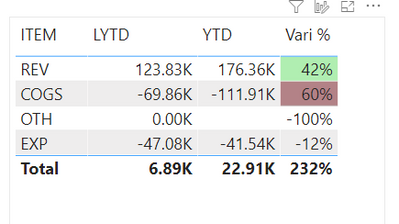
@admin11 I would try creating another measure to use for the conditional formatting:
CF for Table =
if(selectedvalue('Table'[ITEM])="Rev",[Vari NP %],
if(selectedvalue('Table'[ITEM])="COGS",[Vari NP %]*-1,
blank()))
then in the conditional formatting use this one as your range with the diverging option on, making the center 0.
Respectfully,
Zoe Douglas (DataZoe)
Follow me on LinkedIn at https://www.linkedin.com/in/zoedouglas-data
See my reports and blog at https://www.datazoepowerbi.com/


- Mark as New
- Bookmark
- Subscribe
- Mute
- Subscribe to RSS Feed
- Permalink
- Report Inappropriate Content
Hi, @admin11
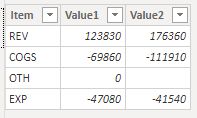
Based on your descritpion, I created data to reproduce your scenario. The pbix file is attached in the end.
Table:
Measure1:
Measure1 = SUM('Table'[Value1])
Measure2:
Measure2 = SUM('Table'[Value2])
Vari %:
Vari % =
DIVIDE(
    [Measure2]-[Measure1],
    [Measure1]
)
You may create a measure as below.
Color Control =
var val =
SWITCH(
    SELECTEDVALUE('Table'[Item]),
    "Rev",[Measure2]-[Measure1],
    "Exp",[Measure1]-[Measure2]
)
return
IF(
    val>0,
    "green",
    IF(
        val<0,
        "red"
    )
)
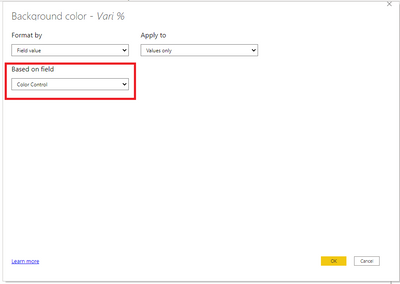
Then you need to conditionally format 'Vari %' based on 'Color Control'.
Result:

Best Regards
Allan
If this post helps, then please consider Accept it as the solution to help the other members find it more quickly.
- Mark as New
- Bookmark
- Subscribe
- Mute
- Subscribe to RSS Feed
- Permalink
- Report Inappropriate Content
Hi, @admin11
Based on your descritpion, I created data to reproduce your scenario. The pbix file is attached in the end.
Table:
Measure1:
Measure1 = SUM('Table'[Value1])
Measure2:
Measure2 = SUM('Table'[Value2])
Vari %:
Vari % =
DIVIDE(
    [Measure2]-[Measure1],
    [Measure1]
)
You may create a measure as below.
Color Control =
var val =
SWITCH(
    SELECTEDVALUE('Table'[Item]),
    "Rev",[Measure2]-[Measure1],
    "Exp",[Measure1]-[Measure2]
)
return
IF(
    val>0,
    "green",
    IF(
        val<0,
        "red"
    )
)
Then you need to conditionally format 'Vari %' based on 'Color Control'.
Result:
Best Regards
Allan
If this post helps, then please consider Accept it as the solution to help the other members find it more quickly.
- Mark as New
- Bookmark
- Subscribe
- Mute
- Subscribe to RSS Feed
- Permalink
- Report Inappropriate Content
- Mark as New
- Bookmark
- Subscribe
- Mute
- Subscribe to RSS Feed
- Permalink
- Report Inappropriate Content
@admin11 I would try creating another measure to use for the conditional formatting:
CF for Table =
if(selectedvalue('Table'[ITEM])="Rev",[Vari NP %],
if(selectedvalue('Table'[ITEM])="COGS",[Vari NP %]*-1,
blank()))
then in the conditional formatting use this one as your range with the diverging option on, making the center 0.
Respectfully,
Zoe Douglas (DataZoe)
Follow me on LinkedIn at https://www.linkedin.com/in/zoedouglas-data
See my reports and blog at https://www.datazoepowerbi.com/


- Mark as New
- Bookmark
- Subscribe
- Mute
- Subscribe to RSS Feed
- Permalink
- Report Inappropriate Content
Hi Paul,
Can you link to your PBIX please.
Regards
Phil
Did I answer your question? Then please mark my post as the solution.
If I helped you, click on the Thumbs Up to give Kudos.
Blog :: YouTube Channel :: Connect on Linkedin
Proud to be a Super User!
- Mark as New
- Bookmark
- Subscribe
- Mute
- Subscribe to RSS Feed
- Permalink
- Report Inappropriate Content
Thank you for sharing alway.
Above link is my PBI file
Paul

Helpful resources

Power BI Monthly Update - November 2025
Check out the November 2025 Power BI update to learn about new features.

Fabric Data Days
Advance your Data & AI career with 50 days of live learning, contests, hands-on challenges, study groups & certifications and more!

FabCon Atlanta 2026
Join us at FabCon Atlanta, March 16-20, for the ultimate Fabric, Power BI, AI and SQL community-led event. Save $200 with code FABCOMM.


