cancel
Showing results for 
Search instead for 
Did you mean: 

Next up in the FabCon + SQLCon recap series: The roadmap for Microsoft SQL and Maximizing Developer experiences in Fabric. All sessions are available on-demand after the live show. Register now

Reply
amybirc77
Helper II
Helper II

How to load data and not the hierarchy

Hi All,

I am importing data from SQL Server table, the date is in the MM/DD/YYYY Format. When I add it to the report it by default is loading as YEAR,qtr,month and day. Is there a way where it can just load as date insted?

Thanks

2 ACCEPTED SOLUTIONS
jgeddes
Super User
Super User

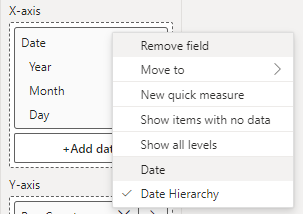
You can change the behaviour of the date field by right clicking on the Date field when in the build pane and select date instead of date hierarchy.

jgeddes_0-1714049797718.png


Did I answer your question? Mark my post as a solution!

Proud to be a Super User!


View solution in original post

Thanks  that fixed it.

View solution in original post

4 REPLIES 4
aniaquen232
New Member

It sounds like your reporting tool is automatically interpreting the date field from your SQL Server table and breaking it down into separate components like year, quarter, month, and day. To load the date as a single unit instead of breaking it down into its hierarchical components, you can follow these steps:

  1. Format Date in SQL Query: When fetching data from your SQL Server table, format the date field to be in a format that the reporting tool recognizes as a single date unit. For example, you can use the SQL CONVERT() function to format the date in a standard format like YYYY-MM-DD.

    SELECT CONVERT(varchar, your_date_column, 23) AS formatted_date FROM your_table;
  2. Adjust Reporting Tool Settings: Check the settings or preferences in your reporting tool to see if there's an option to treat the date field as a single unit instead of breaking it down into components. Look for options related to date formatting, data types, or default behavior when loading date fields.

  3. Explicitly Specify Date Field Type: If your reporting tool allows it, explicitly specify that the field from your SQL query is a date type. This can sometimes override the default behavior of breaking down the date into hierarchical components. Read more

jgeddes
Super User
Super User

You can change the behaviour of the date field by right clicking on the Date field when in the build pane and select date instead of date hierarchy.

jgeddes_0-1714049797718.png


Did I answer your question? Mark my post as a solution!

Proud to be a Super User!


Thanks  that fixed it.

Ok dear

Helpful resources

Announcements
New to Fabric survey Carousel

New to Fabric Survey

If you have recently started exploring Fabric, we'd love to hear how it's going. Your feedback can help with product improvements.

Power BI DataViz World Championships carousel

Power BI DataViz World Championships - June 2026

A new Power BI DataViz World Championship is coming this June! Don't miss out on submitting your entry.

March Power BI Update Carousel

Power BI Community Update - March 2026

Check out the March 2026 Power BI update to learn about new features.