cancel
Showing results for 
Search instead for 
Did you mean: 

July 7 - July 17 | Round 2 of the Power BI Dataviz World Championships. Don't miss your chance! Learn more

Reply
hirdesh19
Frequent Visitor

How to integrate REST API which has dynamic value in URL

I am very new to PowerBI, I want to add REST API like /API/{TicketId}/audit.json  here {Ticketid} should be dynamic and filled from another API  /API/Ticket.json

is this type of integration possible in Power BI, if yes please let guide me on this

1 ACCEPTED SOLUTION
Eric_Zhang
Microsoft Employee
Microsoft Employee

@hirdesh19

You could try to add a custom column to call the REST API with the TicketId. See a demo with Facebook APIs. However such kind of dataset is not supporting data refresh in Power BI Service.
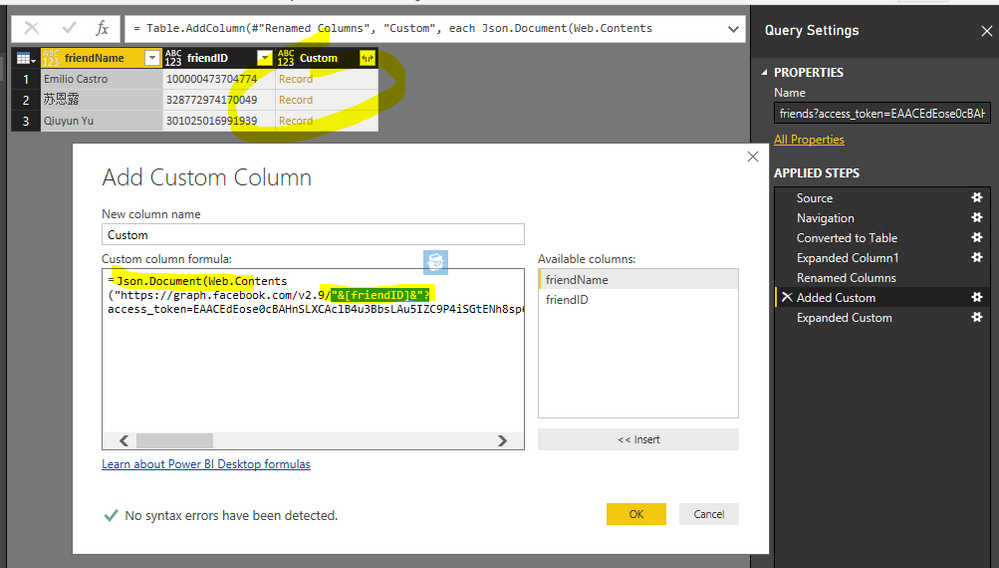
 

Capture.PNG

let
    Source = Json.Document(Web.Contents("https://graph.facebook.com/v2.9/me/friends?access_token=EAACEdEose0cBAHnSLXCAclB4u3BbsLAu5IZC9P4iSGtENh8sp6cXMxLKsxVlsqyAxT2ornkzd4w0zoQKZCXJYA2PbJ1lxEl9v1TUNYgx7j6pfn8nC1HT6cZBi8vZAVJil2jJx8NZBUdAvw6YZCl2mec3AEvQRnFV1zdTvryMOobBmgs0pYVJ4l1U0YFWHoNeEZD&debug=all&format=json&method=get&pretty=0&suppress")),
    data = Source[data],
    #"Converted to Table" = Table.FromList(data, Splitter.SplitByNothing(), null, null, ExtraValues.Error),
    #"Expanded Column1" = Table.ExpandRecordColumn(#"Converted to Table", "Column1", {"name", "id"}, {"Column1.name", "Column1.id"}),
    #"Renamed Columns" = Table.RenameColumns(#"Expanded Column1",{{"Column1.name", "friendName"}, {"Column1.id", "friendID"}}),
    #"Added Custom" = Table.AddColumn(#"Renamed Columns", "Custom", each Json.Document(Web.Contents("https://graph.facebook.com/v2.9/"&[friendID]&"?access_token=EAACEdEose0cBAHnSLXCAclB4u3BbsLAu5IZC9P4iSGtENh8sp6cXMxLKsxVlsqyAxT2ornkzd4w0zoQKZCXJYA2PbJ1lxEl9v1TUNYgx7j6pfn8nC1HT6cZBi8vZAVJil2jJx8NZBUdAvw6YZCl2mec3AEvQRnFV1zdTvryMOobBmgs0pYVJ4l1U0YFWHoNeEZD&debug=all&fields=about&format=json&method=get&pretty=0&suppress_http_code=1"))),
    #"Expanded Custom" = Table.ExpandRecordColumn(#"Added Custom", "Custom", {"about"}, {"Custom.about"})
in
    #"Expanded Custom"


By the way, for me, when interact with complex REST APIs, I'd create an external console application to call whatever API needed and save the data in some file and database. The file and database can be refreshed by scheduling the external app running in a certain interval. Then things can be very easy when connecting from Power BI to a file or database.


View solution in original post

3 REPLIES 3
Eric_Zhang
Microsoft Employee
Microsoft Employee

@hirdesh19

You could try to add a custom column to call the REST API with the TicketId. See a demo with Facebook APIs. However such kind of dataset is not supporting data refresh in Power BI Service.


Capture.PNG

let
    Source = Json.Document(Web.Contents("https://graph.facebook.com/v2.9/me/friends?access_token=EAACEdEose0cBAHnSLXCAclB4u3BbsLAu5IZC9P4iSGtENh8sp6cXMxLKsxVlsqyAxT2ornkzd4w0zoQKZCXJYA2PbJ1lxEl9v1TUNYgx7j6pfn8nC1HT6cZBi8vZAVJil2jJx8NZBUdAvw6YZCl2mec3AEvQRnFV1zdTvryMOobBmgs0pYVJ4l1U0YFWHoNeEZD&debug=all&format=json&method=get&pretty=0&suppress")),
    data = Source[data],
    #"Converted to Table" = Table.FromList(data, Splitter.SplitByNothing(), null, null, ExtraValues.Error),
    #"Expanded Column1" = Table.ExpandRecordColumn(#"Converted to Table", "Column1", {"name", "id"}, {"Column1.name", "Column1.id"}),
    #"Renamed Columns" = Table.RenameColumns(#"Expanded Column1",{{"Column1.name", "friendName"}, {"Column1.id", "friendID"}}),
    #"Added Custom" = Table.AddColumn(#"Renamed Columns", "Custom", each Json.Document(Web.Contents("https://graph.facebook.com/v2.9/"&[friendID]&"?access_token=EAACEdEose0cBAHnSLXCAclB4u3BbsLAu5IZC9P4iSGtENh8sp6cXMxLKsxVlsqyAxT2ornkzd4w0zoQKZCXJYA2PbJ1lxEl9v1TUNYgx7j6pfn8nC1HT6cZBi8vZAVJil2jJx8NZBUdAvw6YZCl2mec3AEvQRnFV1zdTvryMOobBmgs0pYVJ4l1U0YFWHoNeEZD&debug=all&fields=about&format=json&method=get&pretty=0&suppress_http_code=1"))),
    #"Expanded Custom" = Table.ExpandRecordColumn(#"Added Custom", "Custom", {"about"}, {"Custom.about"})
in
    #"Expanded Custom"


By the way, for me, when interact with complex REST APIs, I'd create an external console application to call whatever API needed and save the data in some file and database. The file and database can be refreshed by scheduling the external app running in a certain interval. Then things can be very easy when connecting from Power BI to a file or database.


Anonymous
Not applicable

Hi @Eric_Zhang ,

Really thanks for your helpful reply. But I have a question what does it mean by not support data refresh in Power BI Service? It won't get new data when we refresh the report or what?

Hope to get explain from you,

Thank you.

Thanks,  Eric  This work for me.

Helpful resources

Announcements
FabCon and SQLCon Barcelona 2026

FabCon & SQLCon – Barcelona 2026

Join us in Barcelona for FabCon and SQLCon, the Fabric, Power BI, SQL, and AI community event. Save €200 with code FABCMTY200.

60 days of Data Days Carousel

Data Days 2026

Join Data Days 2026: 60 days of free live/on-demand sessions, challenges, study groups, and certification opportunities.

Power BI DataViz World Championships carousel

Power BI DataViz World Championships - June 2026

A new Power BI DataViz World Championship is coming this June! Don't miss out on submitting your entry.

Top Solution Authors