Join us at FabCon Atlanta from March 16 - 20, 2026, for the ultimate Fabric, Power BI, AI and SQL community-led event. Save $200 with code FABCOMM.
Register now!The Power BI Data Visualization World Championships is back! Get ahead of the game and start preparing now! Learn more
I need to add values like this :
Col1 | Col2 | Col3
----------------------
A B C
D E F
G H I
Please help me how to add values into table in PowerBI
Solved! Go to Solution.
Hi @NPR ,
I created a sample as your required:
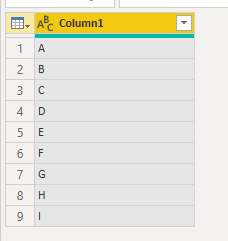
Then add below M code:
let
Source = Table.FromRows(Json.Document(Binary.Decompress(Binary.FromText("i45WclSK1YlWcgKTzmDSBUy6gkk3MOkOJj3ApKdSbCwA", BinaryEncoding.Base64), Compression.Deflate)), let _t = ((type text) meta [Serialized.Text = true]) in type table [Column1 = _t]),
#"Changed Type" = Table.TransformColumnTypes(Source,{{"Column1", type text}}),
#"Added Index" = Table.AddIndexColumn(#"Changed Type", "Index", 1, 1),
#"Divided Column" = Table.TransformColumns(#"Added Index", {{"Index", each Number.RoundUp( _ / 3), type number}}),
#"Added Index1" = Table.AddIndexColumn(#"Divided Column", "Index.1", 1, 1),
#"Divided Column1" = Table.TransformColumns(#"Added Index1", {{"Index.1", each Number.Mod (_ , 3), type number}}),
#"Pivoted Column" = Table.Pivot(Table.TransformColumnTypes(#"Divided Column1", {{"Index", type text}}, "en-US"), List.Distinct(Table.TransformColumnTypes(#"Divided Column1", {{"Index", type text}}, "en-US")[Index]), "Index", "Column1"),
#"Removed Columns" = Table.RemoveColumns(#"Pivoted Column",{"Index.1"})
in
#"Removed Columns"
get the result:
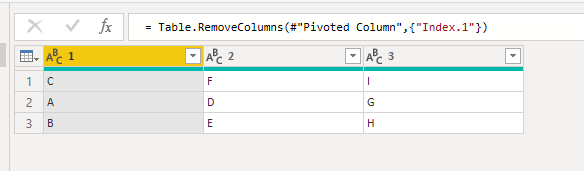
Then you can rename the column.
@NPR You mean, how to enter this data into table in Power BI ? If yes, then use "Enter Data" option
Proud to be a PBI Community Champion
No, i need to enter data into table horizortally. But (A,B,C,D.........) These items are in one column. Usually we can not add like this. That's why i am trying to add....!
Col1 | Col2 | Col3
-------------------
A B C
D E F
G H I
Not like this
Col1 | Col2 | Col3
-------------------
A
B
C
D
E
F
Hi @NPR ,
I created a sample as your required:
Then add below M code:
let
Source = Table.FromRows(Json.Document(Binary.Decompress(Binary.FromText("i45WclSK1YlWcgKTzmDSBUy6gkk3MOkOJj3ApKdSbCwA", BinaryEncoding.Base64), Compression.Deflate)), let _t = ((type text) meta [Serialized.Text = true]) in type table [Column1 = _t]),
#"Changed Type" = Table.TransformColumnTypes(Source,{{"Column1", type text}}),
#"Added Index" = Table.AddIndexColumn(#"Changed Type", "Index", 1, 1),
#"Divided Column" = Table.TransformColumns(#"Added Index", {{"Index", each Number.RoundUp( _ / 3), type number}}),
#"Added Index1" = Table.AddIndexColumn(#"Divided Column", "Index.1", 1, 1),
#"Divided Column1" = Table.TransformColumns(#"Added Index1", {{"Index.1", each Number.Mod (_ , 3), type number}}),
#"Pivoted Column" = Table.Pivot(Table.TransformColumnTypes(#"Divided Column1", {{"Index", type text}}, "en-US"), List.Distinct(Table.TransformColumnTypes(#"Divided Column1", {{"Index", type text}}, "en-US")[Index]), "Index", "Column1"),
#"Removed Columns" = Table.RemoveColumns(#"Pivoted Column",{"Index.1"})
in
#"Removed Columns"
get the result:
Then you can rename the column.
@NPR You need to click on the asterisk symbol to create a new column
Proud to be a PBI Community Champion
The Power BI Data Visualization World Championships is back! Get ahead of the game and start preparing now!
Check out the November 2025 Power BI update to learn about new features.
| User | Count |
|---|---|
| 65 | |
| 46 | |
| 43 | |
| 26 | |
| 19 |
| User | Count |
|---|---|
| 198 | |
| 125 | |
| 102 | |
| 69 | |
| 53 |