Join us at FabCon Atlanta from March 16 - 20, 2026, for the ultimate Fabric, Power BI, AI and SQL community-led event. Save $200 with code FABCOMM.
Register now!The Power BI Data Visualization World Championships is back! Get ahead of the game and start preparing now! Learn more
Hi there,
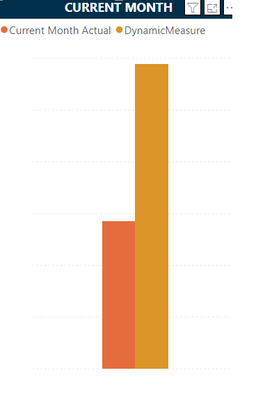
I have created a dynamic measure that will give me results based on the slicer selected. The measure is working as suspected, but I would like the legend to also change based on what is selected on the slicer
Formula
DynamicMeasure =
SWITCH(
SELECTEDVALUE('vCorporateGandA'[LedgerType]),
"Actual", [Current Month Actual],
"Budget", [Current Month Budget],
BLANK()
)
Chart:
The slicer is on "Budget" so I would like the yellow bar to show "Budget" instead of "DynamicMeasure"
Hi @brittanyruffin ,
It is not possible to add a measure as bar chat legend, as measure actually returns a single value.
Best Regards,
Adamk Kong
If this post helps, then please consider Accept it as the solution to help the other members find it more quickly.
try using field parameters .
https://www.youtube.com/watch?v=-nqEv2YXLsUe
If my answer helped sort things out for you, i would appreciate a thumbs up 👍 and mark it as the solution ✅!
It makes a difference and might help someone else too. Thanks for spreading the good vibes! 🤠
I will have 3 different charts that need to filter at the same time. I have 2 other charts for QTD and YTD. The field parameters didn't work for me
Check out the November 2025 Power BI update to learn about new features.
Advance your Data & AI career with 50 days of live learning, contests, hands-on challenges, study groups & certifications and more!
| User | Count |
|---|---|
| 57 | |
| 44 | |
| 42 | |
| 20 | |
| 18 |