cancel
Showing results for 
Search instead for 
Did you mean: 

The Power BI Data Visualization World Championships is back! Get ahead of the game and start preparing now! Learn more

Reply
Davis-CMC
Regular Visitor

Loading Issue - Stuck on sample file

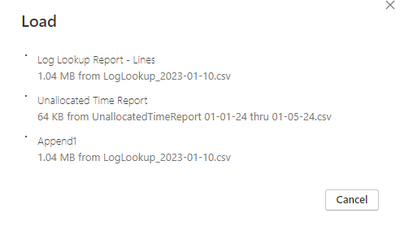
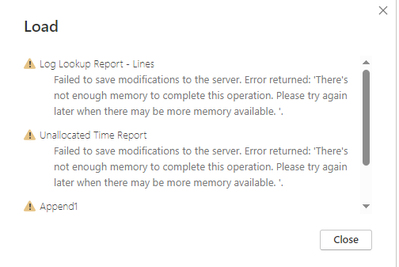
I am loading 4 queries, 2 are querying local folders, 1 is a copied query with some different filters and 1 is an 'append as new' query. When loading to the model, the loading of the data gets stuck on the .csv that is the sample file (shown below as LogLookup_2023-01-10.csv). After some time, it generates a memory error (also shown below). The total data size is roughly 300-400MB.


Any ideas what could be causing this?

DavisCMC_1-1706559092655.png


DavisCMC_0-1706558831238.png


2 REPLIES 2
Anonymous
Not applicable

Hi @Davis-CMC ,

Please have a try.

  • Review and optimize your Power Query steps to ensure they are as efficient as possible. Remove any unnecessary transformations and consider simplifying complex ones.
  • Try splitting the data load process. Instead of appending all at once, append in smaller chunks to see if that helps avoid the memory issue.
  •  Instead of refreshing all queries at once, try refreshing them one by one to isolate the problem and to prevent memory overflow.
  •  Ensure that you are using the latest version of Power BI Desktop, as updates often include performance improvements and bug fixes.

Solved: insufficient memory to complete this operation - Microsoft Fabric Community

Solved: There is not enough memory to complete this operat... - Microsoft Fabric Community


How to Get Your Question Answered Quickly 


If it does not help, please provide more details with your desired output and pbix file without privacy information (or some sample data) .


Best Regards
Community Support Team _ Rongtie

If this post helps, then please consider Accept it as the solution to help the other members find it more quickly.


lbendlin
Super User
Super User

Try to avoid using the sample file as it will load twice.


Show your code, or  provide sample data that covers your issue or question completely, in a usable format (not as a screenshot).

Do not include sensitive information or anything not related to the issue or question.

If you are unsure how to upload data please refer to https://community.fabric.microsoft.com/t5/Community-Blog/How-to-provide-sample-data-in-the-Power-BI-...

Please show the expected outcome based on the sample data you provided.

Want faster answers? https://community.fabric.microsoft.com/t5/Desktop/How-to-Get-Your-Question-Answered-Quickly/m-p/1447...

Helpful resources

Announcements
Power BI DataViz World Championships

Power BI Dataviz World Championships

The Power BI Data Visualization World Championships is back! Get ahead of the game and start preparing now!

December 2025 Power BI Update Carousel

Power BI Monthly Update - December 2025

Check out the December 2025 Power BI Holiday Recap!

FabCon Atlanta 2026 carousel

FabCon Atlanta 2026

Join us at FabCon Atlanta, March 16-20, for the ultimate Fabric, Power BI, AI and SQL community-led event. Save $200 with code FABCOMM.