Join us at FabCon Atlanta from March 16 - 20, 2026, for the ultimate Fabric, Power BI, AI and SQL community-led event. Save $200 with code FABCOMM.
Register now!The Power BI Data Visualization World Championships is back! Get ahead of the game and start preparing now! Learn more
Hi Team,
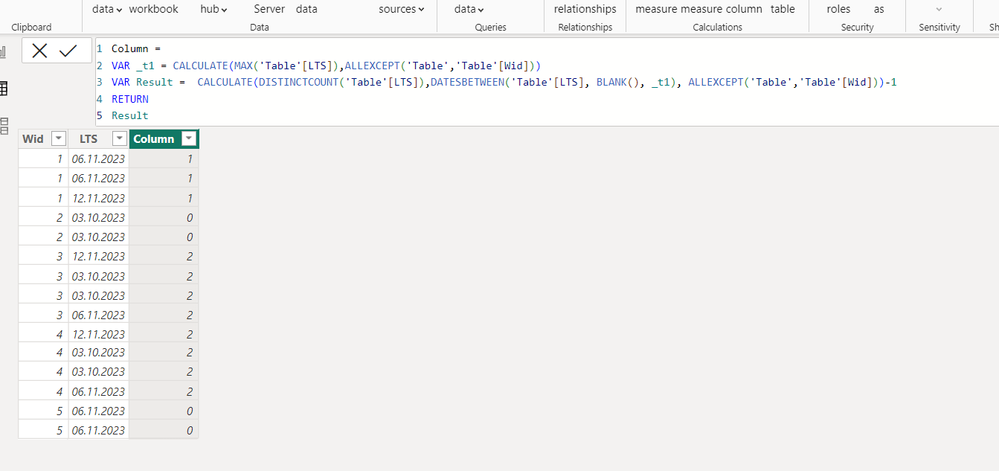
I want to get Target date change count in calculated column. how to create formula for that.
| Wid | LTS | lts change count |
| 1 | 6/11/2023 | 1 |
| 1 | 6/11/2023 | 1 |
| 1 | 12/11/2023 | 1 |
| 2 | 3/10/2023 | 0 |
| 2 | 3/10/2023 | 0 |
| 3 | 12/11/2023 | 2 |
| 3 | 3/10/2023 | 2 |
| 3 | 3/10/2023 | 2 |
| 3 | 6/11/2023 | 2 |
| 4 | 12/11/2023 | 2 |
| 4 | 3/10/2023 | 2 |
| 4 | 3/10/2023 | 2 |
| 4 | 6/11/2023 | 2 |
| 5 | 6/11/2023 | 0 |
| 5 | 6/11/2023 | 0 |
Solved! Go to Solution.
Hi v-tianyich-msft,
I have found solution using excel formula like below. but i'm unable to get in dax power. my solution for this problem in excel as per below.
Below last 2 column is my solution & formulas for this column like below
| lst change (0=False,1=True) | No. of time lts change |
| =IF(AND(X39<>X38,W39=W38),1,0) | =SUMIFS($Y$39:$Y$53,$W$39:$W$53,W39) |
| =IF(AND(X40<>X39,W40=W39),1,0) | =SUMIFS($Y$39:$Y$53,$W$39:$W$53,W40) |
| =IF(AND(X41<>X40,W41=W40),1,0) | =SUMIFS($Y$39:$Y$53,$W$39:$W$53,W41) |
| =IF(AND(X42<>X41,W42=W41),1,0) | =SUMIFS($Y$39:$Y$53,$W$39:$W$53,W42) |
| =IF(AND(X43<>X42,W43=W42),1,0) | =SUMIFS($Y$39:$Y$53,$W$39:$W$53,W43) |
| =IF(AND(X44<>X43,W44=W43),1,0) | =SUMIFS($Y$39:$Y$53,$W$39:$W$53,W44) |
| =IF(AND(X45<>X44,W45=W44),1,0) | =SUMIFS($Y$39:$Y$53,$W$39:$W$53,W45) |
| =IF(AND(X46<>X45,W46=W45),1,0) | =SUMIFS($Y$39:$Y$53,$W$39:$W$53,W46) |
| =IF(AND(X47<>X46,W47=W46),1,0) | =SUMIFS($Y$39:$Y$53,$W$39:$W$53,W47) |
| =IF(AND(X48<>X47,W48=W47),1,0) | =SUMIFS($Y$39:$Y$53,$W$39:$W$53,W48) |
| =IF(AND(X49<>X48,W49=W48),1,0) | =SUMIFS($Y$39:$Y$53,$W$39:$W$53,W49) |
| =IF(AND(X50<>X49,W50=W49),1,0) | =SUMIFS($Y$39:$Y$53,$W$39:$W$53,W50) |
| =IF(AND(X51<>X50,W51=W50),1,0) | =SUMIFS($Y$39:$Y$53,$W$39:$W$53,W51) |
| =IF(AND(X52<>X51,W52=W51),1,0) | =SUMIFS($Y$39:$Y$53,$W$39:$W$53,W52) |
| =IF(AND(X53<>X52,W53=W52),1,0) | =SUMIFS($Y$39:$Y$53,$W$39:$W$53,W53) |
| Wid | LTS | lst change (0=False,1=True) | No. of time lts change |
| 1 | 6/11/2023 | 0 | 1 |
| 1 | 6/11/2023 | 0 | 1 |
| 1 | 12/11/2023 | 1 | 1 |
| 2 | 3/10/2023 | 0 | 0 |
| 2 | 3/10/2023 | 0 | 0 |
| 3 | 12/11/2023 | 0 | 2 |
| 3 | 3/10/2023 | 1 | 2 |
| 3 | 3/10/2023 | 0 | 2 |
| 3 | 6/11/2023 | 1 | 2 |
| 4 | 12/11/2023 | 0 | 2 |
| 4 | 3/10/2023 | 1 | 2 |
| 4 | 3/10/2023 | 0 | 2 |
| 4 | 6/11/2023 | 1 | 2 |
| 5 | 6/11/2023 | 0 | 0 |
| 5 | 6/11/2023 | 0 | 0 |
Hi @Anonymous ,
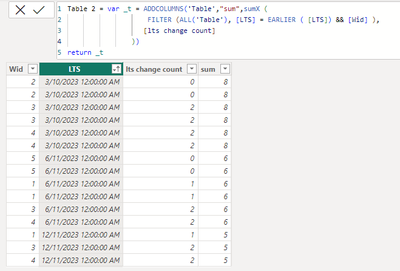
Based on your description, I'm wondering you're trying to total the number of modifications by LTS, and you can check the results as follows:
Try these expression:
Measure = var _t = ADDCOLUMNS('Table',"sum",sumX (
FILTER (ALL('Table'), [LTS] = EARLIER ( [LTS]) ),
[lts change count]
))
return MAXX(_t,[sum])
Table 2 = var _t = ADDCOLUMNS('Table',"sum",sumX (
FILTER (ALL('Table'), [LTS] = EARLIER ( [LTS])),
[lts change count]
))
return _t
Please feel free to correct me and provide more information if I have misunderstood you!
An attachment for your reference. Hope it helps!
Best regards,
Community Support Team_ Scott Chang
If this post helps then please consider Accept it as the solution to help the other members find it more quickly.
Hi v-tianyich-msft,
Thanks for your reply! actually i want lts change count not its sum. because i have wid & lts date. i want to know how many times lts date change for particular id.
E.g. if i want to count in another column. how much time lts changed for wid 1. it should show 1 because first we set lts date 06th Nove but we change it to 12th Nov. so we change 1 time . so i want 1 in next column
| Wid | LTS |
| 1 | 6/11/2023 |
| 1 | 6/11/2023 |
| 1 | 12/11/2023 |
| 2 | 3/10/2023 |
| 2 | 3/10/2023 |
| 3 | 12/11/2023 |
| 3 | 3/10/2023 |
| 3 | 3/10/2023 |
| 3 | 6/11/2023 |
| 4 | 12/11/2023 |
| 4 | 3/10/2023 |
| 4 | 3/10/2023 |
| 4 | 6/11/2023 |
| 5 | 6/11/2023 |
| 5 | 6/11/2023 |
The Power BI Data Visualization World Championships is back! Get ahead of the game and start preparing now!
Check out the November 2025 Power BI update to learn about new features.
| User | Count |
|---|---|
| 59 | |
| 43 | |
| 42 | |
| 23 | |
| 17 |
| User | Count |
|---|---|
| 190 | |
| 122 | |
| 96 | |
| 66 | |
| 47 |