Don't miss your chance to take exam DP-600 or DP-700 on us!
Request nowLearn from the best! Meet the four finalists headed to the FINALS of the Power BI Dataviz World Championships! Register now
Hi Team,
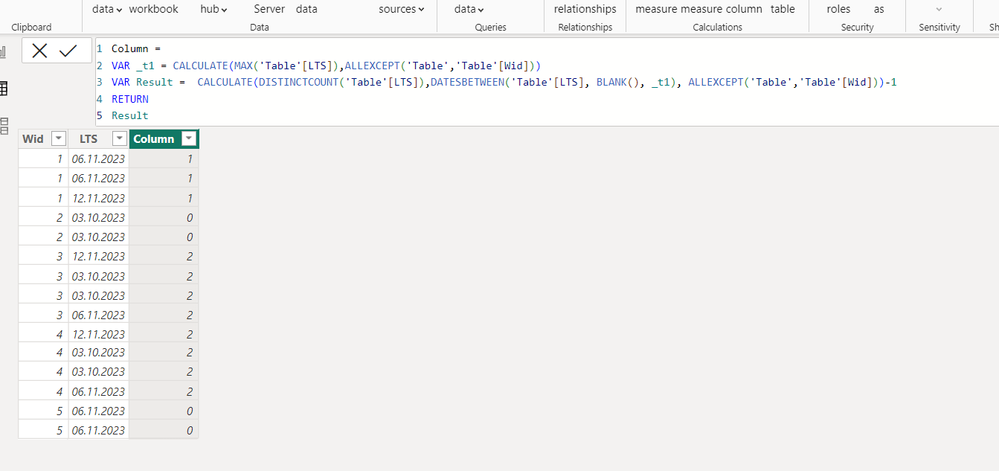
I want to get Target date change count in calculated column. how to create formula for that.
| Wid | LTS | lts change count |
| 1 | 6/11/2023 | 1 |
| 1 | 6/11/2023 | 1 |
| 1 | 12/11/2023 | 1 |
| 2 | 3/10/2023 | 0 |
| 2 | 3/10/2023 | 0 |
| 3 | 12/11/2023 | 2 |
| 3 | 3/10/2023 | 2 |
| 3 | 3/10/2023 | 2 |
| 3 | 6/11/2023 | 2 |
| 4 | 12/11/2023 | 2 |
| 4 | 3/10/2023 | 2 |
| 4 | 3/10/2023 | 2 |
| 4 | 6/11/2023 | 2 |
| 5 | 6/11/2023 | 0 |
| 5 | 6/11/2023 | 0 |
Solved! Go to Solution.
Hi v-tianyich-msft,
I have found solution using excel formula like below. but i'm unable to get in dax power. my solution for this problem in excel as per below.
Below last 2 column is my solution & formulas for this column like below
| lst change (0=False,1=True) | No. of time lts change |
| =IF(AND(X39<>X38,W39=W38),1,0) | =SUMIFS($Y$39:$Y$53,$W$39:$W$53,W39) |
| =IF(AND(X40<>X39,W40=W39),1,0) | =SUMIFS($Y$39:$Y$53,$W$39:$W$53,W40) |
| =IF(AND(X41<>X40,W41=W40),1,0) | =SUMIFS($Y$39:$Y$53,$W$39:$W$53,W41) |
| =IF(AND(X42<>X41,W42=W41),1,0) | =SUMIFS($Y$39:$Y$53,$W$39:$W$53,W42) |
| =IF(AND(X43<>X42,W43=W42),1,0) | =SUMIFS($Y$39:$Y$53,$W$39:$W$53,W43) |
| =IF(AND(X44<>X43,W44=W43),1,0) | =SUMIFS($Y$39:$Y$53,$W$39:$W$53,W44) |
| =IF(AND(X45<>X44,W45=W44),1,0) | =SUMIFS($Y$39:$Y$53,$W$39:$W$53,W45) |
| =IF(AND(X46<>X45,W46=W45),1,0) | =SUMIFS($Y$39:$Y$53,$W$39:$W$53,W46) |
| =IF(AND(X47<>X46,W47=W46),1,0) | =SUMIFS($Y$39:$Y$53,$W$39:$W$53,W47) |
| =IF(AND(X48<>X47,W48=W47),1,0) | =SUMIFS($Y$39:$Y$53,$W$39:$W$53,W48) |
| =IF(AND(X49<>X48,W49=W48),1,0) | =SUMIFS($Y$39:$Y$53,$W$39:$W$53,W49) |
| =IF(AND(X50<>X49,W50=W49),1,0) | =SUMIFS($Y$39:$Y$53,$W$39:$W$53,W50) |
| =IF(AND(X51<>X50,W51=W50),1,0) | =SUMIFS($Y$39:$Y$53,$W$39:$W$53,W51) |
| =IF(AND(X52<>X51,W52=W51),1,0) | =SUMIFS($Y$39:$Y$53,$W$39:$W$53,W52) |
| =IF(AND(X53<>X52,W53=W52),1,0) | =SUMIFS($Y$39:$Y$53,$W$39:$W$53,W53) |
| Wid | LTS | lst change (0=False,1=True) | No. of time lts change |
| 1 | 6/11/2023 | 0 | 1 |
| 1 | 6/11/2023 | 0 | 1 |
| 1 | 12/11/2023 | 1 | 1 |
| 2 | 3/10/2023 | 0 | 0 |
| 2 | 3/10/2023 | 0 | 0 |
| 3 | 12/11/2023 | 0 | 2 |
| 3 | 3/10/2023 | 1 | 2 |
| 3 | 3/10/2023 | 0 | 2 |
| 3 | 6/11/2023 | 1 | 2 |
| 4 | 12/11/2023 | 0 | 2 |
| 4 | 3/10/2023 | 1 | 2 |
| 4 | 3/10/2023 | 0 | 2 |
| 4 | 6/11/2023 | 1 | 2 |
| 5 | 6/11/2023 | 0 | 0 |
| 5 | 6/11/2023 | 0 | 0 |
Hi @Anonymous ,
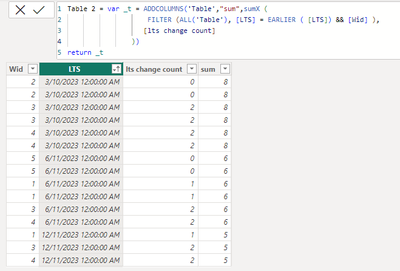
Based on your description, I'm wondering you're trying to total the number of modifications by LTS, and you can check the results as follows:
Try these expression:
Measure = var _t = ADDCOLUMNS('Table',"sum",sumX (
FILTER (ALL('Table'), [LTS] = EARLIER ( [LTS]) ),
[lts change count]
))
return MAXX(_t,[sum])
Table 2 = var _t = ADDCOLUMNS('Table',"sum",sumX (
FILTER (ALL('Table'), [LTS] = EARLIER ( [LTS])),
[lts change count]
))
return _t
Please feel free to correct me and provide more information if I have misunderstood you!
An attachment for your reference. Hope it helps!
Best regards,
Community Support Team_ Scott Chang
If this post helps then please consider Accept it as the solution to help the other members find it more quickly.
Hi v-tianyich-msft,
Thanks for your reply! actually i want lts change count not its sum. because i have wid & lts date. i want to know how many times lts date change for particular id.
E.g. if i want to count in another column. how much time lts changed for wid 1. it should show 1 because first we set lts date 06th Nove but we change it to 12th Nov. so we change 1 time . so i want 1 in next column
| Wid | LTS |
| 1 | 6/11/2023 |
| 1 | 6/11/2023 |
| 1 | 12/11/2023 |
| 2 | 3/10/2023 |
| 2 | 3/10/2023 |
| 3 | 12/11/2023 |
| 3 | 3/10/2023 |
| 3 | 3/10/2023 |
| 3 | 6/11/2023 |
| 4 | 12/11/2023 |
| 4 | 3/10/2023 |
| 4 | 3/10/2023 |
| 4 | 6/11/2023 |
| 5 | 6/11/2023 |
| 5 | 6/11/2023 |
Share feedback directly with Fabric product managers, participate in targeted research studies and influence the Fabric roadmap.
Check out the February 2026 Power BI update to learn about new features.
| User | Count |
|---|---|
| 50 | |
| 40 | |
| 37 | |
| 14 | |
| 14 |
| User | Count |
|---|---|
| 85 | |
| 69 | |
| 37 | |
| 29 | |
| 27 |