FabCon is coming to Atlanta
Join us at FabCon Atlanta from March 16 - 20, 2026, for the ultimate Fabric, Power BI, AI and SQL community-led event. Save $200 with code FABCOMM.
Register now!- Power BI forums
- Get Help with Power BI
- Desktop
- Service
- Report Server
- Power Query
- Mobile Apps
- Developer
- DAX Commands and Tips
- Custom Visuals Development Discussion
- Health and Life Sciences
- Power BI Spanish forums
- Translated Spanish Desktop
- Training and Consulting
- Instructor Led Training
- Dashboard in a Day for Women, by Women
- Galleries
- Data Stories Gallery
- Themes Gallery
- Contests Gallery
- QuickViz Gallery
- Quick Measures Gallery
- Visual Calculations Gallery
- Notebook Gallery
- Translytical Task Flow Gallery
- TMDL Gallery
- R Script Showcase
- Webinars and Video Gallery
- Ideas
- Custom Visuals Ideas (read-only)
- Issues
- Issues
- Events
- Upcoming Events
View all the Fabric Data Days sessions on demand. View schedule
- Power BI forums
- Forums
- Get Help with Power BI
- Desktop
- Re: How to find share of the specific country for ...
- Subscribe to RSS Feed
- Mark Topic as New
- Mark Topic as Read
- Float this Topic for Current User
- Bookmark
- Subscribe
- Printer Friendly Page

- Mark as New
- Bookmark
- Subscribe
- Mute
- Subscribe to RSS Feed
- Permalink
- Report Inappropriate Content
How to find share of the specific country for a specific products from overall value?
Dear all,
I am analyzing the import/export trade of the countries and I would like to get a share of the country partner for a specific product.
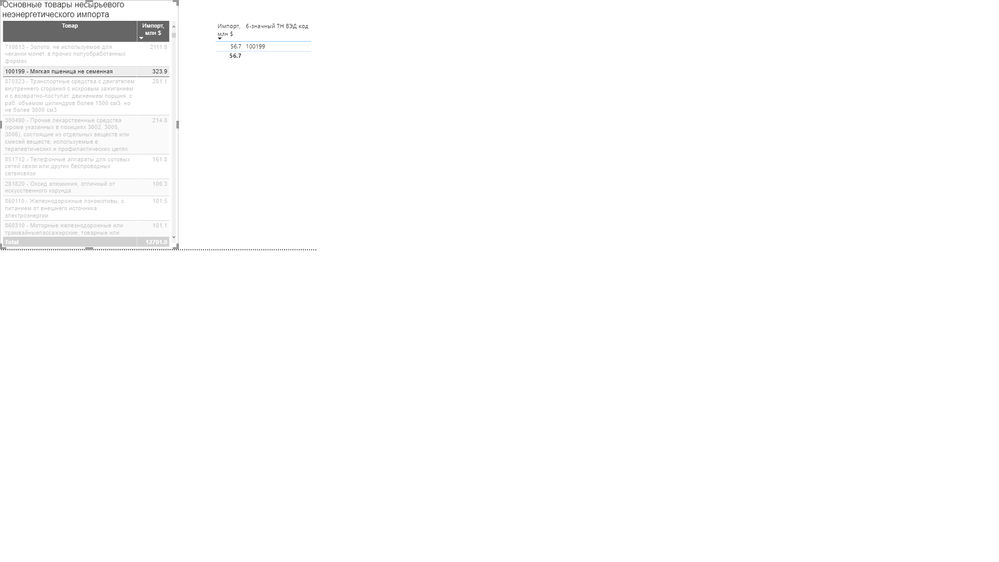
For example, in the figure below for the product 100199, the total was 323.9 $ in 2019, and 56.7 $ came from my country. In addition to this value, I would like to get a percentage. In this example, the share is 17.5%. So I want to see 56.7$ and 17.5% together in one visual. How can I get this percentage value? So my inputs are: Product, Import Value, Reporter Country(imported country), and Partner country(is equal to my country).
Solved! Go to Solution.


- Mark as New
- Bookmark
- Subscribe
- Mute
- Subscribe to RSS Feed
- Permalink
- Report Inappropriate Content
Hi @Anonymous ,
You may create measure like DAX below.
Percentage =
DIVIDE (
    CALCULATE (
        SUM ( Table1[Import Value] ),
        FILTER (
            ALLSELECTED ( Table1 ),
            Table1[Reporter Country] = MAX ( Table1[Reporter Country] )
                && Table1[Product] = MAX ( Table1[Product] )
        )
    ),
    CALCULATE (
        SUM ( Table1[Import Value] ),
        FILTER (
            ALLSELECTED ( Table1 ),
            Table1[Reporter Country] = MAX ( Table1[Reporter Country] )
        )
    )
)
Best Regards,
Amy
Community Support Team _ Amy
If this post helps, then please consider Accept it as the solution to help the other members find it more quickly.


- Mark as New
- Bookmark
- Subscribe
- Mute
- Subscribe to RSS Feed
- Permalink
- Report Inappropriate Content
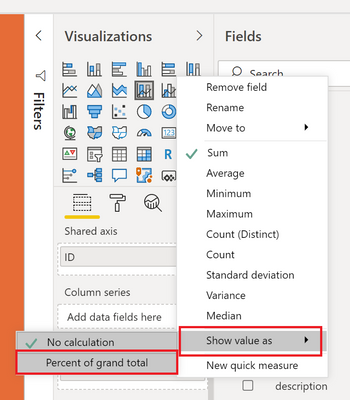
@Anonymous - Add your measure/column to your table/matrix again. In the Visualizations area, click the drop down arrow for the field and choose Show As | Percent of Grand Total
Follow on LinkedIn
@ me in replies or I'll lose your thread!!!
Instead of a Kudo, please vote for this idea
Become an expert!: Enterprise DNA
External Tools: MSHGQM
YouTube Channel!: Microsoft Hates Greg
Latest book!: DAX For Humans
DAX is easy, CALCULATE makes DAX hard...
- Mark as New
- Bookmark
- Subscribe
- Mute
- Subscribe to RSS Feed
- Permalink
- Report Inappropriate Content
Thx for reply, but this method is showing total as 100%. I am sure that there should be a measure to calculate @Greg_Deckler
- Mark as New
- Bookmark
- Subscribe
- Mute
- Subscribe to RSS Feed
- Permalink
- Report Inappropriate Content
@Anonymous - Probably need to better understand your source data. Please post text sample. Percentages are covered in recipe 7 of chapter 4 of DAX Cookbook here: https://github.com/gdeckler/DAXCookbook
Follow on LinkedIn
@ me in replies or I'll lose your thread!!!
Instead of a Kudo, please vote for this idea
Become an expert!: Enterprise DNA
External Tools: MSHGQM
YouTube Channel!: Microsoft Hates Greg
Latest book!: DAX For Humans
DAX is easy, CALCULATE makes DAX hard...


- Mark as New
- Bookmark
- Subscribe
- Mute
- Subscribe to RSS Feed
- Permalink
- Report Inappropriate Content
@Anonymous ,
You can have measure like
divide(sum(Table[value]),calculate(sum(Table[value]),allselected(Table)))
or
divide(sum(Table[value]),calculate(sum(Table[value]),all(Table)))
- Mark as New
- Bookmark
- Subscribe
- Mute
- Subscribe to RSS Feed
- Permalink
- Report Inappropriate Content
Thx for your answer, unfortunately, these measures did not work. I want to see the import share of my country for a specific product as I mentioned before. @amitchandak
- Mark as New
- Bookmark
- Subscribe
- Mute
- Subscribe to RSS Feed
- Permalink
- Report Inappropriate Content
Hi @Anonymous ,
You may create measure like DAX below.
Percentage =
DIVIDE (
    CALCULATE (
        SUM ( Table1[Import Value] ),
        FILTER (
            ALLSELECTED ( Table1 ),
            Table1[Reporter Country] = MAX ( Table1[Reporter Country] )
                && Table1[Product] = MAX ( Table1[Product] )
        )
    ),
    CALCULATE (
        SUM ( Table1[Import Value] ),
        FILTER (
            ALLSELECTED ( Table1 ),
            Table1[Reporter Country] = MAX ( Table1[Reporter Country] )
        )
    )
)
Best Regards,
Amy
Community Support Team _ Amy
If this post helps, then please consider Accept it as the solution to help the other members find it more quickly.
Helpful resources

Power BI Monthly Update - November 2025
Check out the November 2025 Power BI update to learn about new features.

Fabric Data Days
Advance your Data & AI career with 50 days of live learning, contests, hands-on challenges, study groups & certifications and more!

FabCon Atlanta 2026
Join us at FabCon Atlanta, March 16-20, for the ultimate Fabric, Power BI, AI and SQL community-led event. Save $200 with code FABCOMM.


