cancel
Showing results for 
Search instead for 
Did you mean: 

View all the Fabric Data Days sessions on demand. View schedule

Reply
kv
Advocate I
Advocate I

How to filter a table visual based on a CrossFiltered relationship in a calculated measure

I have the below calculated measure using a CrossFilter function as below. It is displayed on a card visual. It reduces the total number of rows (grants) correctly, and also updates based on other filters applied via slicers on the Power BI Page


AvailableCountOfGrants =

    CALCULATE

        (   DISTINCTCOUNT(DimGrant[Grant_Id])

            , CROSSFILTER

               (

                  DimGrant[Grant_Id]

                 ,'etl ChartOfAccounts'[Grant_Id]

                 , Both

                )

            , vwDimGrantActiveStatus[IsActive] = "Yes"

        )


How can I apply the same filtering logic to display a list of filtered rows from DimGrant in a table visual? How can I convert the filtering logic in the measure to be used for filtering visuals. Also vwGrantActiveStatus and DimGrant are related 1 to 1


From within the modeling pane, I tried creating a New Table using CalculateTable and applying the cross filter logic but that did not work. When I was pulling data from such a calculated table, the other Page level filters were not being preserved. And I spent a lot of time looking at variations of using DAX filters like Related, KeepFilters, AllSelected, Filter, etc. Nothing works. I probably don't have the right approach at this since the goal is simply to created a filtered table visual using the same logic from the calculated measure.


Thank you much.

1 ACCEPTED SOLUTION
kv
Advocate I
Advocate I

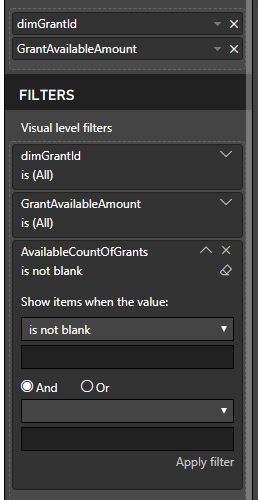
Ok found it. I just had to drag the count measure in the visual level filter for the table visualization and apply - Show items when the value is not blank

 Capture.JPG


This reduced the number of rows correctly in the table viz in relation to chosen filters from other slicers. Yay.

Credit to this post for helping see that. https://community.powerbi.com/t5/Desktop/Include-a-measure-in-the-visual-level-filter/m-p/302518/hig...

Power BI Desktop forum is great! Thank you.

View solution in original post

1 REPLY 1
kv
Advocate I
Advocate I

Ok found it. I just had to drag the count measure in the visual level filter for the table visualization and apply - Show items when the value is not blank

 Capture.JPG


This reduced the number of rows correctly in the table viz in relation to chosen filters from other slicers. Yay.

Credit to this post for helping see that. https://community.powerbi.com/t5/Desktop/Include-a-measure-in-the-visual-level-filter/m-p/302518/hig...

Power BI Desktop forum is great! Thank you.

Helpful resources

Announcements
November Power BI Update Carousel

Power BI Monthly Update - November 2025

Check out the November 2025 Power BI update to learn about new features.

Fabric Data Days Carousel

Fabric Data Days

Advance your Data & AI career with 50 days of live learning, contests, hands-on challenges, study groups & certifications and more!

FabCon Atlanta 2026 carousel

FabCon Atlanta 2026

Join us at FabCon Atlanta, March 16-20, for the ultimate Fabric, Power BI, AI and SQL community-led event. Save $200 with code FABCOMM.

Top Solution Authors
Top Kudoed Authors