Don't miss your chance to take the Fabric Data Engineer (DP-700) exam on us!
Learn moreNext up in the FabCon + SQLCon recap series: The roadmap for Microsoft SQL and Maximizing Developer experiences in Fabric. All sessions are available on-demand after the live show. Register now
I have the following table in a Power Bi Report:
| External Identifier | Entity Id | Source | Entity Name |
| 00/0000/0 | dc7706b1-6406-4a71-bdda-d6891c411c60 | A | John Smith |
| 8090909 | 0dbe1894-c972-491b-af87-28f935d73e9e | B | ABC Company |
| 12345678 | cf955264-8a21-4640-93fb-b0974831033f | D | Amy Small |
| 0 | 06f38ee9-d75d-4adb-ab10-b75f32c47da1 | C | Jeff West Family Trust |
| 00/0000/0 | a248692e-763f-41c3-abf4-26917a55a39c | A | World Bank |
| 8090909 | ee43373c-cdf9-4a24-9384-4e2f6be44400 | B | Richard James |
| 0 | 146fcb63-5940-4eb4-84ef-fad33b42841c | C | CCC Productions |
| 0 | e13cce4e-c792-4010-90c2-e6f1a34ed66c | B | Mary Davis |
| 00/0000/0 | b4146ae1-0ef1-4d35-8049-28cd18d510a4 | A | X Investments |
I want to filter the table so I only see the rows where an External Identifier appears more than once. Is there a way to do this?
Edit: Is it possible to get the count of external identifier per source?
Solved! Go to Solution.
@Anonymous , You could try this:-
Ext_count =
COUNTROWS (
FILTER (
'Table',
'Table'[External Identifier] = EARLIER ( 'Table'[External Identifier] )
&& 'Table'[Source] = EARLIER ( 'Table'[Source] )
)
)
Best Regards,
Samarth
If this post helps, please consider accepting it as the solution to help the other members find it more quickly.
Appreciate your Kudos!!
Connect on Linkedin
@Samarth_18 thanks for the answer. This seems to work. If I have an additional column called source is it possible to do the above but per source?
| External Identifier | Entity Id | Source | Entity Name |
| 00/0000/0 | dc7706b1-6406-4a71-bdda-d6891c411c60 | A | John Smith |
| 8090909 | 0dbe1894-c972-491b-af87-28f935d73e9e | A | ABC Company |
| 12345678 | cf955264-8a21-4640-93fb-b0974831033f | B | Amy Small |
| 0 | 06f38ee9-d75d-4adb-ab10-b75f32c47da1 | C | Jeff West Family Trust |
| 00/0000/0 | a248692e-763f-41c3-abf4-26917a55a39c | A | World Bank |
| 8090909 | ee43373c-cdf9-4a24-9384-4e2f6be44400 | A | Richard James |
| 0 | 146fcb63-5940-4eb4-84ef-fad33b42841c | C | CCC Productions |
| 0 | e13cce4e-c792-4010-90c2-e6f1a34ed66c | D | Mary Davis |
| 00/0000/0 | b4146ae1-0ef1-4d35-8049-28cd18d510a4 | A | X Investments |
So essentially I want to get the count for each external identifier per source.
Hi @Anonymous ,
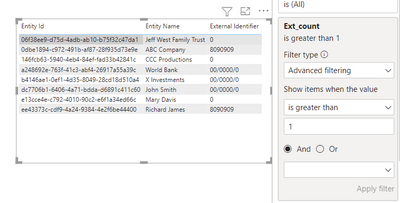
You can create a column as below and use it as filter on your visual:-
Ext_count = COUNTROWS(FILTER('Table (4)','Table (4)'[External Identifier] = EARLIER('Table (4)'[External Identifier])))
Best Regards,
Samarth
If this post helps, please consider accepting it as the solution to help the other members find it more quickly.
Appreciate your Kudos!!
Connect on Linkedin
Thanks for the tip. I am almost at the right solution. Is it possible to apply the above solution but get the count of external identifiers per source?
@Anonymous , You could try this:-
Ext_count =
COUNTROWS (
FILTER (
'Table',
'Table'[External Identifier] = EARLIER ( 'Table'[External Identifier] )
&& 'Table'[Source] = EARLIER ( 'Table'[Source] )
)
)
Best Regards,
Samarth
If this post helps, please consider accepting it as the solution to help the other members find it more quickly.
Appreciate your Kudos!!
Connect on Linkedin
If you have recently started exploring Fabric, we'd love to hear how it's going. Your feedback can help with product improvements.
A new Power BI DataViz World Championship is coming this June! Don't miss out on submitting your entry.
Share feedback directly with Fabric product managers, participate in targeted research studies and influence the Fabric roadmap.
| User | Count |
|---|---|
| 48 | |
| 45 | |
| 41 | |
| 19 | |
| 18 |
| User | Count |
|---|---|
| 68 | |
| 67 | |
| 33 | |
| 31 | |
| 29 |