cancel
Showing results for 
Search instead for 
Did you mean: 

Get Fabric Certified for FREE during Fabric Data Days. Don't miss your chance! Request now

Reply
levered_up
Helper I
Helper I

How to edit the Matrix Sum Total Row to show Average or Median?

I have created a very simple matrix, looking roughly like the below. The PBI matrix tool automatically calculates the total of all the values for each name across the years.

Is there a way that I can alter/append a 'AVERAGE' (or 'MEDIAN') row to the bottom of the matrix?


Thank you very much in advance (and please explain in simple language - I am new to PBI!)


P.S. I have searched far and wide for an answer to this, but was unable to find a solution where the average is added as a row, as opposed to a column.


 Stock AStock BStock C
20015%1%9%
20024%2%10%
20036%3%11%
Total15%6%20%
1 ACCEPTED SOLUTION
nandukrishnavs
Community Champion
Community Champion

@levered_up 


Sample Table


Year Stock Value
2011 A 0.02
2012 B 0.12
2013 C 0.08
2011 B 0.13
2012 C 0.16
2013 A 0.2
2011 C 0.07
2012 A 0.11
2013 B 0.01


Write a DAX measure


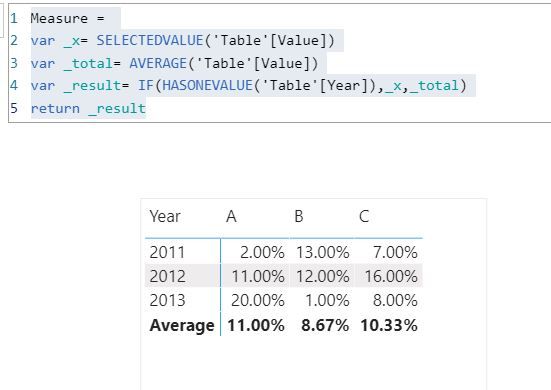
Measure = 
var _x= SELECTEDVALUE('Table'[Value])
var _total= AVERAGE('Table'[Value])
var _result= IF(HASONEVALUE('Table'[Year]),_x,_total)
return _result


Use this measure in the Matrix visual

avgDAX.JPG

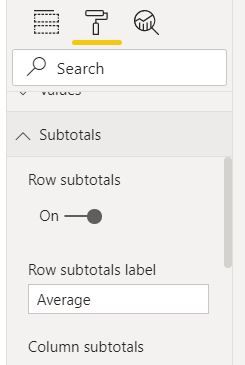
You can change the row subtotal label from the below settings.


 settings.JPG

Please refer to the attached pbix file


Regards,
Nandu Krishna

View solution in original post

5 REPLIES 5
nandukrishnavs
Community Champion
Community Champion

@levered_up 


Sample Table


Year Stock Value
2011 A 0.02
2012 B 0.12
2013 C 0.08
2011 B 0.13
2012 C 0.16
2013 A 0.2
2011 C 0.07
2012 A 0.11
2013 B 0.01


Write a DAX measure


Measure = 
var _x= SELECTEDVALUE('Table'[Value])
var _total= AVERAGE('Table'[Value])
var _result= IF(HASONEVALUE('Table'[Year]),_x,_total)
return _result


Use this measure in the Matrix visual

avgDAX.JPG

You can change the row subtotal label from the below settings.


 settings.JPG

Please refer to the attached pbix file


Regards,
Nandu Krishna

Would you know how I go about adding another "subtotal" row below it for the median?

Thank you for the great answer though! This worked a treat. Accepting as solution.

amitchandak
Super User
Super User

@levered_up , Not very clear. But you can you can use is filtered or has one value


example

if(isfiltered(Table[Year]) ,[Measure],averageX(Values(Table[Year]), [Measure]))


this will avg by year averageX(Values(Table[Year]), [Measure])


Also, refer

https://powerpivotpro.com/2013/03/hasonevalue-vs-isfiltered-vs-hasonefilter/

Share with Power BI Enthusiasts: Full Power BI Video (20 Hours) YouTube
Microsoft Fabric Series 60+ Videos YouTube
Microsoft Fabric Hindi End to End YouTube
Sumanth_23
Memorable Member
Memorable Member

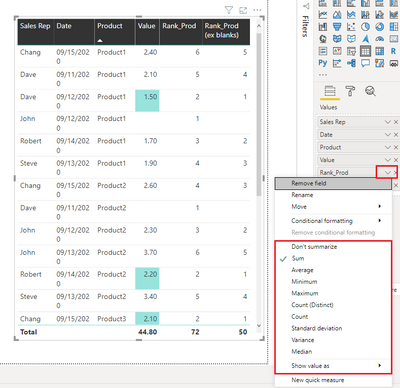
hi @levered_up - You can change the calculation method for the particular column in the matrix as seen below

Sumanth_23_0-1601375008061.png


Please mark the post as a solution and provide a 👍 if my comment helped with solving your issue. Thanks!

Did I answer your question? Mark my post as a solution! Appreciate your Kudos!

Proud to be a Super User!


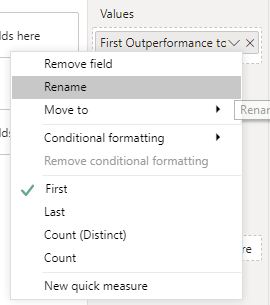
Hi @Sumanth_23 , thank you for your quick reply.


When I try and do the same as you, I am not presented with the same options?


levered_up_0-1601375654196.png


Helpful resources

Announcements
November Power BI Update Carousel

Power BI Monthly Update - November 2025

Check out the November 2025 Power BI update to learn about new features.

Fabric Data Days Carousel

Fabric Data Days

Advance your Data & AI career with 50 days of live learning, contests, hands-on challenges, study groups & certifications and more!

FabCon Atlanta 2026 carousel

FabCon Atlanta 2026

Join us at FabCon Atlanta, March 16-20, for the ultimate Fabric, Power BI, AI and SQL community-led event. Save $200 with code FABCOMM.

Top Solution Authors
Top Kudoed Authors