Join us in Barcelona for FabCon and SQLCon, September 28 - October 1, 2026.
This is best Fabric, Power BI, SQL and AI community event. How do we know? The last event sold out! Save €200 with code FABCMTY200.
Register now- Power BI forums
- Get Help with Power BI
- Desktop
- Service
- Report Server
- Power Query
- Mobile Apps
- Developer
- DAX Commands and Tips
- Custom Visuals Development Discussion
- Health and Life Sciences
- Power BI Spanish forums
- Translated Spanish Desktop
- Training and Consulting
- Instructor Led Training
- Dashboard in a Day for Women, by Women
- Galleries
- Data Stories Gallery
- Themes Gallery
- Contests Gallery
- QuickViz Gallery
- Quick Measures Gallery
- Visual Calculations Gallery
- Fabric Apps Gallery
- Notebook Gallery
- Translytical Task Flow Gallery
- TMDL Gallery
- R Script Showcase
- Webinars and Video Gallery
- Ideas
- Custom Visuals Ideas (read-only)
- Issues
- Issues
- Events
- Upcoming Events
The Fabric community is upgrading! Read all of the details including the timeline and what you can expect. Learn more
- Power BI forums
- Forums
- Get Help with Power BI
- Desktop
- Re: How to do Ranking
- Subscribe to RSS Feed
- Mark Topic as New
- Mark Topic as Read
- Float this Topic for Current User
- Bookmark
- Subscribe
- Printer Friendly Page

- Mark as New
- Bookmark
- Subscribe
- Mute
- Subscribe to RSS Feed
- Permalink
- Report Inappropriate Content
How to do Ranking
I have a lot of compliance data that I am graphing by the delta. I have 55 different people I am trying to rank based on their compliance. How do I set up ranking in Power Bi desktop?
Solved! Go to Solution.


- Mark as New
- Bookmark
- Subscribe
- Mute
- Subscribe to RSS Feed
- Permalink
- Report Inappropriate Content
Create a new Measure as
Sum of Admin_Fee_Delta=sum('New Lease'[Admin_Fee_Delta])
and Create a new measure as
Admin_Rank = RANKX(ALL('New Lease'[Region]),'New Lease'[Sum of Admin_Fee_Delta],,DESC)
I hope it would work.


- Mark as New
- Bookmark
- Subscribe
- Mute
- Subscribe to RSS Feed
- Permalink
- Report Inappropriate Content
Hi @Anonymous,
It's hard to provide the detailed solution without sample table, you'd better share sample table and list expected result for further analysis. For ranking, we usually use RANKX function.
Best Regards,
Angelia
- Mark as New
- Bookmark
- Subscribe
- Mute
- Subscribe to RSS Feed
- Permalink
- Report Inappropriate Content
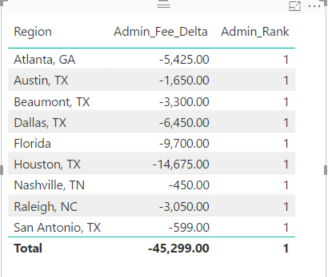
@Angelia, Ok so being more specfic, I have a bunch of regions that all have delta's and I want to rank them by the sum of that delta. So I have a table built that has Region, then my delta, then my rank of that delta but I keep getting 1 for all my ranks. I am not sure what I am doing wrong. This is my measure, please let me know what Iam doing wrong or what I need to change. Thank you so much!
Admin_Rank = rankx(filter(all('New Lease'),'New Lease'[Admin_Fee_Delta]),CALCULATE(sum([Admin_Fee_Delta])),0)
- Mark as New
- Bookmark
- Subscribe
- Mute
- Subscribe to RSS Feed
- Permalink
- Report Inappropriate Content
@Anonymous
I think this would help you.
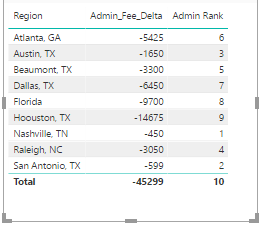
Dax Function: Admin Rank = RANKX(ALL(Sheet1[Region]),Sheet1[Sum of Admin_Fee_Delta],,DESC)
- Mark as New
- Bookmark
- Subscribe
- Mute
- Subscribe to RSS Feed
- Permalink
- Report Inappropriate Content
I get an error using that verbage and I copied directly.
To get a result this is what I had to change it to
Admin_Rank = RANKX(ALL('New Lease'[Region]),sum('New Lease'[Admin_Fee_Delta]),0)
And everything is still 1 for the ranking
- Mark as New
- Bookmark
- Subscribe
- Mute
- Subscribe to RSS Feed
- Permalink
- Report Inappropriate Content
Look into this report, you may get the exact understanding.
- Mark as New
- Bookmark
- Subscribe
- Mute
- Subscribe to RSS Feed
- Permalink
- Report Inappropriate Content
The link is opening a page and I log in but it never loads.
Why in your version are you using sheet1 and why will mine not accpet that? Same with desc?
- Mark as New
- Bookmark
- Subscribe
- Mute
- Subscribe to RSS Feed
- Permalink
- Report Inappropriate Content
Make sure that the Rank is Measure in your report.
- Mark as New
- Bookmark
- Subscribe
- Mute
- Subscribe to RSS Feed
- Permalink
- Report Inappropriate Content
That is what I am trying to create with my formula, the rank...am I missing a step before this one?
- Mark as New
- Bookmark
- Subscribe
- Mute
- Subscribe to RSS Feed
- Permalink
- Report Inappropriate Content
Create a new Measure as
Sum of Admin_Fee_Delta=sum('New Lease'[Admin_Fee_Delta])
and Create a new measure as
Admin_Rank = RANKX(ALL('New Lease'[Region]),'New Lease'[Sum of Admin_Fee_Delta],,DESC)
I hope it would work.
- Mark as New
- Bookmark
- Subscribe
- Mute
- Subscribe to RSS Feed
- Permalink
- Report Inappropriate Content
It worked, thank you so much!!!
Helpful resources

FabCon & SQLCon – Barcelona 2026
Join us in Barcelona for FabCon and SQLCon, the Fabric, Power BI, SQL, and AI community event. Save €200 with code FABCMTY200.

Power BI DataViz World Championships - June 2026
A new Power BI DataViz World Championship is coming this June! Don't miss out on submitting your entry.

| User | Count |
|---|---|
| 24 | |
| 22 | |
| 20 | |
| 18 | |
| 14 |


| User | Count |
|---|---|
| 45 | |
| 38 | |
| 24 | |
| 22 | |
| 20 |


