cancel
Showing results for 
Search instead for 
Did you mean: 

The Power BI Data Visualization World Championships is back! Get ahead of the game and start preparing now! Learn more

Reply
Anonymous
Not applicable

How to display bigger images

Hi all,


Have a question about the following.

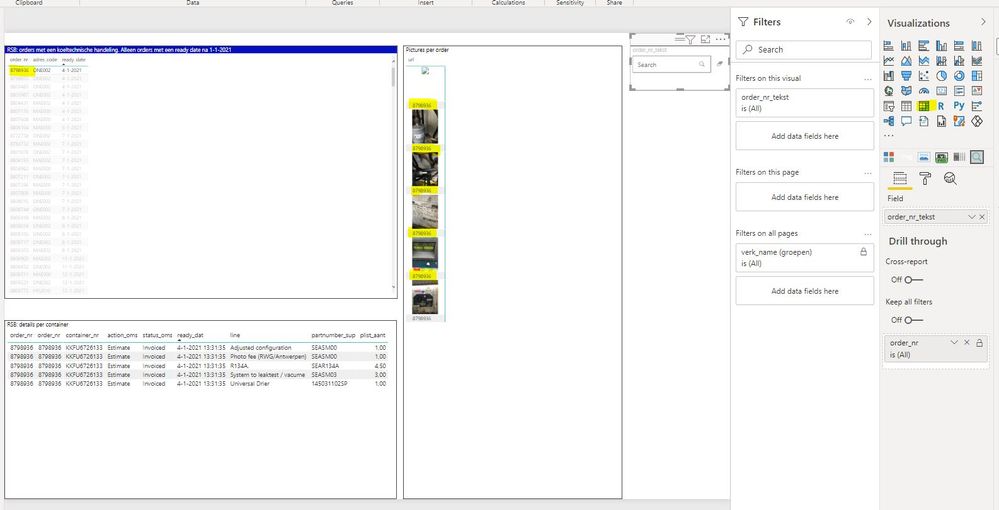
I have made a report in which I can select an order number (on the left side).

On the right side the pictures, related to that particular order, are shown.

I used the MATRIX visual for this.

However, the pictures are so small, it is hardly workable.

Is there a way to show the pictures in a bigger format on the screen?

Maybe a custom visual?


Thanks upfront for your advise!


John

Knipsel.JPG


2 ACCEPTED SOLUTIONS
Preeti_Yadav
Resolver I
Resolver I

Hi @Anonymous ,

You can try using the "Simple Image" visual for displaying the pictures.


Did I answer your question? Mark my post as a solution!Appreciate Kudos!!


Regards,

Preeti

View solution in original post

@Anonymous , Tried Image Grid and Card browser in past, check if those can help

https://appsource.microsoft.com/en-us/product/power-bi-visuals/WA104381278?tab=Overview

https://appsource.microsoft.com/en-us/product/power-bi-visuals/WA104381355?tab=Overview

Share with Power BI Enthusiasts: Full Power BI Video (20 Hours) YouTube
Microsoft Fabric Series 60+ Videos YouTube
Microsoft Fabric Hindi End to End YouTube

View solution in original post

4 REPLIES 4
Preeti_Yadav
Resolver I
Resolver I

Hi @Anonymous ,

You can try using the "Simple Image" visual for displaying the pictures.


Did I answer your question? Mark my post as a solution!Appreciate Kudos!!


Regards,

Preeti

Anonymous
Not applicable

Hi @Preeti_Yadav ,

Thanks for your reply.

The format of the picture is fine!

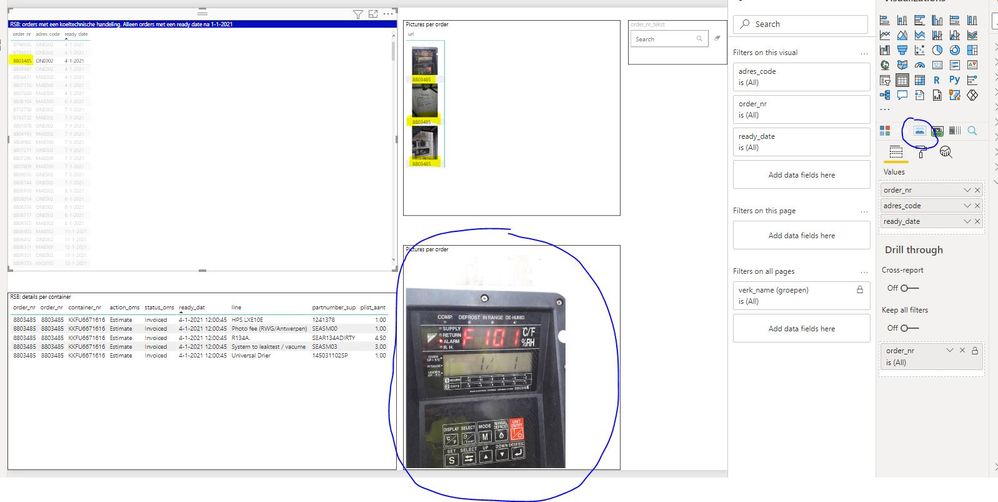
But if I use the 'simple image' visual, it only shows one picture of the selected order.

But I want to see all the pictures of that particular order_nr.

In below example, 3 pictures are added to the order, but ony one picture is displayed.

Is this a setting, am I doing something wrong?

Regards,

John

Knipsel.JPG


@Anonymous , Tried Image Grid and Card browser in past, check if those can help

https://appsource.microsoft.com/en-us/product/power-bi-visuals/WA104381278?tab=Overview

https://appsource.microsoft.com/en-us/product/power-bi-visuals/WA104381355?tab=Overview

Share with Power BI Enthusiasts: Full Power BI Video (20 Hours) YouTube
Microsoft Fabric Series 60+ Videos YouTube
Microsoft Fabric Hindi End to End YouTube
Anonymous
Not applicable

Helpful resources

Announcements
November Power BI Update Carousel

Power BI Monthly Update - November 2025

Check out the November 2025 Power BI update to learn about new features.

Fabric Data Days Carousel

Fabric Data Days

Advance your Data & AI career with 50 days of live learning, contests, hands-on challenges, study groups & certifications and more!

FabCon Atlanta 2026 carousel

FabCon Atlanta 2026

Join us at FabCon Atlanta, March 16-20, for the ultimate Fabric, Power BI, AI and SQL community-led event. Save $200 with code FABCOMM.

Top Kudoed Authors