Join us at FabCon Atlanta from March 16 - 20, 2026, for the ultimate Fabric, Power BI, AI and SQL community-led event. Save $200 with code FABCOMM.
Register now!The Power BI Data Visualization World Championships is back! Get ahead of the game and start preparing now! Learn more
Hi everyone,
I am trying to create a measure to calculate the percentiles of my data. Currently, I have more than 50 columns of data, coupled with 4 percentile ranges, that would mean hard coding more than 200 measures.
Is there a way to create a dynamic measure that calculates across different columns ? Or is there a more clever approach to what I'm doing right now ?
Here's a snap of how my data is looking. Any help on this would be much appreciated !
Hi @Anonymous,
Could you please tell me if your problem has been solved? If it is, could you please mark the helpful replies as Answered?
Regards,
Daniel He
Hi @Anonymous,
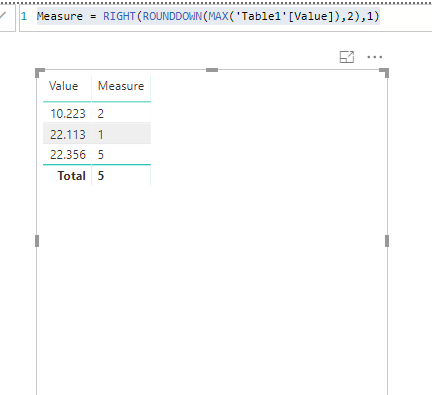
Based on my test, you could refer to below measure:
Measure = RIGHT(ROUNDDOWN(MAX('Table1'[Value]),2),1)
Result:
Regards,
Daniel He
to be honest... you cant change columns in a measure. best option is unpivot all those columns and use filter when getting percentile
The Power BI Data Visualization World Championships is back! Get ahead of the game and start preparing now!
| User | Count |
|---|---|
| 66 | |
| 44 | |
| 40 | |
| 29 | |
| 19 |
| User | Count |
|---|---|
| 200 | |
| 126 | |
| 103 | |
| 70 | |
| 53 |