FabCon is coming to Atlanta
Join us at FabCon Atlanta from March 16 - 20, 2026, for the ultimate Fabric, Power BI, AI and SQL community-led event. Save $200 with code FABCOMM.
Register now!- Power BI forums
- Get Help with Power BI
- Desktop
- Service
- Report Server
- Power Query
- Mobile Apps
- Developer
- DAX Commands and Tips
- Custom Visuals Development Discussion
- Health and Life Sciences
- Power BI Spanish forums
- Translated Spanish Desktop
- Training and Consulting
- Instructor Led Training
- Dashboard in a Day for Women, by Women
- Galleries
- Data Stories Gallery
- Themes Gallery
- Contests Gallery
- QuickViz Gallery
- Quick Measures Gallery
- Visual Calculations Gallery
- Notebook Gallery
- Translytical Task Flow Gallery
- TMDL Gallery
- R Script Showcase
- Webinars and Video Gallery
- Ideas
- Custom Visuals Ideas (read-only)
- Issues
- Issues
- Events
- Upcoming Events
View all the Fabric Data Days sessions on demand. View schedule
- Power BI forums
- Forums
- Get Help with Power BI
- Desktop
- How to create column or new table to show list of ...
- Subscribe to RSS Feed
- Mark Topic as New
- Mark Topic as Read
- Float this Topic for Current User
- Bookmark
- Subscribe
- Printer Friendly Page


- Mark as New
- Bookmark
- Subscribe
- Mute
- Subscribe to RSS Feed
- Permalink
- Report Inappropriate Content
How to create column or new table to show list of stores with 2 or more people with badge?
Hello and TIA!
I track users that have received a badge by completing learning. Each store is required to have atleast 2 or more people that have received a specific badge. (there are two different badges, but I need to track the Champions badge).
How could I create a new table/column to basically say "Yes" this store has 2+ people that have received this badge?
https://www.dropbox.com/s/j2s9ww5my4ry3pc/Badges_TEST.pbix?dl=0
Solved! Go to Solution.


- Mark as New
- Bookmark
- Subscribe
- Mute
- Subscribe to RSS Feed
- Permalink
- Report Inappropriate Content
Here is a calculated column:
TwoPlus =
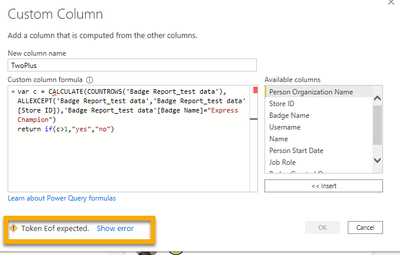
var c = CALCULATE(COUNTROWS('Badge Report_test data'),ALLEXCEPT('Badge Report_test data','Badge Report_test data'[Store ID]),'Badge Report_test data'[Badge Name]="PH Express Champion")
return if(c>1,"yes","no")
your sample data only had one store ID so you may want to validate that.
- Mark as New
- Bookmark
- Subscribe
- Mute
- Subscribe to RSS Feed
- Permalink
- Report Inappropriate Content
- Mark as New
- Bookmark
- Subscribe
- Mute
- Subscribe to RSS Feed
- Permalink
- Report Inappropriate Content
TwoPlus =
var c = CALCULATE(COUNTROWS('Badge Report_test data'),ALLEXCEPT('Badge Report_test data','Badge Report_test data'[Store ID]),'Badge Report_test data'[Badge Name]="PH Express Champion")
return if(c>1,1,0)
Do a sum, not a count.
- Mark as New
- Bookmark
- Subscribe
- Mute
- Subscribe to RSS Feed
- Permalink
- Report Inappropriate Content
@lbendlin Is there a way to get a count of "Yes" from that column that you created? I've tried all Count measures and none of them work.
- Mark as New
- Bookmark
- Subscribe
- Mute
- Subscribe to RSS Feed
- Permalink
- Report Inappropriate Content
it's a custom column in DAX, not in Power Query
- Mark as New
- Bookmark
- Subscribe
- Mute
- Subscribe to RSS Feed
- Permalink
- Report Inappropriate Content
You Rock!!! Thanks.
- Mark as New
- Bookmark
- Subscribe
- Mute
- Subscribe to RSS Feed
- Permalink
- Report Inappropriate Content
Here is a calculated column:
TwoPlus =
var c = CALCULATE(COUNTROWS('Badge Report_test data'),ALLEXCEPT('Badge Report_test data','Badge Report_test data'[Store ID]),'Badge Report_test data'[Badge Name]="PH Express Champion")
return if(c>1,"yes","no")
your sample data only had one store ID so you may want to validate that.
- Mark as New
- Bookmark
- Subscribe
- Mute
- Subscribe to RSS Feed
- Permalink
- Report Inappropriate Content
- Mark as New
- Bookmark
- Subscribe
- Mute
- Subscribe to RSS Feed
- Permalink
- Report Inappropriate Content
Please provide sample data in usable format (not as a picture) and show the expected outcome.
- Mark as New
- Bookmark
- Subscribe
- Mute
- Subscribe to RSS Feed
- Permalink
- Report Inappropriate Content
@lbendlinI've added a sample file in Dropbox. My goal is to be able to see a list of stores that have at least 2 people that have received the Champion badge. This could be in the form of just highlighting these stores.
https://www.dropbox.com/s/j2s9ww5my4ry3pc/Badges_TEST.pbix?dl=0

Helpful resources

Power BI Monthly Update - November 2025
Check out the November 2025 Power BI update to learn about new features.

Fabric Data Days
Advance your Data & AI career with 50 days of live learning, contests, hands-on challenges, study groups & certifications and more!

FabCon Atlanta 2026
Join us at FabCon Atlanta, March 16-20, for the ultimate Fabric, Power BI, AI and SQL community-led event. Save $200 with code FABCOMM.


