I first uploaded my query table named "Sheet1" as follows:

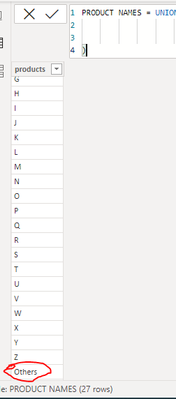
I wanted to create a DAX expression which showed the Top 3 and Others values, so I first created a table named "PRODUCT NAMES" with all the product names along with an "Others" row:
PRODUCT NAMES = UNION(
VALUES(Sheet1[products]),
ROW("Product Names","Others")
)
The table was formed as follows with "Others" being denoted by the red circle:
The Top 3 products were first denoted with the expression:
TopN = 3
The sum of the "Current Volume" is denoted using the formula:
Total Volume = CALCULATE(SUM(Sheet1[Current volume]))
A ranking was then denoted with "Others" at 4th place using the DAX expression:
RankbyVolume = IF(
SELECTEDVALUE('PRODUCT NAMES'[products])="Others",
[TopN]+1,
RANKX(
ALL('PRODUCT NAMES'),
[Total Volume])
)
The formula was used to rank products according to Total Volume" but to determine the value for "Others" I used a DAX expression to add up all values greater than the Top 3 as follows:
top product & others =
IF(
[RankbyVolume]<=[TopN], [Total Volume],
IF(SELECTEDVALUE('PRODUCT NAMES'[products])= "Others",
SUMX(
FILTER(
ALL('PRODUCT NAMES'[products]),
[RankbyVolume]>[TopN]),
[Total Volume]
)
)
)
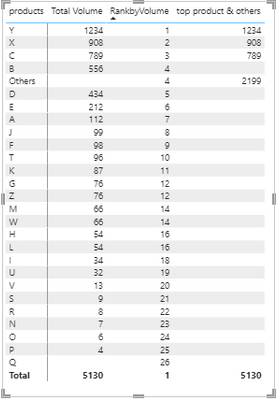
I then used a Pivot Table visual to display the Total Volume, RankbyVolume and top product & others values as shown below:
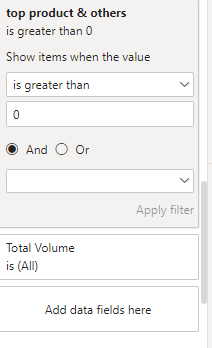
I then applied a filter where "top product & others"is greater than 0:
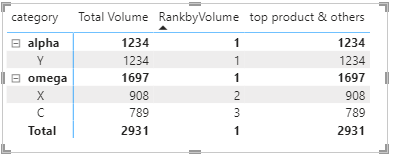
I also added category values from "Sheet1", which has 3 categories of products (alpha, beta & omega), in the row with the following results:
The main problem is that I want a DAX expression which displays 4 rows (Top 3 products and Others ) for each category on "Sheet1" (alpha, beta & omega).
Does anyone have the solution to this problem?