Join us at FabCon Atlanta from March 16 - 20, 2026, for the ultimate Fabric, Power BI, AI and SQL community-led event. Save $200 with code FABCOMM.
Register now!The Power BI Data Visualization World Championships is back! Get ahead of the game and start preparing now! Learn more
Hi All
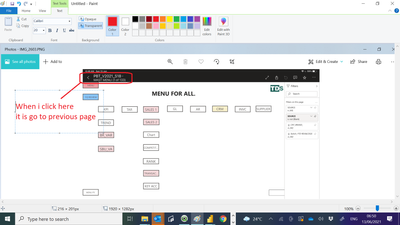
Below screen shot taken from PBI ios App.
When i click the Top left conner file name , it will automatic go to previous page. i find this back button is very useful.
Below screen shot taken from PBI desktop. May i know how to create a short cut ? So that when i press control B , it will go to previous page like above ?
Paul
Solved! Go to Solution.
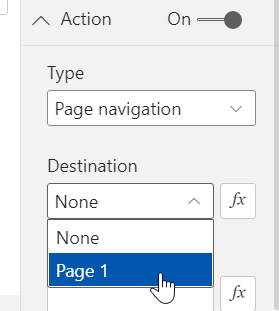
maybe you can insert a button or shape and set up in the Action.
Proud to be a Super User!
maybe you can insert a button or shape and set up in the Action.
Proud to be a Super User!
Thank you for your reply , Since i have many page , it is very troublesome to create back ward button for every page , though there are more simple approach.
Paul
Check out the November 2025 Power BI update to learn about new features.
Advance your Data & AI career with 50 days of live learning, contests, hands-on challenges, study groups & certifications and more!