cancel
Showing results for 
Search instead for 
Did you mean: 

Get Fabric Certified for FREE during Fabric Data Days. Don't miss your chance! Request now

Reply
sy898661
Helper V
Helper V

How to create a % On Time measure

Hi!


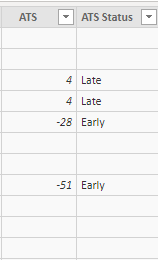
I am trying to create a % On Time Delivery measure, but its not working. I have a column (ATS) that shows if an order is Early (negative number), On Time (0), or Late (positive number) by doing a DATEDIFF between planned and actual delivery date.


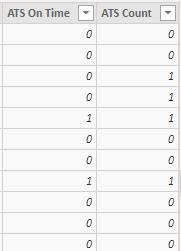
I have another column (ATS On Time) that is 

=IF(Sheet[ATS] <= 0, 1, 0)

So it has a 1 if the status is Early or On Time, and a 0 if it is Late


I have another column (ATS Count) that is

=IF(NOT ISBLANK(Sheet[ATS]), 1, 0)

So it has a 1 if the row has an order status, and a 0 if it is blank


So I tried creating a measure (% On Time) that is

=DIVIDE(SUM(Sheet[ATS On Time]) , SUM(Sheet[ATS Count]))

but it is showing 100% when it definitely should be 50%. What am I doing wrong?!


PBI 1.PNG     PBI.PNG

1 ACCEPTED SOLUTION
Anonymous
Not applicable

Hi @sy898661 ,


I tried with your measure and it works perfectly.


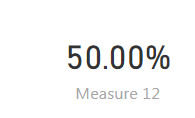
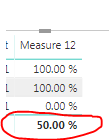
I get this output:

Capture 3.PNG

Capture123.PNG


Dont know if this is what your output should look like. however your formula looks correct.


Thanks,

Tejaswi

View solution in original post

4 REPLIES 4
sy898661
Helper V
Helper V

@Cmcmahan @Anonymous 


I'm not sure what I changed but it started working!!! Haha 🙂

Thank you both for replying!

Anonymous
Not applicable

Hi @sy898661 ,


I tried with your measure and it works perfectly.


I get this output:

Capture 3.PNG

Capture123.PNG


Dont know if this is what your output should look like. however your formula looks correct.


Thanks,

Tejaswi

The measure looks correct.  It could be done in one step, without creating the extra tables, but it should work just fine.


Do you have an active slicer or filter that could be restricting the dataset?

There's also the possiblity that you are displaying the result as a whole number.  .5 rounds up to 1, which would give you this behavior.  If you add another late delivery to your data, does the measure drop to zero?

Helpful resources

Announcements
November Power BI Update Carousel

Power BI Monthly Update - November 2025

Check out the November 2025 Power BI update to learn about new features.

Fabric Data Days Carousel

Fabric Data Days

Advance your Data & AI career with 50 days of live learning, contests, hands-on challenges, study groups & certifications and more!

FabCon Atlanta 2026 carousel

FabCon Atlanta 2026

Join us at FabCon Atlanta, March 16-20, for the ultimate Fabric, Power BI, AI and SQL community-led event. Save $200 with code FABCOMM.

Top Solution Authors
Top Kudoed Authors