cancel
Showing results for 
Search instead for 
Did you mean: 

Get Fabric Certified for FREE during Fabric Data Days. Don't miss your chance! Request now

Reply
Anonymous
Not applicable

How to create a MEASURE that: SUMMARIZE DISTINCT, ignore slicer and a fixed FILTERING of the data

Dears,


Looking for a hint on how to achieve the creation of a measure (to be used in other calculation) as I will try to describe below: 


INPUT: I want to only work on the bold part of the below table, basically date A and only 3M ahead.

GPIDPeriodM1M2M3M4M5M6
EU1A101010101010
US2A 11111
EU3A   555
US2A11    
EU4A888   
EU1B 1010101010
US2B 11111
EU3B   555
US4B 121212  


INTERMEDIATE TABLE

GPIDValue
EU110
EU48
US21


My goal is to filter out the data I do not need (Period B & Date > M3), Group by distinct ID and sum the result by group. One ID has always the same value but can appear in different moment in time.

Also, it needs to ignore the slicer so that even if I select M4, it will display the fixed value (as initial range should be fixed)


OUTPUT:

GPSum(Value)
EU18
US1


I tried a lot of methods to get it into a measure. It only works when I make a separate table with the below code but then I cannot use the output for another calculation:


MEASURE = SUMX(SUMMARIZE(filter(table, table[Date]=A && table[M]<[M3]  ),table[GP],table[Value]),'table'[Value])


Thank you for your help !

1 ACCEPTED SOLUTION
Anonymous
Not applicable

Hi @Anonymous ,


Based on your description, you can create a measure as follows.

Measure = 

var x1=SUMMARIZE(FILTER('Table',[Period]="A"),'Table'[GP],'Table'[ID],'Table'[M1],'Table'[M2],'Table'[M3])

var x2=FILTER(SUMMARIZE(x1,'Table'[GP],'Table'[ID],"Value",MAX('Table'[M1])),[Value]<>BLANK())

return

SUMX(x2,[Value])
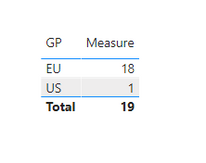
Result:

v-yuaj-msft_0-1612493006012.png


Hope that's what you were looking for.

Best Regards,

Yuna


If this post helps, then please consider Accept it as the solution to help the other members find it more quickly.

View solution in original post

5 REPLIES 5
Anonymous
Not applicable

Hi @Anonymous ,


Based on your description, you can create a measure as follows.

Measure = 

var x1=SUMMARIZE(FILTER('Table',[Period]="A"),'Table'[GP],'Table'[ID],'Table'[M1],'Table'[M2],'Table'[M3])

var x2=FILTER(SUMMARIZE(x1,'Table'[GP],'Table'[ID],"Value",MAX('Table'[M1])),[Value]<>BLANK())

return

SUMX(x2,[Value])
Result:

v-yuaj-msft_0-1612493006012.png


Hope that's what you were looking for.

Best Regards,

Yuna


If this post helps, then please consider Accept it as the solution to help the other members find it more quickly.

lbendlin
Super User
Super User

on what granularity level?

Anonymous
Not applicable

ID (distinct) level 🤗

lbendlin
Super User
Super User

why are there two entries for A - 2 - US - M2 ?

Anonymous
Not applicable

Because it is possible in my dataset, I need to remove duplicates.

Helpful resources

Announcements
November Power BI Update Carousel

Power BI Monthly Update - November 2025

Check out the November 2025 Power BI update to learn about new features.

Fabric Data Days Carousel

Fabric Data Days

Advance your Data & AI career with 50 days of live learning, contests, hands-on challenges, study groups & certifications and more!

FabCon Atlanta 2026 carousel

FabCon Atlanta 2026

Join us at FabCon Atlanta, March 16-20, for the ultimate Fabric, Power BI, AI and SQL community-led event. Save $200 with code FABCOMM.

Top Solution Authors
Top Kudoed Authors