FabCon is coming to Atlanta
Join us at FabCon Atlanta from March 16 - 20, 2026, for the ultimate Fabric, Power BI, AI and SQL community-led event. Save $200 with code FABCOMM.
Register now!- Power BI forums
- Get Help with Power BI
- Desktop
- Service
- Report Server
- Power Query
- Mobile Apps
- Developer
- DAX Commands and Tips
- Custom Visuals Development Discussion
- Health and Life Sciences
- Power BI Spanish forums
- Translated Spanish Desktop
- Training and Consulting
- Instructor Led Training
- Dashboard in a Day for Women, by Women
- Galleries
- Data Stories Gallery
- Themes Gallery
- Contests Gallery
- QuickViz Gallery
- Quick Measures Gallery
- Visual Calculations Gallery
- Notebook Gallery
- Translytical Task Flow Gallery
- TMDL Gallery
- R Script Showcase
- Webinars and Video Gallery
- Ideas
- Custom Visuals Ideas (read-only)
- Issues
- Issues
- Events
- Upcoming Events
The Power BI Data Visualization World Championships is back! Get ahead of the game and start preparing now! Learn more
- Power BI forums
- Forums
- Get Help with Power BI
- Desktop
- How to create a Custom Column or New Table based w...
- Subscribe to RSS Feed
- Mark Topic as New
- Mark Topic as Read
- Float this Topic for Current User
- Bookmark
- Subscribe
- Printer Friendly Page

- Mark as New
- Bookmark
- Subscribe
- Mute
- Subscribe to RSS Feed
- Permalink
- Report Inappropriate Content
How to create a Custom Column or New Table based with multiple Column condition
Hi,
Suppose I am having such Table,
How Can I Create a custom column called <Actual Milestone> that calculate the actual milestone based on the earliest date with is in this case 16-Apr-19
| Project | Milestone | Completed On | Actual Milestone |
| 59910 | Milestone 1 | 6-Jan-19 | Milestone 4 |
| 59910 | Milestone 2 | 1-Feb-19 | Milestone 4 |
| 59910 | Milestone 3 | 14-March-19 | Milestone 4 |
| 59910 | Milestone 4 | 16-Apr-19 | Milestone 4 |
| 59910 | Milestone 5 | Milestone 4 |
Or Even Better,
To create a new Table that shows only
| Project | Completed On | Actual Milestone |
| 59910 | 16-Apr-19 | Milestone 4 |
Thanks a lot
Solved! Go to Solution.
- Mark as New
- Bookmark
- Subscribe
- Mute
- Subscribe to RSS Feed
- Permalink
- Report Inappropriate Content
Hi buddy,
well, this is happening because you have one date being repeted, so you need something like "index column".
I create one column called "KEY" it would serve to resolve your problem, here goes the steps.
i recreate the table, now only using the summerize for column "Project":
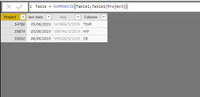


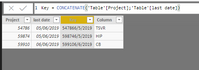
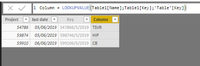

- Mark as New
- Bookmark
- Subscribe
- Mute
- Subscribe to RSS Feed
- Permalink
- Report Inappropriate Content
Hi buddy,
Try create a table on DAX like i do.
1 - Create a table with this DAX:
- Mark as New
- Bookmark
- Subscribe
- Mute
- Subscribe to RSS Feed
- Permalink
- Report Inappropriate Content
Thank you for your reply,
but I get this error message
'A table of multiple values was supplied where a single value was expected.'
I think because I have a column that contain more than on project, In fact the final table would be like
Project 1 --- Milestone 2 --- Date1
Project2 --- Milestone 1 --- Date2
Project3 --- Milestone 3 --- Date3
- Mark as New
- Bookmark
- Subscribe
- Mute
- Subscribe to RSS Feed
- Permalink
- Report Inappropriate Content
Try this next one:
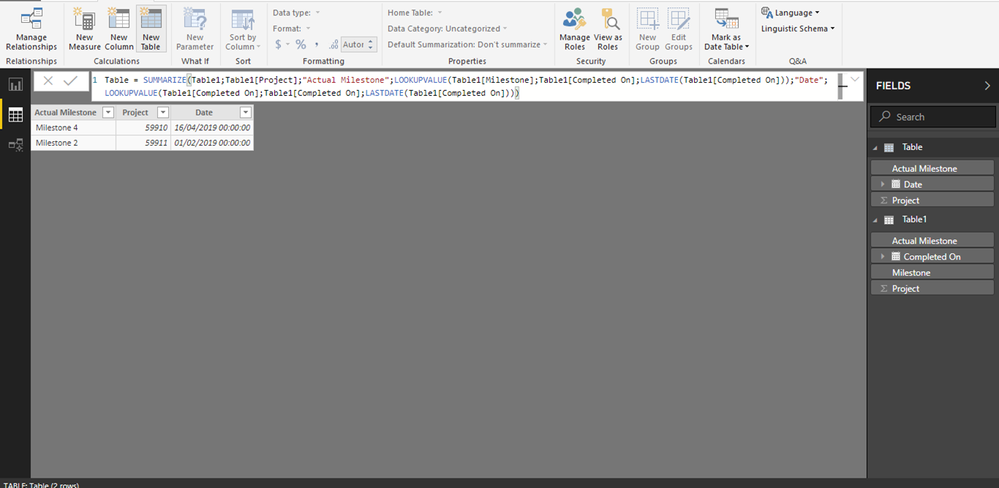
- Mark as New
- Bookmark
- Subscribe
- Mute
- Subscribe to RSS Feed
- Permalink
- Report Inappropriate Content
Thank you,
In fact,
when I Have this table of more than 3000 rows, this is a specimen,
| 59910 | CMT | 1-May-19 |
| 59910 | TSVR1 | 16-May-19 |
| 59910 | TSVR2 | 30-May-19 |
| 59910 | CB | 6-Jun-19 |
| 59910 | HIP | 10-May-19 |
| 59874 | CMT | 10-May-19 |
| 59874 | TSVR1 | 7-May-19 |
| 59874 | CSRB | 10-May-19 |
| 59874 | TSVR2 | 21-May-19 |
| 59874 | CB | 28-May-19 |
| 59874 | HIP | 5-Jun-19 |
With this code :
Table = SUMMARIZE(Table2,Table2[PCR],"Actual Milestone",LOOKUPVALUE(Table2[HIP],Table2[DATE],LASTDATE(Table2[DATE])),"Date",LOOKUPVALUE(Table2[DATE],Table2[DATE],LASTDATE(Table2[DATE])))
I am getting this result :
Actual Milestone Date PCR
HIP 6/5/2019 59874
CB 6/6/2019 59910
The Problem as soon as I add rows (Check I added another row in the end)
| 59910 | CMT | 1-May-19 |
| 59910 | TSVR1 | 16-May-19 |
| 59910 | TSVR2 | 30-May-19 |
| 59910 | CB | 6-Jun-19 |
| 59910 | HIP | 10-May-19 |
| 59874 | CMT | 10-May-19 |
| 59874 | TSVR1 | 7-May-19 |
| 59874 | CSRB | 10-May-19 |
| 59874 | TSVR2 | 21-May-19 |
| 59874 | CB | 28-May-19 |
| 59874 | HIP | 5-Jun-19 |
| 54786 | TSVR | 5-Jun-19 |
I receive this message:
A table of multiple vales was supplied where a single value was expected 😞
- Mark as New
- Bookmark
- Subscribe
- Mute
- Subscribe to RSS Feed
- Permalink
- Report Inappropriate Content
Hi buddy,
well, this is happening because you have one date being repeted, so you need something like "index column".
I create one column called "KEY" it would serve to resolve your problem, here goes the steps.
i recreate the table, now only using the summerize for column "Project":
Helpful resources

Power BI Dataviz World Championships
The Power BI Data Visualization World Championships is back! Get ahead of the game and start preparing now!

Power BI Monthly Update - December 2025
Check out the December 2025 Power BI Holiday Recap!

FabCon Atlanta 2026
Join us at FabCon Atlanta, March 16-20, for the ultimate Fabric, Power BI, AI and SQL community-led event. Save $200 with code FABCOMM.

| User | Count |
|---|---|
| 38 | |
| 36 | |
| 33 | |
| 33 | |
| 29 |


| User | Count |
|---|---|
| 134 | |
| 96 | |
| 78 | |
| 67 | |
| 65 |


