cancel
Showing results for 
Search instead for 
Did you mean: 

The Power BI Data Visualization World Championships is back! Get ahead of the game and start preparing now! Learn more

Reply
Bokazoit
Continued Contributor

How to create YTD Cumulative measure/running total?

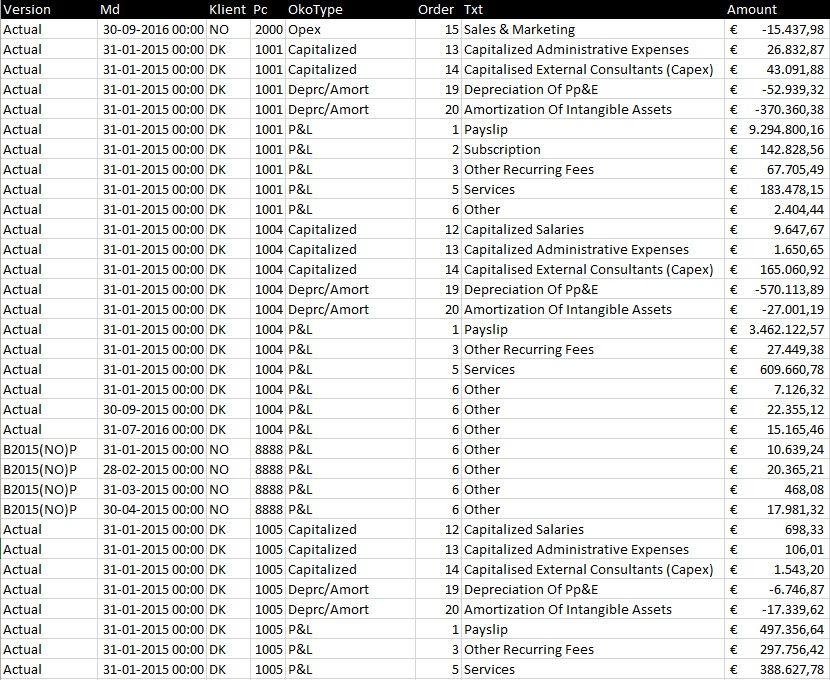
Above

Data.jpg


Above is a screendump of the data in my table. I am trying to create an running total or Cumulative Sum. For each chart I will pick one or more from the [OkoType] and in the chart show month ([Md]) on x-axis and [Amount] on y-Axis and as Legend I use the [Version] coloumn.


No matter how I slice it will only give me the amount for each month and not the running total/Cumulative. I have tried something like this:


Cumulative Quantity = 
CALCULATE (
    SUM ( AgressoAcc[Total] );
    FILTER (
        ALL ( AgressoAcc[Md] );
        AgressoAcc[Md] <= MAX ( AgressoAcc[Md] )
    )
)

But no matter it helps. What am I doing wrong?


1 ACCEPTED SOLUTION
Anonymous
Not applicable

@Bokazoit


Try this


1. Firstly create a calendar table in the model and coonect the datekey of calendar table and datekey of transaction table.

   Follow thos link to create a calendar table.

   http://community.powerbi.com/t5/Desktop/How-do-i-create-a-date-table/m-p/23896/highlight/true#M7605


2. Create a column Year in the calendar table as Year = Year(Calendar[Date])

3. Now create the measure as

Cumulativ = CALCULATE (
                       sum(AgreesoAcc[Total]),
                                              FILTER (
                                                      ALL ( 'Calendar' ),
                                                      'Calendar'[Year] = MAX ( 'Calendar'[Year] ) &&
                                                             'Calendar'[Date] <= MAX ( 'Calendar'[Date] )
                                       )

                                   )


If this works please accpet this as solution and also give KUDOS.


CheenuSIng


View solution in original post

3 REPLIES 3
Anonymous
Not applicable

@Bokazoit


Try this


1. Firstly create a calendar table in the model and coonect the datekey of calendar table and datekey of transaction table.

   Follow thos link to create a calendar table.

   http://community.powerbi.com/t5/Desktop/How-do-i-create-a-date-table/m-p/23896/highlight/true#M7605


2. Create a column Year in the calendar table as Year = Year(Calendar[Date])

3. Now create the measure as

Cumulativ = CALCULATE (
                       sum(AgreesoAcc[Total]),
                                              FILTER (
                                                      ALL ( 'Calendar' ),
                                                      'Calendar'[Year] = MAX ( 'Calendar'[Year] ) &&
                                                             'Calendar'[Date] <= MAX ( 'Calendar'[Date] )
                                       )

                                   )


If this works please accpet this as solution and also give KUDOS.


CheenuSIng


blopez11
Super User
Super User

Change ALL ( AggressoAcc [Md] ) to just ALL ( AggressoAcc )

Bokazoit
Continued Contributor

If I create a matrix with columns as Month and Rows as Version and sum on Amount. Creates a measure with the corrections You suggested I get the same values for sum(Amount) and Cumulative Total. So if january sum(Amount) = 6 and february sum(Amount) = 7 my Cumulative do not give me January 6 and February (6+7) = 13 instead it is 7 ??

Helpful resources

Announcements
Power BI DataViz World Championships

Power BI Dataviz World Championships

The Power BI Data Visualization World Championships is back! Get ahead of the game and start preparing now!

December 2025 Power BI Update Carousel

Power BI Monthly Update - December 2025

Check out the December 2025 Power BI Holiday Recap!

FabCon Atlanta 2026 carousel

FabCon Atlanta 2026

Join us at FabCon Atlanta, March 16-20, for the ultimate Fabric, Power BI, AI and SQL community-led event. Save $200 with code FABCOMM.