FabCon is coming to Atlanta
Join us at FabCon Atlanta from March 16 - 20, 2026, for the ultimate Fabric, Power BI, AI and SQL community-led event. Save $200 with code FABCOMM.
Register now!- Power BI forums
- Get Help with Power BI
- Desktop
- Service
- Report Server
- Power Query
- Mobile Apps
- Developer
- DAX Commands and Tips
- Custom Visuals Development Discussion
- Health and Life Sciences
- Power BI Spanish forums
- Translated Spanish Desktop
- Training and Consulting
- Instructor Led Training
- Dashboard in a Day for Women, by Women
- Galleries
- Data Stories Gallery
- Themes Gallery
- Contests Gallery
- QuickViz Gallery
- Quick Measures Gallery
- Visual Calculations Gallery
- Notebook Gallery
- Translytical Task Flow Gallery
- TMDL Gallery
- R Script Showcase
- Webinars and Video Gallery
- Ideas
- Custom Visuals Ideas (read-only)
- Issues
- Issues
- Events
- Upcoming Events
The Power BI Data Visualization World Championships is back! Get ahead of the game and start preparing now! Learn more
- Power BI forums
- Forums
- Get Help with Power BI
- Desktop
- Re: How to create Power BI TOP N and others Report
- Subscribe to RSS Feed
- Mark Topic as New
- Mark Topic as Read
- Float this Topic for Current User
- Bookmark
- Subscribe
- Printer Friendly Page


- Mark as New
- Bookmark
- Subscribe
- Mute
- Subscribe to RSS Feed
- Permalink
- Report Inappropriate Content
How to create Power BI TOP N and others Report
Hello All.
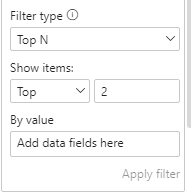
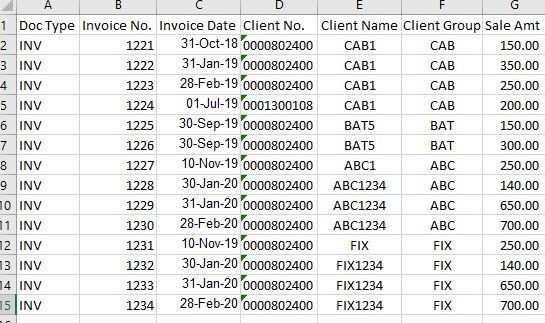
I need to get the top 2 client group sales and the rest is to be shown as others. TopN client (number [No.]) will be selected from the filters (Advance filter) and rest all clients should show as other.
What best measure should I use to this result?
Solved! Go to Solution.


- Mark as New
- Bookmark
- Subscribe
- Mute
- Subscribe to RSS Feed
- Permalink
- Report Inappropriate Content
Hi @gauravnarchal ,
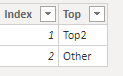
1. Create a new table manually like this:
2. Create these measures:
Total Sales =
CALCULATE (
    SUM ( 'Table'[Sale Amt] ),
    ALLEXCEPT ( 'Table', 'Table'[Client Group] )
)
Sales Amount Top =
CALCULATE (
[Total Sales],
KEEPFILTERS ( TOPN ( 2, ALL ( 'Table'[Client Group] ), [Total Sales] ) )
)Sales Amount Other =
CALCULATE (
[Total Sales],
KEEPFILTERS (
EXCEPT (
ALL ( 'Table'[Client Group] ),
TOPN ( 2, ALL ( 'Table'[Client Group] ), [Total Sales] )
)
)
)Sales Amount Other Total Only =
IF ( NOT ( ISFILTERED ( 'Table'[Client Group] ) ), [Sales Amount Other] )Sales Amount Top & Others =
IF (
HASONEVALUE ( 'Top & Other'[Top] ),
SWITCH (
VALUES ( 'Top & Other'[Top] ),
"Top2", [Sales Amount Top],
"Other", [Sales Amount Other Total Only]
),
[Sales Amount Top]
)3. Use a Matrix visual to show the result:
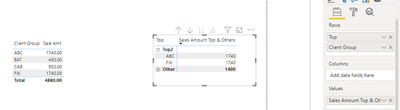
Attached my sample file that hopes to help you: How to create Power BI TOP N and others Report.pbix
Best Regards,
Yingjie Li
If this post helps then please consider Accept it as the solution to help the other members find it more quickly.

- Mark as New
- Bookmark
- Subscribe
- Mute
- Subscribe to RSS Feed
- Permalink
- Report Inappropriate Content
- Mark as New
- Bookmark
- Subscribe
- Mute
- Subscribe to RSS Feed
- Permalink
- Report Inappropriate Content
Hi @gauravnarchal ,
1. Create a new table manually like this:
2. Create these measures:
Total Sales =
CALCULATE (
    SUM ( 'Table'[Sale Amt] ),
    ALLEXCEPT ( 'Table', 'Table'[Client Group] )
)
Sales Amount Top =
CALCULATE (
[Total Sales],
KEEPFILTERS ( TOPN ( 2, ALL ( 'Table'[Client Group] ), [Total Sales] ) )
)Sales Amount Other =
CALCULATE (
[Total Sales],
KEEPFILTERS (
EXCEPT (
ALL ( 'Table'[Client Group] ),
TOPN ( 2, ALL ( 'Table'[Client Group] ), [Total Sales] )
)
)
)Sales Amount Other Total Only =
IF ( NOT ( ISFILTERED ( 'Table'[Client Group] ) ), [Sales Amount Other] )Sales Amount Top & Others =
IF (
HASONEVALUE ( 'Top & Other'[Top] ),
SWITCH (
VALUES ( 'Top & Other'[Top] ),
"Top2", [Sales Amount Top],
"Other", [Sales Amount Other Total Only]
),
[Sales Amount Top]
)3. Use a Matrix visual to show the result:
Attached my sample file that hopes to help you: How to create Power BI TOP N and others Report.pbix
Best Regards,
Yingjie Li
If this post helps then please consider Accept it as the solution to help the other members find it more quickly.
- Mark as New
- Bookmark
- Subscribe
- Mute
- Subscribe to RSS Feed
- Permalink
- Report Inappropriate Content
I would create a calculated table based on your distinct client groups.
then add the following columns ot the table :
-Sales = Sum(sales amnt)
-rank = RANKX(All(client groups), [Sales],,,Dense)
-topn = if([rank] <= 2 , "Top 2", "Other" )
Does this make sense?
- Mark as New
- Bookmark
- Subscribe
- Mute
- Subscribe to RSS Feed
- Permalink
- Report Inappropriate Content
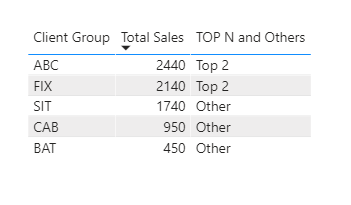
@Anonymous It is not summarizing others in one row. See below screenshot.
- Mark as New
- Bookmark
- Subscribe
- Mute
- Subscribe to RSS Feed
- Permalink
- Report Inappropriate Content
can you e-mail me a copy of the PBIX file and i can see what i can do to fix it 🙂
- Mark as New
- Bookmark
- Subscribe
- Mute
- Subscribe to RSS Feed
- Permalink
- Report Inappropriate Content
- Mark as New
- Bookmark
- Subscribe
- Mute
- Subscribe to RSS Feed
- Permalink
- Report Inappropriate Content

this is the end result of the matrix
send me your e-mail and i can send your way sorry one drive is giving me issues tonight not enough coffee for it 🙂
- Mark as New
- Bookmark
- Subscribe
- Mute
- Subscribe to RSS Feed
- Permalink
- Report Inappropriate Content
can you send me your e-mail it wont attach the link for some reason
it is all fixed and is a good solution
Helpful resources

Power BI Monthly Update - November 2025
Check out the November 2025 Power BI update to learn about new features.

Fabric Data Days
Advance your Data & AI career with 50 days of live learning, contests, hands-on challenges, study groups & certifications and more!

FabCon Atlanta 2026
Join us at FabCon Atlanta, March 16-20, for the ultimate Fabric, Power BI, AI and SQL community-led event. Save $200 with code FABCOMM.

| User | Count |
|---|---|
| 58 | |
| 45 | |
| 42 | |
| 20 | |
| 18 |


| User | Count |
|---|---|
| 171 | |
| 110 | |
| 91 | |
| 55 | |
| 45 |


