Join us at FabCon Atlanta from March 16 - 20, 2026, for the ultimate Fabric, Power BI, AI and SQL community-led event. Save $200 with code FABCOMM.
Register now!The Power BI Data Visualization World Championships is back! Get ahead of the game and start preparing now! Learn more
Hi,
I´m new to Power Bi and i need some help, so I hope you can help me.
I have a table which looks like that:
Juni Juli Aug Sept Okt Nov Dez
| x | x | x | x | x | x | x |
| x | 1 | 1 | 1 | 1 | 0 | 0 |
| 1 | 0,5 | 1 | 1 | 0,5 | 1 | 1 |
And I want to create a view where i have to amount of 0,1,x and 0,5 summarized for each month
| x | 1 | 0,5 | 0 | |
| Juni | 2 | 20 | 3 | 1 |
| Juli | 2 | 20 | 3 | 1 |
| Aug | 2 | 20 | 3 | 1 |
| Sept | 2 | 20 | 3 | 1 |
| Okt | 2 | 20 | 3 | 1 |
| Nov | 2 | 20 | 3 | 1 |
| Dezember | 2 | 20 | 3 | 3 |
How can I achieve that?
Thank you and best regards,
Christian
Solved! Go to Solution.
@Anonymous - So if that is your source table, generally you would want to unpivot those columns in Power Query. Then things should be pretty easy.
Hi @Anonymous ,
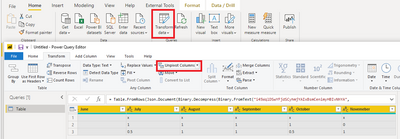
1. Select all of your column and use Unpivot columns in power query editor, close and apply it.
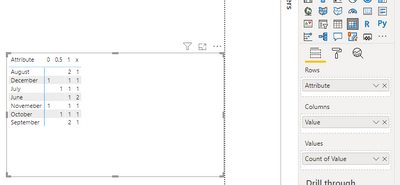
2. Put the new fields in a matrix visual, set the value field as count of values to get the expected result:
Best Regards,
Yingjie Li
If this post helps then please consider Accept it as the solution to help the other members find it more quickly.
Hi @Anonymous ,
1. Select all of your column and use Unpivot columns in power query editor, close and apply it.
2. Put the new fields in a matrix visual, set the value field as count of values to get the expected result:
Best Regards,
Yingjie Li
If this post helps then please consider Accept it as the solution to help the other members find it more quickly.
Thank you, I´m gonna try it! 🙂
@Anonymous - So if that is your source table, generally you would want to unpivot those columns in Power Query. Then things should be pretty easy.
The Power BI Data Visualization World Championships is back! Get ahead of the game and start preparing now!
| User | Count |
|---|---|
| 40 | |
| 37 | |
| 35 | |
| 34 | |
| 28 |
| User | Count |
|---|---|
| 136 | |
| 99 | |
| 73 | |
| 66 | |
| 65 |