I created an R-Visual to forecast the future Net Payments for May of 2017. I was able to forecast by only selecting two inputs for this visual. But as soon as I added a third input, this altered the shape of my curve even though I'm not using it in this script. How can I prevent this from happening? Posting_Day_DD is the value I want plotted on the X-axis, "May 2017 Net" is on the Y-axis, and a calculation based off of max_posting_day_of_MM is the new value I need added to this visual. For simplification, I'm just trying to add this value. The reason I need this third input is that I need it to calculate the remaining days of the month to use in the forecast function in R.
One more nice-to-have is a way to format the Y-axis so that instead of listing out the whole dollar amount, to list it as $40M instead of 40000000.
Here is my raw data, prior to doing an accumulative sum on the "May 2017 Net" column:
Posting_day_DD	max_posting_day_of_MM	May 2017 Net
1	22	935297.04
2	22	2493840.75
3	22	3466825.79
4	22	3002790.31
5	22	4162256.18
6	22	3248581.99
7	22	2989035.31
8	22	3039454.89
9	22	4050542.91
10	22	5091252.01
11	22	4281840.74
12	22	2654932.64
13	22	3288561.68
14	22	2951754.89
15	22	5022380.56
16	22	3428580.61
Note that the first column is posting days, with "16" corresponding to yesterday's calendar date of 5-22-2017. So there are 22 posting days total in May of 2017.
From the above data, I calculate cumulative average from DAX:
2017 MTD = CALCULATE(SUM(Intra_Month_Cash_Pacing[net_payment_amount]),ALL(Intra_Month_Cash_Pacing[Calendar_Date]),Intra_Month_Cash_Pacing[MM]=MONTH(TODAY()),Intra_Month_Cash_Pacing[YY]=2017)

MTD 2017 Net-P =
IF(ISBLANK(Intra_Month_Cash_Pacing[2017 MTD]),BLANK(),
CALCULATE(
	'Intra_Month_Cash_Pacing'[2017 MTD],
	FILTER(
		ALLSELECTED('Intra_Month_Cash_Pacing'[Posting_Day_DD]),
		ISONORAFTER('Intra_Month_Cash_Pacing'[Posting_Day_DD], MAX('Intra_Month_Cash_Pacing'[Posting_Day_DD]), DESC)
	)
))
Finally here is what my R-script code looks like:
Sys.setlocale("LC_ALL","English") # internationalization
library(forecast)

timeSeries=ts(data=dataset$"MTD 2017 Net-P",start=1,frequency=1)
fit <- auto.arima(timeSeries)
fcast <- forecast(fit, h=5)
plot(fcast, col="red", yaxt="n")

axis(1, col="dodgerblue", col.ticks="green", col.axis="orange", cex.axis=1)
yticks <- pretty(dataset[,2])

axis(2, col="dodgerblue", col.ticks="green", col.axis="blue", cex.axis=0.8, at=yticks, labels=sprintf("%d",yticks))
mtext("Posting Day", side=1, line=3, col="red", cex=1)
mtext("Net Postings", side=2, line=3, col="purple", cex=1)
And here is how this R-visual looks with 2- and 3-inputs respectively.
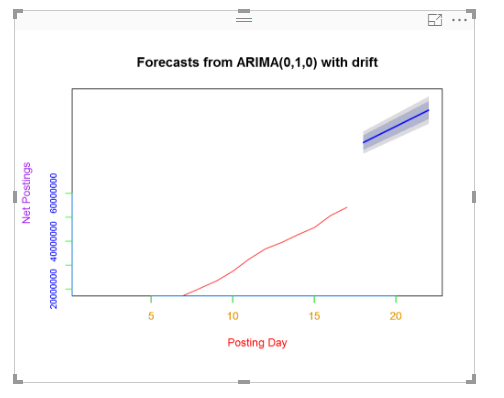 3-input
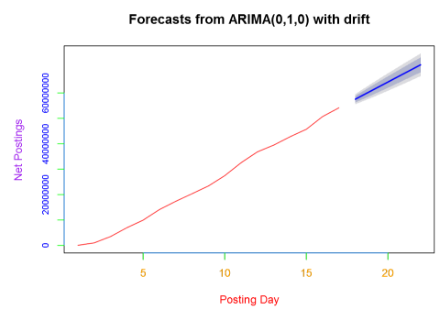 2-input


