Join us at FabCon Atlanta from March 16 - 20, 2026, for the ultimate Fabric, Power BI, AI and SQL community-led event. Save $200 with code FABCOMM.
Register now!The Power BI Data Visualization World Championships is back! Get ahead of the game and start preparing now! Learn more
Hi,
I'm trying to replicate a Countif function in Excel that will count the number of rows based on a item in one column, then I need to see if another column has any data or is null for that row. Based on the combination of the two colums having data on a row, then I need to count the row to get a count of rows that are similar.
The project I'm working on has a total of 10 columns that are looked at to see if there is data in the column and if it does its considered a 2 intead of a 1. A second column is then created to count a row with not null fields in 3 columns. I need to take this out to a total of 10 columns that we look at to see if the column is not null.
In Excel it would just be =COUNTIFS(Cases!P:P,"*",Cases!Z:Z,"*",Cases!AJ:AJ,"",Cases!AT:AT,"",Cases!BD:BD,"",Cases!BN:BN,"",Cases!BX:BX,"",Cases!CH:CH,"",Cases!CR:CR,"",Cases!DB:DB,"")
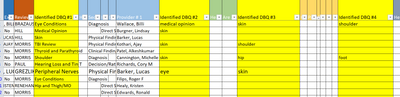
YOu can see here in my data table the highlighted columns, I need to count how many columns have an answer in them. Row 2 has 4 answers, row 3 has 2 answers, row 4 has one answer, etc. Row 12 has zero answers
I need to find a way to simply count by row, how many of these columns have an answer. There are up to 10 columns that will have an answer. Then I need to sum up each colmn number, so like column P has 10 answers, column z has 5 answers, AJ has 4 answers, AT has 2 answers.
could you pls provide some sample data and expected output?
Proud to be a Super User!
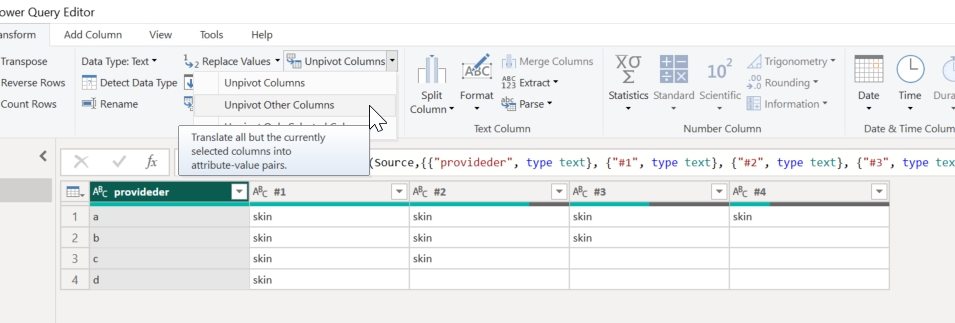
see above
The Power BI Data Visualization World Championships is back! Get ahead of the game and start preparing now!
Check out the November 2025 Power BI update to learn about new features.
| User | Count |
|---|---|
| 66 | |
| 48 | |
| 43 | |
| 26 | |
| 19 |
| User | Count |
|---|---|
| 198 | |
| 126 | |
| 102 | |
| 67 | |
| 50 |