Get Fabric or SQL Certified for Free.
Get certified for free when you join Fabric Data Days 2026 and dive into Fabric, Power BI, SQL, AI, and other essential data skills.
Join now- Power BI forums
- Get Help with Power BI
- Desktop
- Service
- Report Server
- Power Query
- Mobile Apps
- Developer
- DAX Commands and Tips
- Custom Visuals Development Discussion
- Health and Life Sciences
- Power BI Spanish forums
- Translated Spanish Desktop
- Training and Consulting
- Instructor Led Training
- Dashboard in a Day for Women, by Women
- Galleries
- Data Stories Gallery
- Themes Gallery
- Contests Gallery
- QuickViz Gallery
- Quick Measures Gallery
- Visual Calculations Gallery
- Fabric Apps Gallery
- Notebook Gallery
- Translytical Task Flow Gallery
- TMDL Gallery
- R Script Showcase
- Webinars and Video Gallery
- Ideas
- Custom Visuals Ideas (read-only)
- Issues
- Issues
- Events
- Upcoming Events
July 7 - July 17 | Round 2 of the Power BI Dataviz World Championships. Don't miss your chance! Learn more
- Power BI forums
- Forums
- Get Help with Power BI
- Desktop
- Re: How to convert time (HH:MM:SS) into integer?
- Subscribe to RSS Feed
- Mark Topic as New
- Mark Topic as Read
- Float this Topic for Current User
- Bookmark
- Subscribe
- Printer Friendly Page

- Mark as New
- Bookmark
- Subscribe
- Mute
- Subscribe to RSS Feed
- Permalink
- Report Inappropriate Content
How to convert time (HH:MM:SS) into integer?
Hello all,
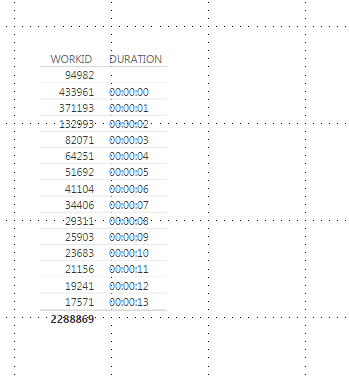
I am new with Power BI, but i am already excited about the possiblities. I would like to know how to convert a time (HH:MM:SS) into a integer (12345)?
Thanks !
Solved! Go to Solution.


- Mark as New
- Bookmark
- Subscribe
- Mute
- Subscribe to RSS Feed
- Permalink
- Report Inappropriate Content
Hi @Anonymous,
From the table structure provided above, I see you also have a "STARTDATE" and a"ENDATE" column, so the STARTTIME and ENDTIME could in different dates, right?
In this scenario, before using the DATEDIFF funtion, you may need to combine the start/end Date and start/end Time to start/end DateTime first. See my sample below.
Assume we have a table called "Table1" like below.
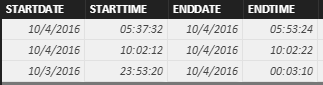
1. Use the formula below to create a calculate column called "STARTDATETIME" to combine the STARTDATE column and STARTTIME column.
STARTDATETIME = Table1[STARTDATE] + Table1[STARTTIME]
2. Use the formula below to create a calculate column called "ENDDATETIME" to combine the ENDDATE column and ENDTIME column.
ENDDATETIME = Table1[ENDDATE] + Table1[ENDTIME]
3. Then you should be able to use the formula below to calculate the duration in minutes.
DURATION = DATEDIFF(Table1[STARTDATETIME], Table1[ENDDATETIME], MINUTE)

Regards


- Mark as New
- Bookmark
- Subscribe
- Mute
- Subscribe to RSS Feed
- Permalink
- Report Inappropriate Content
It's simple my friend, use this formula:
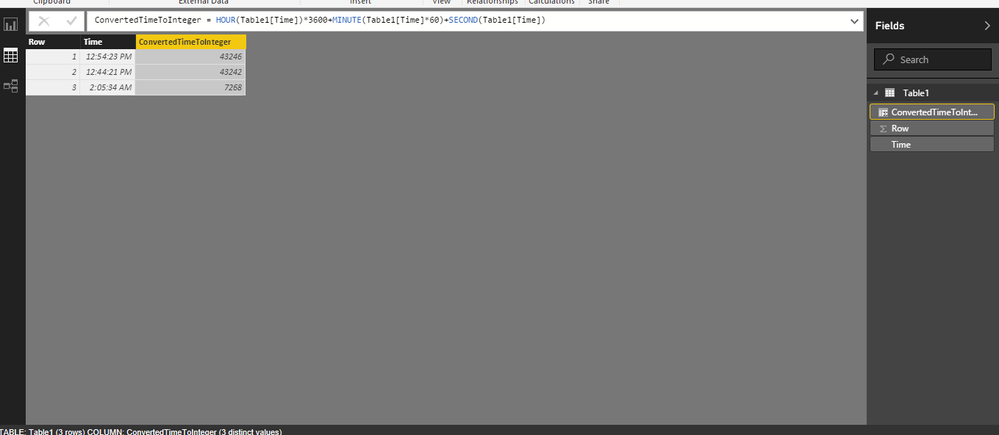
ConvertedTimeToInteger is calculated column!
use Hour,Minute,Second functions 
ConvertedTimeToInteger = HOUR(Table1[Time])*3600+MINUTE(Table1[Time]*60)+SECOND(Table1[Time])
see the picture.
I am ready for any help!
www.mrpowerbi.pro
- Mark as New
- Bookmark
- Subscribe
- Mute
- Subscribe to RSS Feed
- Permalink
- Report Inappropriate Content
Hello,
The requirement of the duration time (in minutes) for product A is ENDTIME- STARTTIME. So i will give you an example.
Product A started this morning (STARTTIME) at 07:15 and ended at 07:44 (ENDTIME). I want to have a new calculated column that can return the integer value of 29 minutes(ENDTIME - STARTTIME).
Which formula should i use my friend?
Greets,
Rega
- Mark as New
- Bookmark
- Subscribe
- Mute
- Subscribe to RSS Feed
- Permalink
- Report Inappropriate Content
Heelo,
did you try this function?
https://msdn.microsoft.com/en-us/library/dn802538.aspx
Let me know if you have any problem.
www.mrpowerbi.pro


- Mark as New
- Bookmark
- Subscribe
- Mute
- Subscribe to RSS Feed
- Permalink
- Report Inappropriate Content
Hi @MrPowerBIPro,
I think datediff is calculating duration between 2 dates, if you could try some functions like Time.Minute or Time.Second
please refer: time function - msdn. Do you mean integer value is second value or something?
- Mark as New
- Bookmark
- Subscribe
- Mute
- Subscribe to RSS Feed
- Permalink
- Report Inappropriate Content
HI @tringuyenminh92,
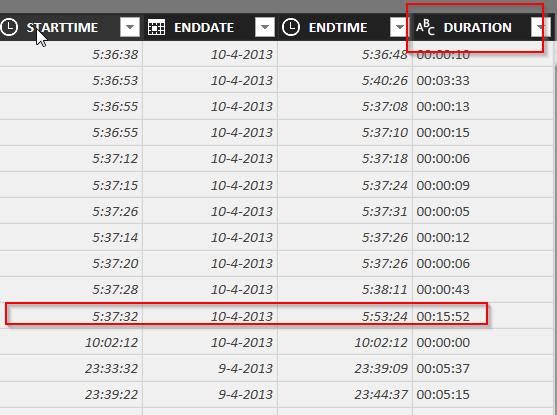
Look at the following image . In the column Duration i would like to have a integer as a result. Check the row where the duration time set on 00:15:52. In this column it must be 15 minutes. Which formula should i use then?
Thank you!
- Mark as New
- Bookmark
- Subscribe
- Mute
- Subscribe to RSS Feed
- Permalink
- Report Inappropriate Content
@Anonymous
See this again:
https://msdn.microsoft.com/en-us/library/dn802538.aspx
Term Definition
| start_date | A scalar datetime value. |
| end_date | A scalar datetime value Return Value. |
| interval | The interval to use when comparing dates. The value can be one of the following: - SECOND - MINUTE - HOUR - DAY - WEEK - MONTH - QUARTER - YEAR |
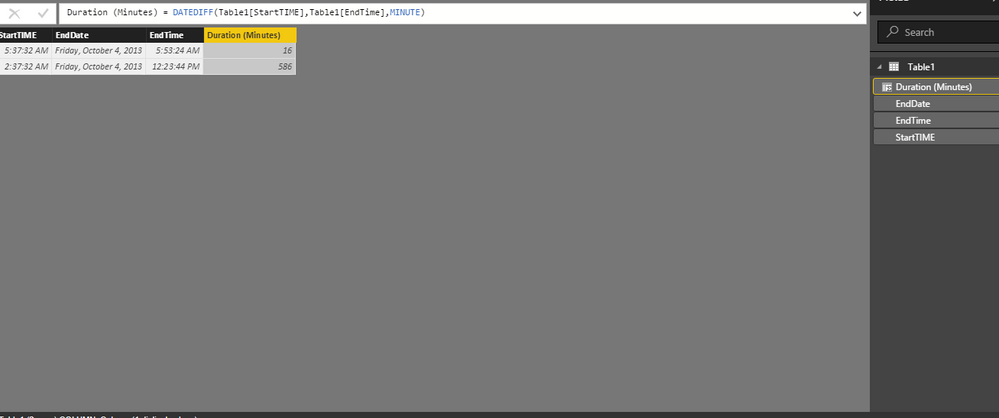
Is it ok?
www.mrpowerbi.pro
- Mark as New
- Bookmark
- Subscribe
- Mute
- Subscribe to RSS Feed
- Permalink
- Report Inappropriate Content
Hi @MrPowerBIPro,
I tried to follow your advize but then i still have a error message by entering the formula. check the image below.

- Mark as New
- Bookmark
- Subscribe
- Mute
- Subscribe to RSS Feed
- Permalink
- Report Inappropriate Content
Hi @Anonymous,
From the table structure provided above, I see you also have a "STARTDATE" and a"ENDATE" column, so the STARTTIME and ENDTIME could in different dates, right?
In this scenario, before using the DATEDIFF funtion, you may need to combine the start/end Date and start/end Time to start/end DateTime first. See my sample below.
Assume we have a table called "Table1" like below.
1. Use the formula below to create a calculate column called "STARTDATETIME" to combine the STARTDATE column and STARTTIME column.
STARTDATETIME = Table1[STARTDATE] + Table1[STARTTIME]
2. Use the formula below to create a calculate column called "ENDDATETIME" to combine the ENDDATE column and ENDTIME column.
ENDDATETIME = Table1[ENDDATE] + Table1[ENDTIME]
3. Then you should be able to use the formula below to calculate the duration in minutes.
DURATION = DATEDIFF(Table1[STARTDATETIME], Table1[ENDDATETIME], MINUTE)
Regards
- Mark as New
- Bookmark
- Subscribe
- Mute
- Subscribe to RSS Feed
- Permalink
- Report Inappropriate Content
This error happend when you have a "Start Date" greater than "End Date"! check the columns!
as in the link mentioned:
https://msdn.microsoft.com/en-us/library/dn802538.aspx
Remarks:
An error is returned if start_date is larger than end_date.
Finally check your data! the formula is correct my friend 🙂
www.mrpowerbi.pro


- Mark as New
- Bookmark
- Subscribe
- Mute
- Subscribe to RSS Feed
- Permalink
- Report Inappropriate Content
or if u want to convert HH:MM:SS to interger as secs , Try this
create calculated column = var time = time column
var hours = left(time,2) * 3600
var Mins= mid(time,4,2) * 60
var Secs= right(time,2)
return hours + Mins + Secs
try and let me know if any help
- Mark as New
- Bookmark
- Subscribe
- Mute
- Subscribe to RSS Feed
- Permalink
- Report Inappropriate Content
Hello Baskar,
I want to convert HH-MM-SS into a integer as minute.
Do i have create a new measure or a new column (based on the following query) ?
create calculated column = var time = time column
var hours = left(time,2) * 3600
var Mins= mid(time,4,2) * 60
var Secs= right(time,2)
return hours + Mins + Secs
- Mark as New
- Bookmark
- Subscribe
- Mute
- Subscribe to RSS Feed
- Permalink
- Report Inappropriate Content
create new column . Do u want Minute level right ? so no need sec
create calculated column = var time = time column
var hours = left(time,2) * 60
var Mins= mid(time,4,2)
return hours + Mins
this is enough, try this . let me know
- Mark as New
- Bookmark
- Subscribe
- Mute
- Subscribe to RSS Feed
- Permalink
- Report Inappropriate Content
Hi Baskar,
it doesn't work.
I copy pasted your formula after creating a new column. Check the error message .

- Mark as New
- Bookmark
- Subscribe
- Mute
- Subscribe to RSS Feed
- Permalink
- Report Inappropriate Content
createcalculated
this is the Formula :
column = var time = time column -- here u have to replace your time column name
var hours = left(time,2) * 60
var Mins= mid(time,4,2)
return hours + Mins
Now try
- Mark as New
- Bookmark
- Subscribe
- Mute
- Subscribe to RSS Feed
- Permalink
- Report Inappropriate Content
create new column
- Mark as New
- Bookmark
- Subscribe
- Mute
- Subscribe to RSS Feed
- Permalink
- Report Inappropriate Content
Try this :
Test (HH:MM:SS) := VAR Duration = sum(Duration) -- Replace this with your column
VAR Hours =
ROUNDDOWN ( Duration /3600 , 0 )
VAR Minutes =
ROUNDDOWN ( ( Duration - ( Hours *3600 ) )/60, 0 )
VAR Seconds =
ROUND(MOD ( Duration - ( Hours *3600 ),60 ),0)
VAR H =
IF ( LEN ( Hours ) = 1,
CONCATENATE ( "0", Hours ),
CONCATENATE ( "", Hours )
)
VAR M =
IF (
LEN ( Minutes ) = 1,
CONCATENATE ( "0", Minutes ),
CONCATENATE ( "", Minutes )
)
VAR S =
IF (
LEN ( Seconds ) = 1,
CONCATENATE ( "0", Seconds ),
CONCATENATE ( "", Seconds )
)
RETURN
CONCATENATE (
H,
CONCATENATE ( "h : ", CONCATENATE ( M, CONCATENATE ( "m : ", CONCATENATE(S,"s") ) ) )
Helpful resources

FabCon & SQLCon – Barcelona 2026
Join us in Barcelona for FabCon and SQLCon, the Fabric, Power BI, SQL, and AI community event. Save €200 with code FABCMTY200.

Data Days 2026
Join Data Days 2026: 60 days of free live/on-demand sessions, challenges, study groups, and certification opportunities.

Power BI DataViz World Championships - June 2026
A new Power BI DataViz World Championship is coming this June! Don't miss out on submitting your entry.

| User | Count |
|---|---|
| 30 | |
| 28 | |
| 26 | |
| 23 | |
| 17 |


| User | Count |
|---|---|
| 57 | |
| 43 | |
| 33 | |
| 24 | |
| 20 |


