cancel
Showing results for 
Search instead for 
Did you mean: 

The Power BI Data Visualization World Championships is back! Get ahead of the game and start preparing now! Learn more

Reply
Don-Bot
Helper V
Helper V

How to connect vertipaq analyzer to power bi desktop

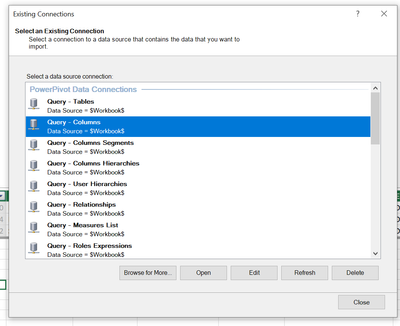
Can someone let me know what I"m missing on this?  I want to connect the vertipaq analyzer to power bi desktop but it seems things have changed since the blog and guy in the cube video I'm using.  


In those it says to edit the SSAS connection to connect.  However, I no longer see an SSAS connection to edit... please let me know what I"m missing.


https://community.fabric.microsoft.com/t5/Community-Blog/Vertipaq-Analyzer-How-to-Connect-to-Power-B...


https://www.youtube.com/watch?v=c-ZqToc85Yc


My options:

DonBot_0-1699289016552.png


1 ACCEPTED SOLUTION
Anonymous
Not applicable

Hi @Don-Bot ,

Try using DAX Studio to connect to pbix and then export the vpax file.
DAX Studio - SQLBI

vcgaomsft_1-1699431745281.png

Then open the vpax file in vertipaq analyzer.

vcgaomsft_2-1699431796035.png
This information is also included in the dax studio view at the bottom.

vcgaomsft_3-1699431937504.png


Best Regards,
Gao

Community Support Team


If there is any post helps, then please consider Accept it as the solution  to help the other members find it more quickly.
If I misunderstand your needs or you still have problems on it, please feel free to let us know. Thanks a lot!

How to get your questions answered quickly --  How to provide sample data in the Power BI Forum

View solution in original post

2 REPLIES 2
Anonymous
Not applicable

Hi @Don-Bot ,

Try using DAX Studio to connect to pbix and then export the vpax file.
DAX Studio - SQLBI

vcgaomsft_1-1699431745281.png

Then open the vpax file in vertipaq analyzer.

vcgaomsft_2-1699431796035.png
This information is also included in the dax studio view at the bottom.

vcgaomsft_3-1699431937504.png


Best Regards,
Gao

Community Support Team


If there is any post helps, then please consider Accept it as the solution  to help the other members find it more quickly.
If I misunderstand your needs or you still have problems on it, please feel free to let us know. Thanks a lot!

How to get your questions answered quickly --  How to provide sample data in the Power BI Forum

amitchandak
Super User
Super User

@Don-Bot , I think they are using DAX studio. Once you install DAX Studio, you should be able to see that under external tools

https://daxstudio.org/

Share with Power BI Enthusiasts: Full Power BI Video (20 Hours) YouTube
Microsoft Fabric Series 60+ Videos YouTube
Microsoft Fabric Hindi End to End YouTube

Helpful resources

Announcements
Power BI DataViz World Championships

Power BI Dataviz World Championships

The Power BI Data Visualization World Championships is back! Get ahead of the game and start preparing now!

November Power BI Update Carousel

Power BI Monthly Update - November 2025

Check out the November 2025 Power BI update to learn about new features.

FabCon Atlanta 2026 carousel

FabCon Atlanta 2026

Join us at FabCon Atlanta, March 16-20, for the ultimate Fabric, Power BI, AI and SQL community-led event. Save $200 with code FABCOMM.