Join us at FabCon Atlanta from March 16 - 20, 2026, for the ultimate Fabric, Power BI, AI and SQL community-led event. Save $200 with code FABCOMM.
Register now!Learn from the best! Meet the four finalists headed to the FINALS of the Power BI Dataviz World Championships! Register now
I'm working on a requirement to pull some data from a dataverse source into an existing direct query report. This report already has a sql script set to direct query storage mode and refreshes every 15 minutes.
I have pulled the dataverse data into my file using the Dataverse shortcut shown in the Home menu.
I know from existing documentation that DataVerse supports direct query however its default storage mode appears to be Import. So far I've attempted to change the storage mode in the advanced setting on the relationships tab but that is disabled.
Any advice or useful articles that anyone is aware of to show how I can get an option to tell it I want direct query?
Feedback very much appreciated!
Hi @markhay ,
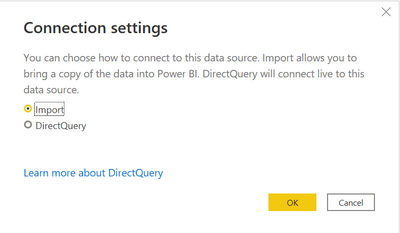
When you connect using the Dataverse connector, you are given an option to choose between import mode or DirectQuery mode.
Power Query Dataverse connector - Power Query | Microsoft Docs
Best Regards,
Stephen Tao
If this post helps, then please consider Accept it as the solution to help the other members find it more quickly.
Thanks Stephen, ointerestingly this option doesnt seem to be preveneted using the ribbon shortcut. but thank you.
In this instance, I opted to query the dataverse source using the Azure SQl connector option which gave me a setup I was used to.
Share feedback directly with Fabric product managers, participate in targeted research studies and influence the Fabric roadmap.
Check out the February 2026 Power BI update to learn about new features.
| User | Count |
|---|---|
| 52 | |
| 51 | |
| 35 | |
| 15 | |
| 14 |
| User | Count |
|---|---|
| 92 | |
| 75 | |
| 41 | |
| 26 | |
| 25 |