Join us at FabCon Atlanta from March 16 - 20, 2026, for the ultimate Fabric, Power BI, AI and SQL community-led event. Save $200 with code FABCOMM.
Register now!The Power BI Data Visualization World Championships is back! It's time to submit your entry. Live now!
Hi,
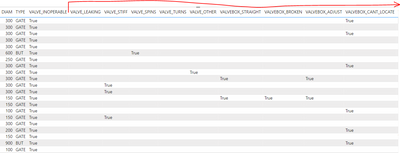
I'm trying to create some sort of chart (clustered column chart??) to display the count of defects found during insepctions. The data looks like this. Each record is from an inspection of a watermain valve, and each valve could have one or many defects associated to it:
Each 'defect' is identified through a "True" value. There are about a dozen or so possible defects. I've created a clustered column chart before, but only using one field where there were multiple values. I guess I'm getting confused on what to do with multiple fields and how to correctly count the 'True' values.
Thanks for any assistance.
Hi @bbulla ,
In order to better understanding your demands and give the right solution, could you please tell me what's your expected output?
Thanks for your efforts & time in advance.
Best regards,
Yadong Fang
If this post helps, then please consider Accept it as the solution to help the other members find it more quickly.
Hi Yadong,
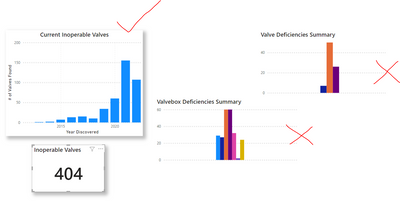
Well I have sort of come up with something. For each defect I am creating a measure that counts the total number of "True" values for that defect. So basically I do this for each defect:
The Power BI Data Visualization World Championships is back! It's time to submit your entry.
Check out the January 2026 Power BI update to learn about new features.
| User | Count |
|---|---|
| 69 | |
| 45 | |
| 36 | |
| 28 | |
| 23 |
| User | Count |
|---|---|
| 141 | |
| 124 | |
| 59 | |
| 40 | |
| 32 |