Don't miss your chance to take the Fabric Data Engineer (DP-600) exam for FREE! Find out how by attending the DP-600 session on April 23rd (pacific time), live or on-demand.
Learn moreJoin the FabCon + SQLCon recap series. Up next: Power BI, Real-Time Intelligence, IQ and AI, and Data Factory take center stage. All sessions are available on-demand after the live show. Register now
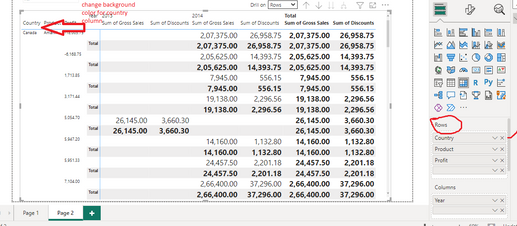
For Example in the above picture I need to change background color of specific country column in matrix visual rows.
Sure, here's a more human-friendly version of the steps to change the background color for a specific column in a matrix visual in Power BI Desktop:
That's it! These steps should change the background color for the specified column in your matrix visual. You can repeat these steps to format other columns in your matrix visual as needed.
Thank you for quick response. Can you please provide any screenshots showing the above process as we were not able to implement few of the steps mentioned.
Thanks in advanced
Diksha Shende
Hello @DikshaShende ,
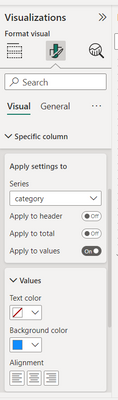
so you go to the formatting options of the matix, then to specific columns setting, pick the column you want the change to be on and set the background color for it.
If I answered your question, please mark my post as solution, Appreciate your Kudos 👍
Proud to be a Super User! | |
Hi Idrissshatila,
Thank you for your time, under specific columns setting we could not find the columns mentioned in 'Rows well'. In the attachted screenshot we want to change the background color of country column, which is added under 'Rows well'.
please provide us a way to achieve this.
Thanks in advanced
Diksha Shende
Check out the April 2026 Power BI update to learn about new features.
If you have recently started exploring Fabric, we'd love to hear how it's going. Your feedback can help with product improvements.
A new Power BI DataViz World Championship is coming this June! Don't miss out on submitting your entry.
| User | Count |
|---|---|
| 48 | |
| 46 | |
| 41 | |
| 20 | |
| 17 |
| User | Count |
|---|---|
| 69 | |
| 67 | |
| 32 | |
| 27 | |
| 26 |