Get certified for free when you join Fabric Data Days 2026 and dive into Fabric, Power BI, SQL, AI, and other essential data skills.
Join nowTry your skills in the Power BI Dataviz World Championship! Round one ends June 26. Join now
Basically, i am trying to 'Normalize' time. So the earliest available date per name starts at 1, and increases by 1.
Name - Date - (New Index Column)
Joe 1/1/2017 1
Joe 1/2/2017 2
Joe 1/3/2017 3
Bob 1/1/2017 1
Bob 1/2/2017 2
..........
Basically, i am trying to plot Sales on the Y- axis, and "Working Days" on the X-axis.
Solved! Go to Solution.
Hi @aar0n,
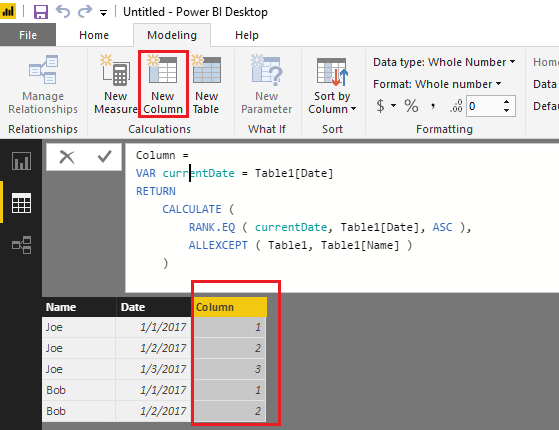
Based on my test, you should be able to use the formula below to create calculate column in your table to add the index column in your scenario. ![]()
Column =
VAR currentDate = Table1[Date]
RETURN
CALCULATE (
RANK.EQ ( currentDate, Table1[Date], ASC ),
ALLEXCEPT ( Table1, Table1[Name] )
)
Regards
Hi @aar0n,
Based on my test, you should be able to use the formula below to create calculate column in your table to add the index column in your scenario. ![]()
Column =
VAR currentDate = Table1[Date]
RETURN
CALCULATE (
RANK.EQ ( currentDate, Table1[Date], ASC ),
ALLEXCEPT ( Table1, Table1[Name] )
)
Regards
Thank you so much!!! works perfectly!!
Perhaps something like:
c_Index = DATEDIFF(MIN([Date]),[Date],DAY)+1
My have to reverse the first two parameters, I can never keep that straight...
Don't miss out on Data Days, June 15 through August 7. Learn Fabric, Power BI, SQL, AI and more.
Check out the May 2026 Power BI update to learn about new features.
| User | Count |
|---|---|
| 24 | |
| 22 | |
| 21 | |
| 20 | |
| 14 |
| User | Count |
|---|---|
| 58 | |
| 52 | |
| 41 | |
| 33 | |
| 31 |